



“Wherever we are, what we hear is mostly noise. … When we listen to it, we find it fascinating.”
Pink noise mixing is a fast way to balance a mix: you play pink noise at a fixed level, then raise each track, one at a time, until you can just hear it through the noise. In FL Studio, put the noise on its own mixer track at about -10 dB, set every sound against it, then mute the noise and fine-tune by ear.
It’s late, you’ve looped the same eight bars a hundred times, and you honestly can’t tell anymore if the bass is too loud or the hats are too quiet. Your ears have gone numb. Every fader move feels like a guess.
That’s exactly when an odd old trick earns its keep: you mix against a steady hiss that sounds like a waterfall. Below is the method step by step in FL Studio, with real screenshots from Mix Elite’s videos. You’ll also get the level to set the noise at, what to do when the mix sounds quiet afterwards, where the trick falls short, and a way to check a vocal’s tone against a pink-noise curve.
Table of Contents
What is pink noise?
Pink noise is a steady hiss with the same amount of energy in every octave. An octave is a doubling in pitch, like 100 to 200 Hz or 1,000 to 2,000 Hz. Hz (hertz) is how pitch is measured: low numbers are bass, high numbers are treble. The higher octaves are much wider, so to keep the energy equal, pink noise gets 3 dB quieter for every octave you go up.
That gentle downhill slope makes it sound soft and full, a lot like steady rain or a waterfall, instead of sharp and fizzy. It’s also why producers trust it. A finished song, averaged over its whole length, also carries more energy in the lows than in the highs. So pink noise works as a fair yardstick for the whole range at once.
Pink noise vs white noise vs brown noise
- White noise has the same energy at every single frequency. The high octaves hold far more frequencies, so it sounds bright and harsh, like TV static.
- Pink noise has the same energy in every octave. It sounds even to our ears, which is why it’s the one used for mixing.
- Brown noise drops 6 dB per octave, twice as fast as pink. It’s a deep rumble, like strong wind or surf, and far too dark to mix against.
One FL Studio catch: Edison’s built-in Generate noise tool makes white noise, not pink, so it’s the wrong color for this job. Step 2 below shows two easy ways to get real pink noise.
How does mixing with pink noise work?

It works because of masking: a loud, steady sound hides quieter sounds behind it. When you set every part so it only just pokes through the same wall of noise, each one ends up at a similar loudness compared with the others. Pink noise covers the lows and the highs evenly, so a bass line and a shaker both face the same wall.
Mix engineer and author Bobby Owsinski describes the method in an excerpt from The Mixing Engineer’s Handbook. He sets the noise to about -10 dBFS, brings a track up until he can just hear it, then pulls it back until it just disappears. dBFS means decibels below full scale, where 0 is the loudest your computer can play without distortion.
He’s also honest about the limits. The method won’t give you a perfect mix, only a balance that’s in the ballpark. That’s the right way to think about pink noise mixing: a starting point you can set up in a few minutes, so you stop guessing and start making real decisions.
Why use pink noise instead of just your ears?
Because the noise never changes, while your ears get used to a loop and tire over a long session. Every track is measured against the same fixed wall of sound, so you stop judging each fader against whatever you set last. It’s fast, too: Sound On Sound’s Eddie Bazil balanced a 28-track mix this way in about four minutes.
Pink noise also treats the lows and the highs fairly. Its energy falls in a curve close to how we hear, so a bass line and a shaker get judged by the same standard. It isn’t better than your ears for the final call, though. It gets every fader into a sensible place, and your ears make the real decisions after that.
How to mix with pink noise in FL Studio, step by step
Set pink noise to about -10 dB on its own mixer track, pull every other fader down, then raise each sound one at a time until you can just hear it through the noise. Then mute the noise and fine-tune by ear. Loop the busiest part of your song, like the chorus or the drop, so every sound plays while you work.
- Give every sound its own mixer track and empty the Master.
- Add pink noise on a mixer track of its own.
- Set the noise to about -10 dB and leave it there.
- Pull every other fader down.
- Raise each sound until it just pokes through the noise.
- Mute the noise and fine-tune by ear.
Step 1: Give every sound its own mixer track
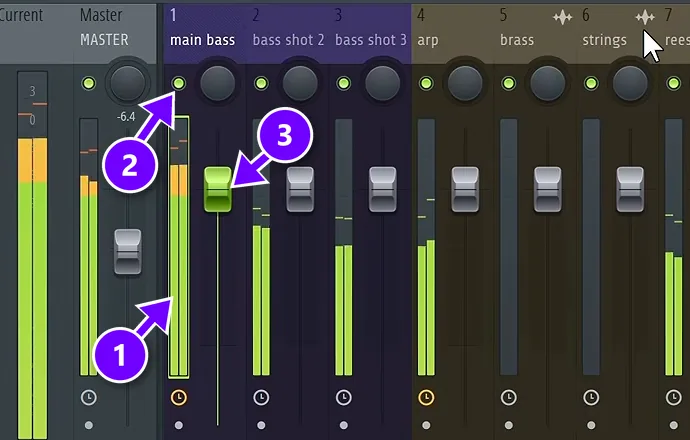
In the Channel Rack, select all your channels and press Ctrl + L. FL Studio sends each one to its own free mixer track. Every sound now has a meter (1), a green mute light (2) and a volume fader (3), and you’ll use all three.
Then empty the Master track. FL Studio’s default template puts a limiter there, and a limiter quietly squashes the very differences you’re trying to hear. Max, the founder of Mix Elite, is strict about it in Mix Elite’s free 4.5-hour FL Studio course. “When you’re mixing, make sure that your master track is completely empty, especially without any limiter at the end,” Max says.
Step 2: Add pink noise on its own track
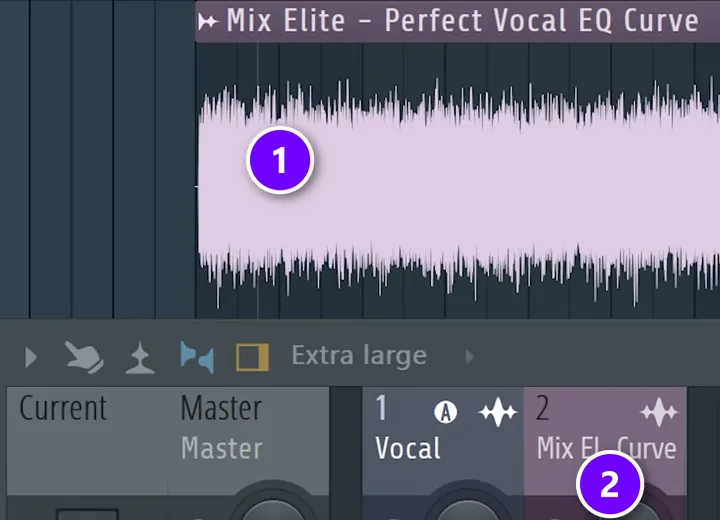
Pick an empty mixer track for the noise and rename it Pink noise (press F2) so you can’t miss it later. Then get the noise in one of two ways:
- A free plugin. MeldaProduction’s MNoiseGenerator is a simple pink and white noise generator that comes in their free MFreeFXBundle. Install it like any other plugin (our guide on installing VST plugins in FL Studio shows how), load it into an empty slot on your noise track and set it to pink.
- An audio file. Drag a pink noise WAV file into the Playlist, stretch it across the whole song and route it to your noise track. It does exactly the same job.
Mix Elite’s vocal balance video uses the file way: the noise sits on its own Playlist track (1) and on its own mixer track (2), right next to the vocal.
Step 3: Set the noise to about -10 dB and leave it there
Play the loop and move the noise track’s fader until its meter sits around -10 dB. If that feels too quiet, -6 dB is fine too. What matters is that you never touch the noise level again until you’re done. Other engineers land close by: Sound On Sound’s Eddie Bazil sets his noise generator to -11 dB, which leaves about 11 dB of headroom (free space before the Master clips) for the rest of the mix.
Now set your speakers or headphones to a comfortable volume. Keep it comfortable, not loud. A loud wall of noise tires your ears in minutes, and tired ears are why you reached for this trick in the first place.
Step 4: Pull every other fader down
Drag every instrument fader all the way down, or mute each track by left-clicking its green light. Only the noise should be playing. You’ll bring the sounds back one at a time, so each one gets judged against the noise alone.
Step 5: Raise each sound until it just pokes through
- Unmute one track and slowly push its fader up until you can just hear the sound through the noise.
- Ease it back down until it just disappears. That edge is your level.
- Mute that track again, then move on to the next one.
- Repeat for every sound, from the kick to the last background pad.
Go slowly near the edge. Close your eyes if the fader position sways you. You’re listening for the moment the sound appears, not for a number on the screen.
Layered sounds count as one. If your clap is three samples on three tracks, set the layers against each other first, send them to one group track, and do the pink noise pass on that group.
Step 6: Mute the noise and fine-tune by ear
Mute the noise track and unmute everything else (Ctrl + right-click any mute light unmutes them all). The mix will sound quieter than before, and that’s fine: turn up your speakers, not the faders. What you should hear is a rough balance where nothing jumps out and nothing hides.
Now your ears take over. Mix Elite’s rule is that your drums and your main sound, like the lead vocal or lead synth, should lead the mix, so nudge those up a little. Then play the whole loop and fix whatever still bugs you, because as Max says, “People will never be listening to your elements soloed, right? They will always be listening to the full mix.”
Delete the noise track, or its plugin, before you export. It’s easy to forget, and a bounce with a hiss under it means doing the export all over again.
What if your mix sounds too quiet after pink noise mixing?
That’s normal, and it’s a good sign. The method keeps every fader low, which leaves headroom so the Master doesn’t clip when every track plays at once. Turn up your speakers or headphones instead of the faders, and leave loudness for mastering, where a limiter brings the finished song up.
Pushing all the faders up now would undo the balance you just set. If one part feels weak, nudge only that part, like the drums or the lead vocal that should lead the mix anyway. When the mix is done, our guide to mastering in FL Studio shows how a limiter on the Master gets a finished song up to release level.
Where pink noise mixing works, and where it doesn’t
Pink noise is great at the boring part: getting a pile of loose faders into a sensible shape fast. It shines when your ears are tired or you don’t trust them yet. Owsinski also likes it for sounds recorded with several mics, like a snare top and bottom or a kick in and out, which need to sit level with each other.
It’s less reliable in a few places, so check these by ear afterwards:
- Hi-hats, cymbals and other bright, clicky sounds. Their sharp attacks cut through noise in a way smooth sounds don’t.
- Sounds that come and go, like risers, crashes and vocal chops. Your loop may not even catch them.
- The lead vocal or main hook, which usually needs to sit above everything else.
- Genre taste. A trap 808 or a house kick is meant to be big, so the method only gets it close.
It never fixes tone, either. If the bass and kick fight over the same lows, or a synth is harsh, no fader will solve it; that’s a job for EQ in your mix. Check your levels again after EQ and compression too, since both change how loud a sound is. Our guide on gain vs volume explains why a level can shift when you add a plugin.
How to use pink noise as a final mix check
Owsinski’s second method turns the idea around. When your mix is nearly done, play pink noise over the whole thing, raise it until it’s louder than the mix, then back it off a little. If one sound still sticks out above the noise, it’s probably too loud, so lower it until it just disappears.
In FL Studio, just unmute your noise track over the full mix and listen for the one sound that refuses to hide. It takes half a minute. It often catches the vocal or snare you’ve been pushing up all night.
Can pink noise help you EQ a vocal?
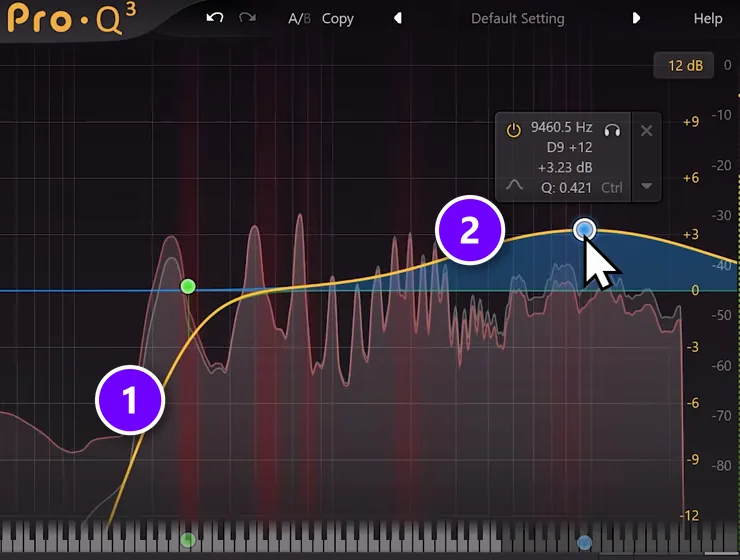
Yes. Mix Elite’s vocal balance video shapes pink noise to match the average tone of dozens of hit-song acapellas, then EQs a vocal until its curve follows that noise on a free analyzer. Treat the curve as a guide, not a rule, and always judge the vocal with the beat playing.
It solves a problem every home producer has: each mic colors a voice in its own way. Max says: “Think of it like a built-in EQ that your microphone applies to your voice whether you want it or not.”
So the Mix Elite team played pink noise under studio-quality acapellas from dozens of hit songs and shaped the noise until it matched their average tone. The result is a reference noise you can hold a vocal up against. Here’s how to use it:
- Put an EQ on the vocal, then a compressor. Set the ratio to about 8:1 to shave off the peaks, because the reference was built from compressed vocals.
- Put the reference noise on its own mixer track, just like in Step 2.
- Load SPAN, Voxengo’s free analyzer, on the Master and route the vocal and the noise to separate inputs, so they show up as two curves.
- Switch SPAN to an average view with about half-octave smoothing, so the curves settle down instead of jumping around.
- Match the noise’s level to the vocal, then EQ the vocal until its curve follows the noise.
In the video’s example that meant a low cut (1), a wide lift in the highs of about 3 dB near 9.5 kHz (2) and a small dip around 600 to 800 Hz. The video uses FabFilter’s Pro-Q 3, but FL Studio’s free Fruity Parametric EQ 2 can do the same moves.
Don’t chase a perfect match, though. The curve is an average of many songs. A vocal shaped on its own can also sound odd until the beat comes in, so always judge it with the instrumental playing. Our guide to balancing a mix walks through the same check alongside levels and panning.
Other ways to use pink noise in your studio
- Match your speakers. Play pink noise through the left speaker, then the right, and check that both sound equally loud from where you sit.
- Set a steady listening level. Many engineers set their monitor volume with pink noise and a sound level meter app, so every session starts at the same loudness.
- Check your room. Play pink noise and watch an analyzer like SPAN from your mixing chair. Big bumps or holes in the low end usually come from the room, not from your mix.
Pink noise mixing mistakes to avoid
- Setting the noise too loud. It wears out your ears fast and drags every fader up with it.
- Moving the noise level halfway through. Every sound you set before the change is now off.
- Leaving a limiter on the Master, which flattens the very differences you’re trying to hear.
- Judging by fader position instead of by ear. Samples come in at different levels, so two faders in the same spot can sound nothing alike.
- Treating the result as the final mix instead of a starting point.
- Exporting with the noise still in the project.
Want the full picture once your levels are set? Our step-by-step guide on how to mix a song takes you from this rough balance through EQ, compression and effects to a finished mix.
DAY 4 OF THE 7-DAY MUSIC PRODUCER COURSE
Fix the volume mistake that holds your mixes back
Day 4 of Mix Elite’s 7-Day Music Producer Course is all about mixing: the simple Holy-Quad mixing formula, the volume mistake people make in the first 5 minutes of every mix, and the mixing mistakes most beginners make. You also download a mixing checklist and a mixing and production template. It’s taught in FL Studio (the free trial works), and on day 7 a pro gives you feedback on your finished track. It’s $27, with a 60-day money-back guarantee.
Frequently asked questions
What level should pink noise be for mixing?
Set it so the meter on the noise track sits around -10 dB in FL Studio. Bobby Owsinski suggests -10 dBFS, or -6 dBFS if you want more level. The exact number matters less than keeping it fixed: set it once, turn your speakers to a comfortable volume, and don’t touch the noise again until every track is set.
Why does my mix sound quiet after pink noise mixing?
Because the method keeps every fader low on purpose. That leaves headroom, so the Master won’t clip when every track plays at once. Turn up your speakers or headphones rather than the faders, nudge up the parts that should lead, like the drums and the lead vocal, and leave real loudness for mastering.
Is pink noise mixing better than using your ears?
For the first rough balance it’s often faster and steadier, because every track is set against the same fixed noise while your ears tire and drift. It isn’t better for the final mix. Once the faders are in place, mute the noise and let your ears make the real calls on tone, effects and which parts lead.
How do I get pink noise in FL Studio?
Edison’s Generate noise tool creates white noise, not pink, so the easiest way is MeldaProduction’s free MNoiseGenerator plugin on an empty mixer track, set to pink. You can also drag a pink noise WAV file into the Playlist, stretch it across the song and route it to a mixer track of its own.
Can I use white noise instead of pink noise for mixing?
It’s not a good idea. White noise has much more energy in the highs, so bright sounds get buried and you end up pushing them too loud, while bass parts get set too low. Pink noise spreads its energy evenly across the octaves, which is closer to how a balanced song sounds, so it gives a fairer result.





