



“When I make music I make mono music. I can only hear out of one side, which means that it’s already mixed down.”
Stereo is better for listening to music, because two different signals, left and right, let a mix sound wide, while mono plays one signal from every speaker. For mixing you need both: keep the kick, snare, bass and lead vocal in mono in the center, spread the rest out, and check that the whole mix still works in mono.
Mono vs stereo stops being theory the first time your mix sounds wide and exciting in headphones, then half of it seems to vanish on a phone speaker. That’s what happens when mono and stereo aren’t working together. Below you’ll learn what each one does, which sounds belong in mono, and the exact FL Studio steps to make a mix wider without losing its punch, from the mixer’s stereo separation knob to a mid/side EQ trick. Width is part of the space step in Mix Elite’s method for mixing a song.
Table of Contents
Mono vs stereo: what’s the difference?
Mono is one signal and stereo is two. A mono sound sends the exact same audio to your left and right speaker, so it seems to come from the middle. A stereo sound sends two slightly different versions, and your brain hears that difference as width and space.
Here’s a detail that trips up a lot of beginners. A mono sound played through two speakers is still mono. Both speakers play the same thing, so it sits in the center. As Max, the founder of Mix Elite, puts it: “If you have speakers and play something mono, it feels like it’s coming right in front of you.”
What does a mono mix mean?
A mono mix is a song where everything has been added together into one channel, so every speaker plays exactly the same thing. Most pop records came out in mono until the late 1960s. Today, a lot of Bluetooth speakers, smart speakers and club systems still play music in mono, which is why your mix has to work that way too.
Is mono or stereo better?

For listening to music, stereo is better: it sounds wider and more real, and almost every song today is mixed in stereo. Mono is better for speech, for devices with one speaker, and for the parts of a mix that need punch, like the kick, bass and lead vocal.
Stereo is how your ears hear the world, a little differently on each side. A good stereo mix gives every sound its own place, so you can pick out the hi-hat on the right and the guitar on the left.
Mono still wins in a few places. Podcasts and voice recordings usually stay mono, because it’s clearer for speech. And inside a mix, mono sounds hit harder. Max’s rule: “The more mono something is, the less space in your mix it takes.” That’s why the most important parts of a beat sit in mono, right in the middle.
Should you turn mono audio on or off?
Leave Mono Audio off unless you hear better on one side or listen with one earbud. It’s a hearing setting, not a sound upgrade: it plays the same sound in both ears, so with it on, songs lose the width they were mixed with. On an iPhone it’s under Settings > Accessibility > Audio & Visual.
Should you mix in mono or stereo?
Mix in stereo, but check in mono often. Mono is the harder test. With everything stacked in the middle, you can hear when a sound is too loud or when two sounds fight over the same frequencies, and panning can’t hide it. If a mix sounds good in mono, it almost always sounds great in stereo.
Some engineers balance the whole mix in mono first and pan at the very end. You don’t have to go that far. Quick mono checks while you mix are enough, plus one final check before you export.
How to check your mix in mono in FL Studio
- Open the Mixer with F9 and click the Master track.
- Turn the Master’s stereo separation knob, the small knob at the bottom of the track, all the way to the right. Image-Line’s manual explains that turning it right adds left and right together into mono.
- Play the loudest part of your song. Listen for anything that gets quieter, thinner or hollow.
- Turn the knob back to the center when you’re done, so you don’t export a mono song by accident.
Then test the real thing. The mastering part of Mix Elite’s free 4.5-hour FL Studio course tells you to play your track everywhere: on headphones, on laptops, in different cars and on mono Bluetooth speakers. Problems that hide on good headphones show up fast on a cheap speaker.
Which sounds should be mono and which should be stereo?
Keep the kick, 808, bass, snare and lead vocal in mono in the center, and put hi-hats, percussion, pads, backing vocals and effects in stereo around them. The lower a sound goes, the less stereo it should be.
Think of your mix as a stage. The loud, heavy and important parts stand in the middle, and the decoration goes to the sides. Bass that spreads to the sides takes up room and turns the mix to mud.
Here’s where each sound usually goes:
- Kick, 808 and bass: mono, in the center. The low end needs one solid spot to hit hard.
- Lead vocal: mono, in the center. The words must stay clear and in front.
- Snare and clap: mostly center, with layers slightly left and right. You get punch from the middle and a little width from the layers.
- Hi-hats, shakers, percussion: panned a little left or right. That spreads the rhythm across the speakers.
- Pads, strings, plucks, arps: stereo. They fill the sides behind the main parts.
- Backing vocals and ad-libs: stereo or panned. They support the lead vocal without covering it.
- Reverb and delay: stereo. They add space and width around the dry sound.
One more trick for a clean stereo picture: if two sounds live in the same range, like a guitar and a synth chord, pan them away from each other. They stop covering each other up, and the whole mix opens.
Should you record vocals and drums in mono or stereo?
Record a vocal in mono. One microphone captures one signal, so you pick a mono input for it, then keep the lead in the center and get width from stereo reverb, delay and panned doubles. Programmed drums work the same way: the kick and snare stay mono in the middle, and only the hats and percussion get panned.
Mix Elite’s vocal recording tutorial makes the same call in FL Studio: when you set the mixer track’s input, always choose the mono one. If you record a real drum kit, a stereo pair of overhead mics captures the whole kit from above, with the kick and snare centered between them, as Shure’s guide to stereo miking drums shows.
What is stereo imaging (stereo width)?
Stereo imaging is where each sound seems to sit when you close your eyes: left or right, close or far. Width is how far the mix spreads from one side to the other. Depth is how near or far a sound feels, which comes mostly from its volume and its reverb.
Good stereo imaging is all about contrast. If everything is wide, nothing feels wide, because there’s nothing narrow to compare it to. A solid mono center with a few wide parts around it sounds bigger than a mix where every track goes through a widener.
Want an easy stereo imaging example? Put on headphones and play a modern trap beat. The kick, 808 and vocal sit dead center, the hi-hats tick a little to one side, and the reverb tails spread out to both ears. That’s the shape to aim for.
How do you make your mix wider without making it muddy or weak?
Keep the low end and the lead vocal in mono, and build the width around them: pan the hats and percussion, layer or double parts and pan them apart, and add stereo reverb and delay with their lows cut. Then check in mono after every widening move, because width that cancels out in mono is what makes a mix sound weak.
There’s no single width button. All of these moves work with FL Studio’s own tools, so start with the first one and only go further if the mix still feels narrow.
Pan your sounds
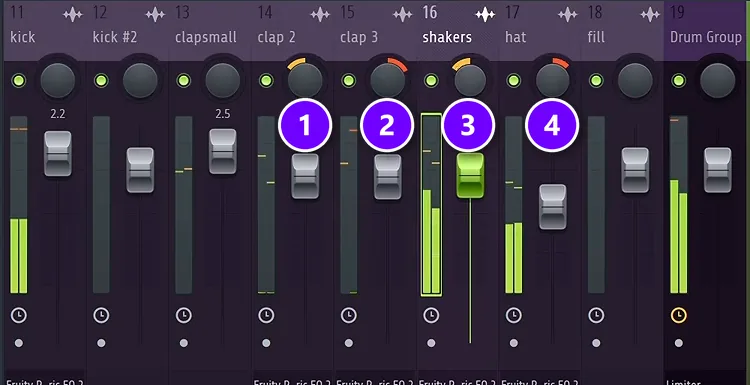
Panning moves a sound to the left or right. Every mixer track has a pan knob at the top, and every channel in the Channel Rack has one too. It brings a lot of excitement to a mix for almost no effort.
In the drum mix of Mix Elite’s free 4.5-hour FL Studio course, the two clap layers are panned slightly left (1) and slightly right (2), the shakers about 10% left (3) and the hat about 10% right (4). The moves are small and they go to opposite sides, so neither ear gets crowded.
Watch out for samples that are already panned. In the course, one clap plays louder on the left, so it gets nudged a little to the right to even it out. Always listen before you pan.
Use the mixer’s stereo separation knob
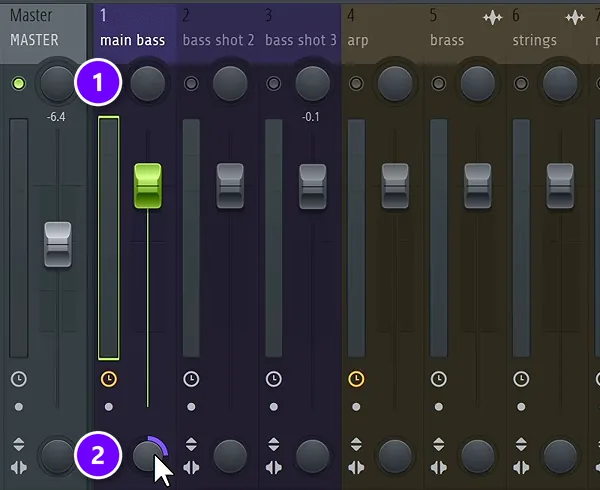
Every mixer track also has a small stereo separation knob near the bottom (2), under the fader. The pan knob sits at the top (1). Turn the separation knob left to make a stereo sound wider, and right to pull it toward mono.
The course calls this knob very important for the last step of mixing, but mostly turns it the other way, to merge. A wide synth or sample that crowds the mix often sits better when you pull it a little toward mono. The knob does nothing to a mono sound, because it works on the difference between left and right.
Try the Haas effect
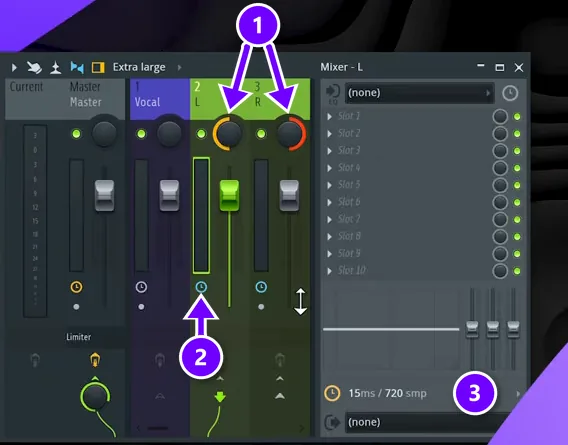
The Haas effect is a trick of the ear. When the same sound reaches one ear a few milliseconds later than the other, your brain hears one wide sound instead of an echo. A Mix Elite short shows how to set it up on a vocal:
- Route the vocal to two empty mixer tracks. Pan one hard left and the other hard right (1).
- On one of those two tracks, click the small clock icon (2). That’s the track delay.
- Set a short delay (3). The short uses 15 ms.
Keep the delay short, roughly under 30 ms, or it starts to sound like an echo. FL Studio’s Fruity Stereo Enhancer can do something similar on one track with its phase offset control, and Image-Line’s manual says 20 to 40 ms usually gives a realistic stereo effect on a mono sound. Either way, check the result in mono. If the vocal turns thin, shorten the delay or turn the delayed side down.
Add stereo reverb and ping-pong delay
Reverb and delay add width as well as space. A stereo reverb spreads its tail to both sides, and a ping-pong delay bounces echoes from one ear to the other. Put them on send tracks, cut their low end, and keep the dry vocal in the middle. Mix Elite’s guide to reverb vs delay walks through the settings for both.
Double-track and layer
Record the same part twice, like a guitar riff or a backing vocal, and pan one take hard left and the other hard right. The tiny differences in timing and pitch between the two takes create a natural width that holds up well in mono. With samples, layer two similar sounds, like the two claps above, and pan them slightly apart.
Use Patcher’s Stereo Tools preset
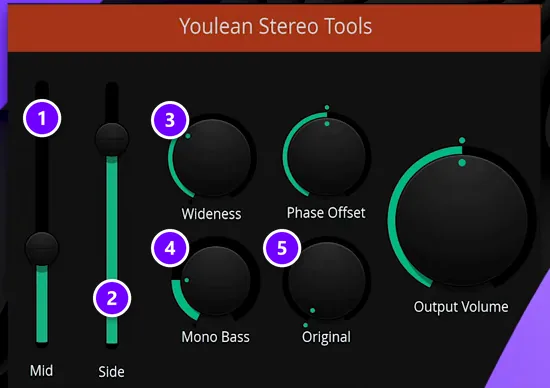
Patcher, which comes with every edition of FL Studio, includes a Stereo Tools preset by Youlean. A Mix Elite short shows the quick way to load it: search “stereo tools” in the Browser and drag it onto a mixer track. You get a Mid (1) and a Side (2) slider to turn the center or the sides up and down, a Wideness knob (3), a Mono Bass knob (4) that turns everything below a set point into mono, and an Original knob (5) that blends the untouched sound back in.
Mono Bass is the fastest fix for a wide synth or sample with too much low end on its sides. Turn it up until the lows feel solid and centered, then check the sound in mono.
What is mid/side EQ?
Mid/side EQ lets you treat the middle and the sides of a stereo sound separately. The mid is everything both speakers share, which is left plus right. The side is only what’s different between them, which is left minus right. You split a sound into those two parts, EQ each one on its own, and put them back together.
Mix Elite’s mid/side EQ video explains it with fruit. Picture a stereo recording where the left speaker says “banana” and “apple,” and the right speaker says “banana” and “kiwi.” The banana is in both, so it’s the mid. Take the right side away from the left and the banana cancels out, which leaves only the apple and the kiwi: the side. Turn both back on and you get the exact same audio, but now you can shape each part on its own.
Most of the time you’ll EQ both parts, which is why mid/side EQ is the most popular kind of mid/side processing, and one of the best tools for fixing a muddy mix.
How to set up mid/side EQ in FL Studio
FL Studio’s Fruity Parametric EQ 2 has no mid/side mode, so you build one in Patcher. The key part is Fruity Stereo Shaper. Its own manual tells you not to panic and to breathe slowly before you start, but the setup only takes a few moves.
Split the signal with Fruity Stereo Shaper
- Open the Mixer with F9, click an empty effect slot on the track you want to fix and load Patcher. The video uses a bus, a mixer track that collects several pluck sounds.
- Inside Patcher, add Fruity Stereo Shaper right after From FL Studio.
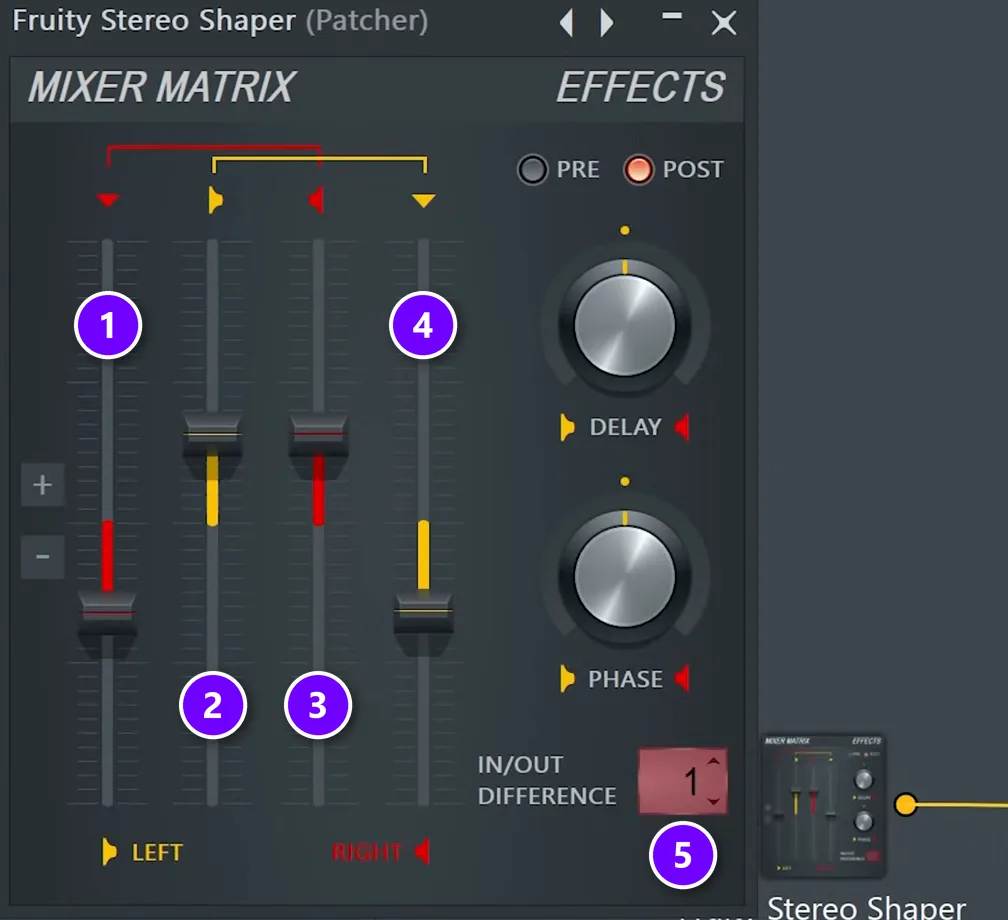
- Set the Left (2) and Right (3) channel sliders to half, 0.50. FL Studio’s hint bar shows that as -6.0 dB. Then pull the two outer sliders (1 and 4), which mix one side into the other, below the center line to -0.50. Each side now gets mixed into the other with its phase flipped, so only the side signal is left.
- Set IN/OUT DIFFERENCE (5) to 1. Stereo Shaper now sends the difference between what goes in and what comes out, which is the mid, to a second output.
Wire the mid and side EQs in Patcher
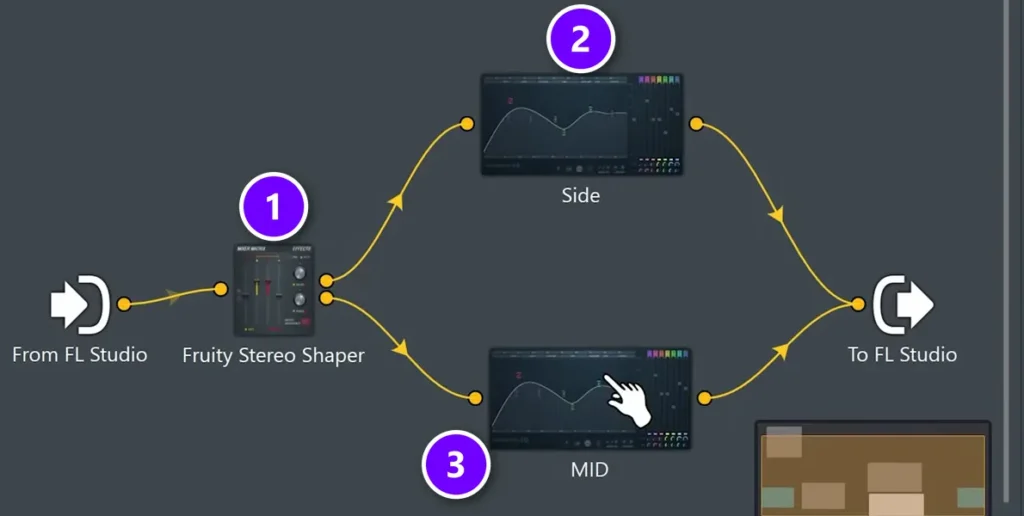
- Add two Fruity Parametric EQ 2 plugins to the Patcher map.
- Wire Stereo Shaper’s main output (1) to one EQ and name it Side (2). Wire its second output to the other EQ and name it Mid (3).
- Connect both EQs to To FL Studio. Nothing has changed yet, and that’s correct: the mid and the side add up to your original sound.
Patcher’s preset menu already has a Mid Side EQ preset that does this wiring for you. Building it once by hand, the way the video does, shows you what’s going on inside, so you’ll know what to change.
Mix Elite’s mid/side EQ video builds the whole setup step by step:
Where to use mid/side EQ in a mix
A mid/side EQ is only useful if you know what to listen for. Here are four places where it fixes real problems.
Clean the low end out of the sides
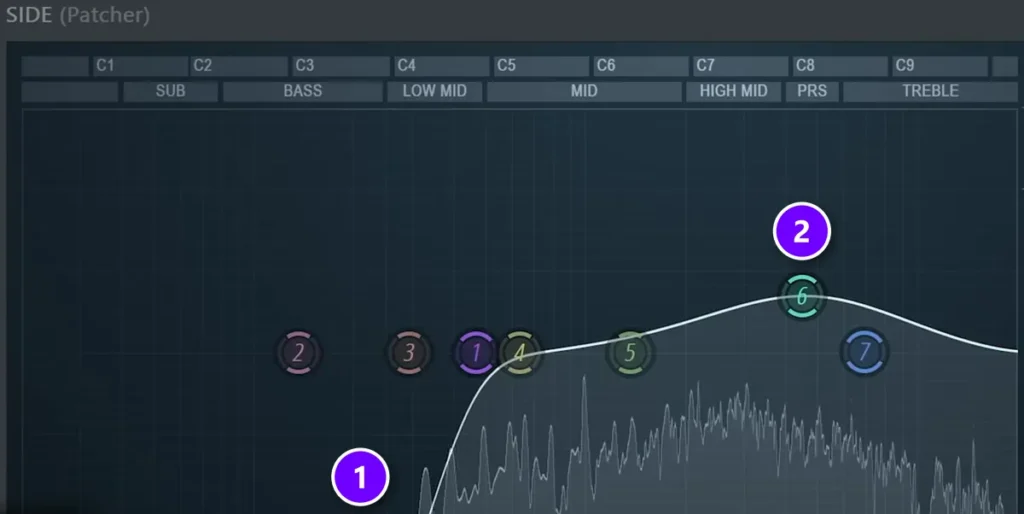
This is the number one use. In the video, a stack of plucks with reverb had piled up low end on the sides, and the drop sounded messy. As Max puts it: “If you have a lot of especially low frequencies on the sides, it will just mess up and muddy up your mix.” On the Side EQ, cut the lows (1) and lift the presence a little (2), to give the sides some air.
Want to hear what you’re removing? Turn the mid off and flip the low cut into a low pass, so only the low side signal plays. Then use the EQ’s COMPARE button to switch between before and after.
Make ad-libs sit around the lead vocal
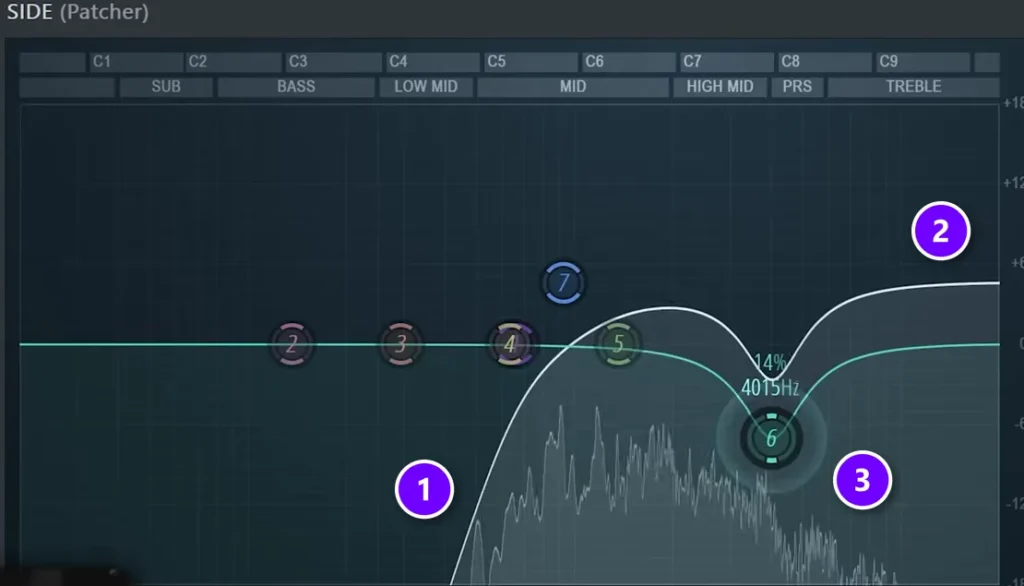
Ad-libs that bounce between your ears shouldn’t carry low body out there. On the ad-libs’ Side EQ, cut the lows (1), add a little top end (2) and then dig out the harsh “s” sounds (3), which you find by sweeping a narrow boost until they jump out. The low body stays in the middle, where it gives the vocal power. For the rest of the chain, see Mix Elite’s guide on how to mix vocals.
Add air to the drums
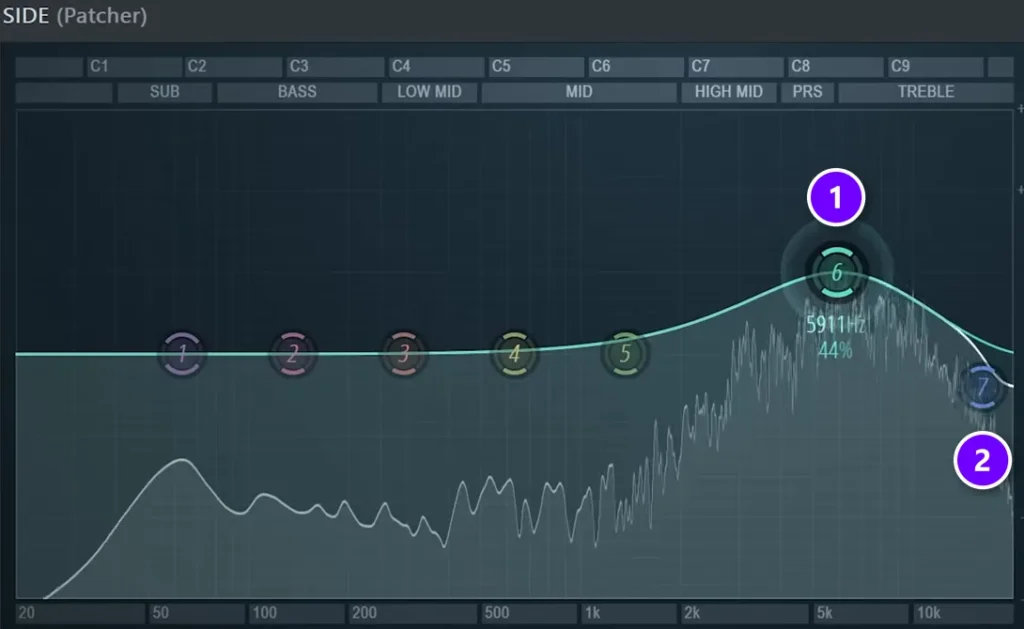
On drums, boost the highs on the sides with a gentle bell (1) and let the very top fall away (2), instead of boosting all the treble. That slope gives the drums a slightly dirtier, more professional feel. If the sides sound boxy, find that spot with a narrow boost and cut it. You can even boost the same spot in the mid, because a more mono sound has more power in the mix.
Use it gently on the master
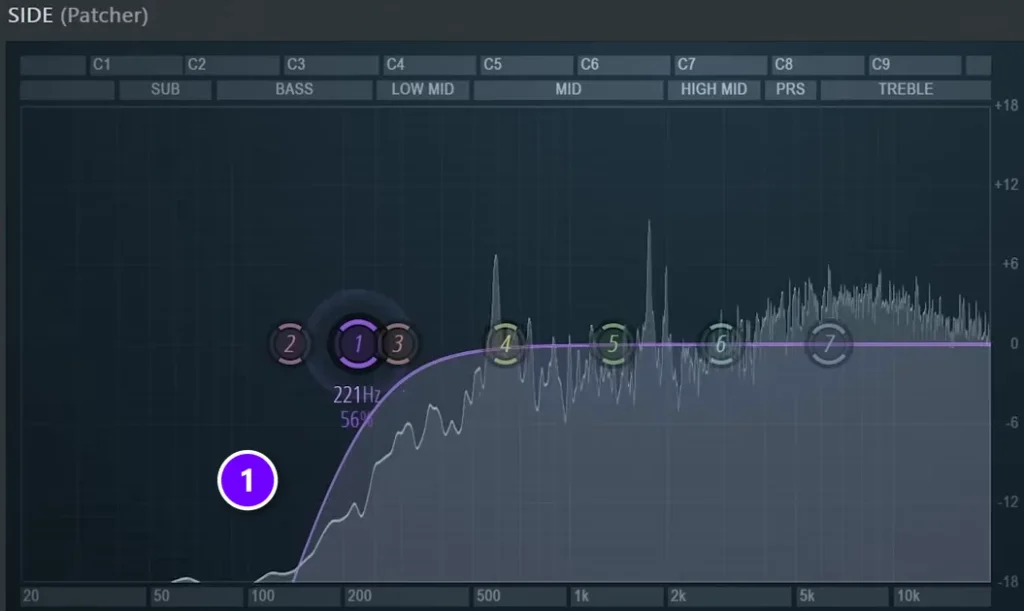
On the master, a gentle low cut on the sides (1) can clean up a whole mix. You can also sweep through the sides for a ringing frequency and pull it down by 1 or 2 dB. Keep it light, and don’t cut the side lows and then boost the mid lows to make up for it unless you really know what you’re doing.
A simpler habit works too. If you treat each instrument on its own during the mix, the master only needs its sub rolled off, and that’s how the video handles it.
Why does my mix lose its power in mono, and how do you fix it?
Usually it’s phase cancellation. When two similar signals, like the left and right of a widened synth, are slightly out of step, adding them into one mono signal cancels parts of the sound, so it turns thin, hollow or quiet. Fix it by keeping the kick and bass in mono, cutting the lows from the sides and backing off wideners until the part holds up in mono.
A single mono sound can’t cause it on its own, because it’s only one signal. The risk comes when two different stereo signals get merged into one mono signal, which is exactly what a phone speaker or a club system does. These habits keep your mix safe:
- Check in mono after every widening move, like the Haas effect, a widener or a stereo delay.
- Keep the kick and bass in mono, where cancellation hurts the most.
- If you have a correlation meter, watch it. Near +1 is safe in mono, and below 0 means parts of the mix cancel out.
- If a layered sound gets thinner when you add a second layer, try the reverse polarity button on the mixer track. Image-Line’s manual says it flips the waveform and can help avoid phase cancellation.
Mono vs stereo mixing mistakes to avoid
- Stereo bass. Wide low end turns to mud and can vanish in mono. Keep the kick and 808 in the center, as our guide on how to mix kick and 808 explains.
- Widening everything. If every track is wide, nothing stands out.
- A widener on the master to fix a narrow mix. Fix width on the tracks instead.
- Never checking in mono. Do it a few times in every mix.
- One lonely hi-hat panned hard to one side. Balance the left and right.
- Reverb with full low end. Cut the lows on reverb sends so the sides stay clean.
Start with the next beat you open. Put the kick, bass and vocal in the middle, pan the hats and percussion a little, pull one crowded stereo synth toward mono with the separation knob, and check the whole thing in mono before you export. That’s most of the job. More traps like these are in Mix Elite’s list of beginner mixing mistakes, and our guide on how to use EQ in mixing covers the cuts and boosts behind every move above.
Mono vs stereo at a glance
Here’s the difference side by side:
| Mono | Stereo | |
|---|---|---|
| Channels | 1 | 2 (left and right) |
| What you hear | Sound comes from the middle, right in front of you | Sound spreads out to the left and right |
| Strength | Solid, focused and punchy | Wide, open and more real |
| Weak spot | Can feel narrow and crowded | Can fall apart when played in mono |
| Typical use | Kick, bass, lead vocal, podcasts | Pads, reverb, backing vocals, a finished song |
DAY 4 OF THE 7-DAY MUSIC PRODUCER COURSE
Want a wide mix that still hits hard? That’s Day 4.
Day 4 of the 7-Day course is all about mixing: the simple Holy-Quad mixing formula, the “Mix Murdering” mistakes most beginners make, and a one-click setting that makes your song wider, with no new plugins. You also get a mixing checklist and a mixing and production template. It’s taught in FL Studio (the free trial works), about 45 minutes a day, and on day 7 a pro gives you feedback on your finished track. It’s $27, and you get 60 days to decide if it was worth it.
Frequently asked questions
Is mono or stereo better?
For listening to music, stereo is better: the left and right speakers play slightly different signals, so the mix sounds wider and more real. Mono is better for speech, for devices with one speaker, and for the parts of a mix that need punch, like the kick, bass and lead vocal. Good mixes use both and still sound solid in mono.
Should vocals be mono or stereo?
Record the lead vocal on a mono input and keep it in the center, so the words stay clear and strong. Backing vocals, doubles and ad-libs can be stereo or panned left and right, and a vocal’s reverb and delay are usually stereo. Cutting the low end out of the sides of the ad-libs keeps the body of the vocal in the middle.
Should drums and bass be mono or stereo?
Keep the kick, snare, 808 and bass in mono, in the center. Low frequencies carry the most energy, and when they spread to the sides they muddy the mix and can cancel out in mono, so the lower you go, the less stereo you want. Hi-hats and percussion can be panned a little, and a real kit’s overheads are recorded as a stereo pair.
Why does my mix lose power in mono?
Usually because of phase cancellation: left and right signals that are similar but slightly out of step cancel each other when they’re added into mono. Wideners, Haas delays and wide low end are the usual causes. Keep the kick and bass in the center, cut the lows from the sides, and check in mono after every widening move.
Should I mix in mono or stereo?
Mix in stereo, but check in mono often. Mono is the harder test: with everything stacked in the middle, you hear when a sound is too loud or when two sounds fight over the same frequencies. In FL Studio, turn the Master track’s stereo separation knob all the way right to hear the mix in mono, then turn it back before you export.





