



“Well, less is more, Lucrezia: I am judged.”
To make a song louder without losing quality, make room before you add level. Delete parts that fight, keep the low end tight and mono, feed the mids, and shave peaks in small steps with clipping and gentle compression on tracks and groups. Then the master limiter only adds the last few dB, so the kick and snare still punch.
You push the limiter until the mix is as loud as the songs on your playlist, and something dies. The kick stops hitting, the snare turns to cardboard and the whole thing feels flat. Then you play it next to a pro track, and yours still sounds smaller.
Max, the founder of Mix Elite, puts it bluntly: “your master will suck and not be crispy, not because of what you do on the master mainly, but what you do while mixing.” That line is from Mix Elite’s loud master video, and it’s why this guide makes your mix louder where it counts, in the mix, with real FL Studio screenshots from those videos.
Table of Contents
Why is my mix quieter than commercial songs?
Usually because a few sharp peaks, from the kick, the snare and the sub, hit the 0 dB ceiling first and hold everything else down. Commercial songs keep those peaks under control in the mix and are then mastered, so a limiter only has to add the last few dB.
Digital audio has a hard ceiling. Nothing can go past 0 dB, so while a few peaks touch it, the body of the song stays low and the mix sounds small, even when the meter looks full.
The peak meter also can’t tell you how loud a song feels. Loudness is measured in LUFS, which our LUFS vs RMS guide explains, so this guide sticks to how to raise it. Three things eat the space in most beginner mixes:
- Too many sounds in the same range. Two leads and a pad fighting in the mids add peaks, not loudness.
- Too much sub. The lowest notes carry the most energy, so they hit the ceiling first. Pro tracks have less sub than most people think.
- Wild peaks. One snare hit far above the rest decides how loud the whole song can go.
Why does my mix distort and go flat when I push the master fader?
Because the level has nowhere to go. Past 0 dB, the file you export clips, which you hear as harsh distortion. And any limiter, clipper or compressor in the path squashes the peaks harder the more level it gets, so the kick and snare lose their snap and the mix goes flat.
The low end makes both problems worse. The sub carries the most energy, so it reaches the ceiling first and starts the distortion long before the mix sounds loud.
Inside FL Studio itself, going over 0 dB on a mixer track does no harm. FL Studio and its plugins work in 32-bit floating point, and Mix Elite’s gain staging video pushes a track far past 0 dB, turns it down on the next mixer track, and nothing is left clipping. The damage happens in two places: plugins that react to level, like a limiter or a distortion, and the file you render.
- Turn the master down, not up. If the master meter hits red while you mix, pull the master or the loudest tracks down. The loudness comes back later, cleanly, in mastering.
- Take the limiter off the master while you mix and mix into a clipper instead, as step 5 shows.
- Clean up the low end first. Less sub means more room before anything clips.
- Check the render. The file you export should never clip, whatever the meters showed inside FL Studio.
Loudness vs dynamics: what you keep and what you can lose

Dynamics is the difference between loud and quiet, and a mix has two kinds. Small dynamics are the hits: the attack of a kick or a snare, which is what you feel as punch. Big dynamics are the shape of the song, like a quiet verse that makes the drop feel huge.
A loud mix that still breathes keeps both. What you can lose is the stray peaks, the few hits that stick out far above everything else and add nothing you’d miss. Shave those, and the whole song can come up without the punch going away.
Squash everything instead, and the hits flatten and the drop stops feeling bigger than the verse. That was the trade of the old loudness war. Streaming has made it pointless, as you’ll see below.
Which mixing tricks boost perceived loudness before the limiter?
Perceived loudness is how loud a song feels, not how high its peaks reach. Before any limiter, the tricks that raise it are fuller mids, a little saturation, less sub, clipped stray peaks and a quieter section before the big one. Each one makes the song feel louder at the same peak level.
Your ears decide most of this. Mix Elite’s 27 mixing tricks video points to the equal loudness curves: sub frequencies need far more volume than the area around 4 kHz to sound just as loud. A mix built on sub hits the ceiling long before it sounds big, while full mids sound loud at a lower level.
The steps below put each trick to work: the low end in step 2, the mids and saturation in step 3, and the peaks in steps 4 and 5. Contrast, the quieter section before the big one, is in the section on keeping the punch further down.
How to make your mix louder without losing quality
Make room first, then add level: delete parts that fight, tighten the low end, feed the mids, shave peaks on tracks and groups, mix into a clipper, and leave only the last few dB to the master limiter. Do it in that order, on the loudest part of the song, the drop or the chorus.
In the video below, Max takes a track from about -10 LUFS, where it starts to distort, to around -6 LUFS that still sounds clean.
Step 1: Delete what fights for the same space
The first loudness tool isn’t a plugin. It’s the delete button. Stack 50 melodies on top of a sub, Max says, and “they’re fighting for the same pixel of headroom.” Headroom is the space left between your loudest peak and the 0 dB ceiling, and every extra layer spends some of it.
Mute each part in the loudest section and ask if you’d miss it. If two sounds do the same job, keep the better one. If you need both, give each its own space with EQ and sidechain, so the most important sound always wins.
Step 2: Tighten the low end
Low frequencies are the heaviest part of a mix, so this step frees the most room. Here’s the low end checklist:
- Cut everything below the lowest note your song plays, and never go lower than 30 Hz.
- Low cut every sound that isn’t the kick or the bass.
- Keep everything below about 100 Hz in mono, so the bass hits the same on every speaker.
- Sidechain the bass to the kick, so they don’t peak at the same moment.
If the low end still feels loose after that, a multiband compressor on the kick and bass group can even it out. Our multiband compression guide shows the low band settings.
Step 3: Feed the mids, not just the lows and highs
Your ears are most sensitive in the middle of the range, so that’s where loudness lives. Mix Elite’s mixing mistakes video calls the smiley-face mix, with big lows, big highs and scooped mids, one of the most common beginner mistakes, because, as Max says, “the mid-range is the area with power, the character, and everything that actually moves you.”
There are two fixes. Turn up the mids in the sounds that live there, like chords and vocals. And add a little distortion or saturation, which creates new harmonics in the mids. A saturated bass is easier to hear on a phone, so it sounds louder without a higher peak.
Step 4: Shave the peaks where they start
This is where most of the extra level comes from. Instead of one limiter catching every peak at the end, control the peaks on the tracks and groups that make them, a little at a time. Clip single drums and whole groups to keep their peaks in check. That work belongs in the mix, not on the master.
- On single drums: a clipper on the snare or kick that shaves only the very tip of each hit.
- On the drum group: gentle compression. Mix Elite’s free 1-hour mixing course uses a 2:1 ratio with 3 to 4 dB of gain reduction, then adds about 3 dB back.
- On the kick and 808 together: a group with a little saturation. Mix Elite’s kick and 808 video explains that it lowers the dynamic range and gives both sounds the same color.
If clipping and limiting still blur together for you, our guide to compression vs clipping vs limiting shows what each one does to a waveform. For threshold, ratio and attack, see the FL Studio compressor guide.
Step 5: Mix into a clipper, not a limiter
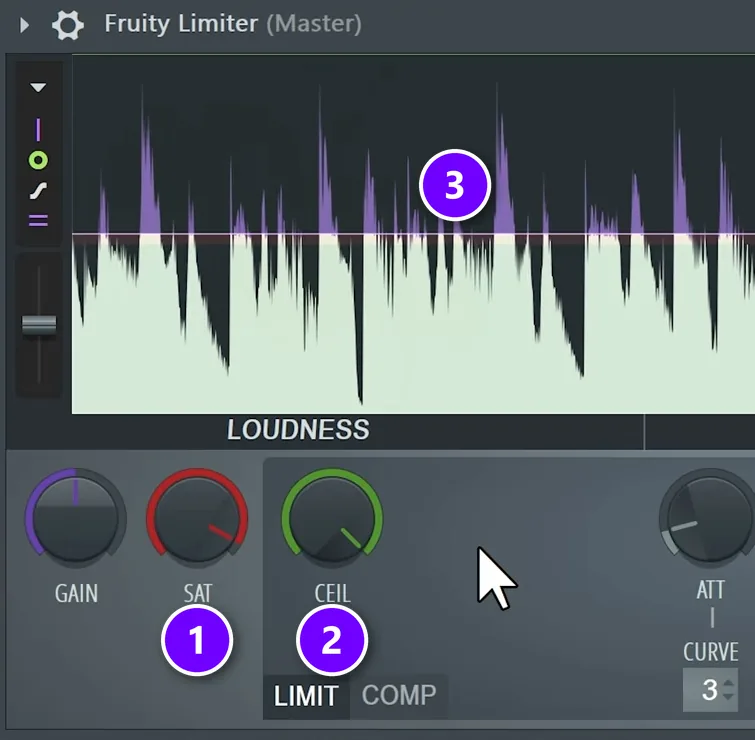
Older FL Studio projects start with Fruity Limiter on the master, and the advice is to take it off while you mix. A limiter turns the whole song down whenever one sound peaks, so a loud kick ducks everything else and you end up mixing against a pumping master.
Mix into a clipper instead. On Fruity Limiter, turn SAT (1) down a little and raise CEIL (2) so the limiting never kicks in. Now the tips of the peaks simply get cut off (3). The mix keeps its punch, and you hear roughly how loud it will get after mastering.
On newer FL Studio: set Emphasizer to 100
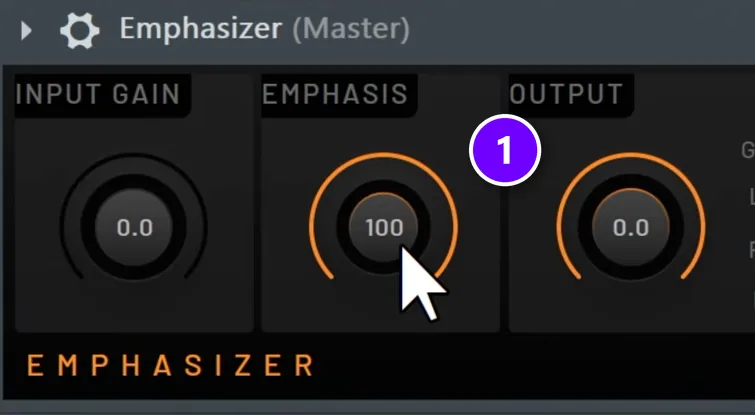
Newer FL Studio versions put a plugin called Emphasizer on the master instead. Set EMPHASIS (1) to 100. Image-Line’s manual explains why: at 0 it acts as a clean limiter, and at the maximum it behaves like a clipper.
Switch the clipper off before you export the mix for mastering. It’s there so you can hear the mix loud while you work, and the mastering stage needs the untouched peaks to do its own job.
Step 6: Leave the last few dB to the master limiter
Now the master has an easy job. In Mix Elite’s free 4.5-hour FL Studio course, the master’s gain goes up until you hear distortion, then comes back down by 0.5 to 1 dB. The ceiling sits at -0.3 dB with true peak protection on (in Maximus, that’s the linear phase button), so the limiter only adds the last few dB.
The full chain, from EQ to export, is in our guide to mastering in FL Studio, and our true peak guide explains why that ceiling matters once a song is turned into an MP3 or AAC file.
How loud should your mix be before mastering?
There’s no single number for a mix. It shouldn’t clip when you render it, and its loudness should come from the steps above, not from a limiter you forgot on the master.
If someone else masters your song, switch off any clipper or limiter on the master and export the mix as it is. If you master it yourself, Mix Elite’s target for electronic music is loud: around -8 to -6 integrated LUFS for the finished master.
Does Spotify turn down loud songs?
Yes. Spotify’s own loudness normalization page says it adjusts tracks to -14 dB LUFS by default. Louder masters get turned down to that level, and quieter ones get turned up when there’s enough headroom. Listeners can also choose Loud (-11 LUFS) or Quiet (-19 LUFS).
Spotify’s advice for masters is -14 integrated LUFS with true peak below -1 dB. If you master louder than -14, it asks for true peak below -2 dB to avoid extra distortion.
Apple Music doesn’t publish a LUFS number. Its Apple Digital Masters guide says Sound Check plays songs at about the same loudness, and that songs mastered loud get played back at a lower volume, which can make them sound weaker.
YouTube doesn’t give a LUFS number on its help pages either. Its Stable volume setting, on by default, evens out quiet and loud parts on regular videos, but YouTube says it’s turned off for YouTube Music and official music videos.
A squashed master doesn’t win on Spotify. It gets turned down to the same level as a dynamic one and just sounds flatter. Mix Elite still masters electronic music loud, but only as loud as it gets before it starts to sound worse, and gets there with clean mix moves so the punch survives.
How do you keep the punch in a loud mix?
Let the first hit of every drum through, and make the big moments bigger with arrangement instead of level. Slow attacks on drum compressors, parallel compression on the drum bus and two or three gentle stages of compression keep the punch even when the song is loud.
- Make the drop bigger with arrangement, not level. A thinner verse, with fewer layers and less low end, makes the drop feel huge at the same loudness.
- Let the attack through. On drum compressors, a slower attack lets the first hit pass before the compressor grabs, so the punch stays.
- Blend in parallel compression. Mix Elite’s hard-hitting drums video compresses the drum bus hard (threshold around -30 dB, attack 10 ms, release 20 to 30 ms), matches its volume to the dry drums, then turns the wet mix down to about 30 to 40%. The drums get fatter and more controlled, and the original hits stay.
- Dip the breakdown before the drop. Mix Elite’s FL Studio mastering tutorial automates the level about 2 dB down just before the drop, so the drop opens up.
- Compress in small steps. Two or three stages of 2 to 3 dB sound cleaner than one compressor doing all the work.
- Measure the verse and the drop. If the verse reads as loud as the drop on a loudness meter, the song has lost its shape.
Already squashed? How to bring the dynamics back
If a loop or a mix is already crushed, you can win some life back with expansion, the opposite of compression. A compressor shrinks the gap between loud and quiet, and an expander makes it bigger. Mix Elite’s Maximus expansion video shows it with Maximus on a loop that’s badly squashed.
Downward expansion on the master band
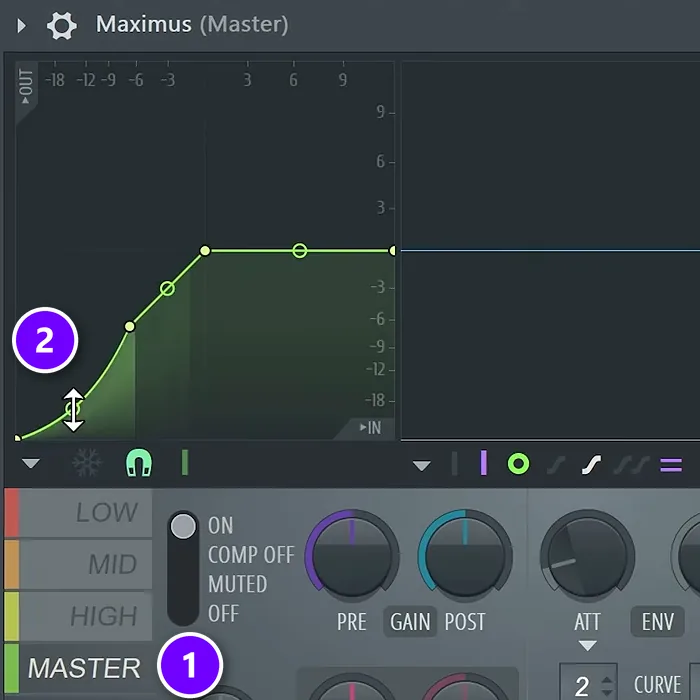
Select MASTER (1), add a point in the middle of the curve and bend the lower half down (2). Quiet sounds get pushed even lower, while the peaks stay where they are. That’s downward expansion.
On a fully squashed loop this alone won’t do much. The bands do the heavy lifting.
Expansion and gating on the high band
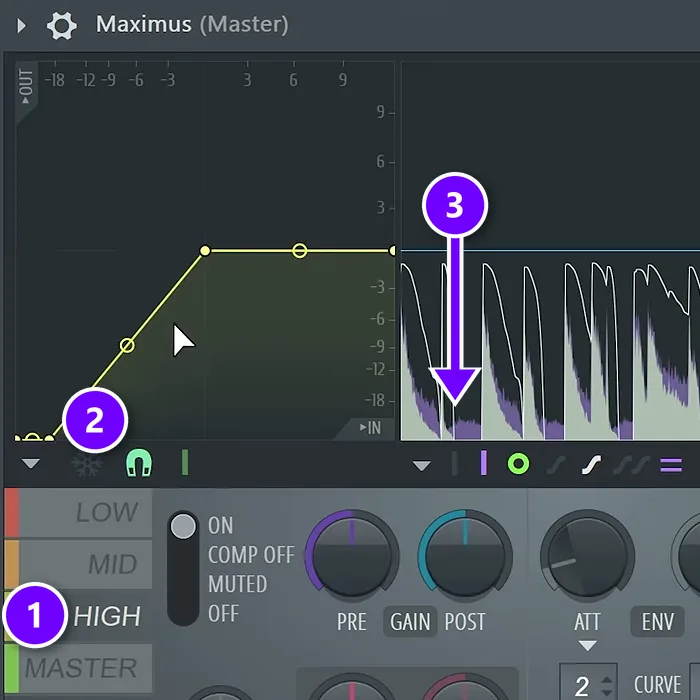
Select HIGH (1) and make the same bend, or drag the bottom point to the right (2) to turn the band into a gate, which mutes anything below a set level. The quiet wash between the hits drops away (3), and the hits stay.
In the expansion video’s example, the high band gates from about -19 to -20 dB and the mid band from about -36 dB, so only very quiet sounds switch off. He leaves the low end alone.
A transient shaper on the high band
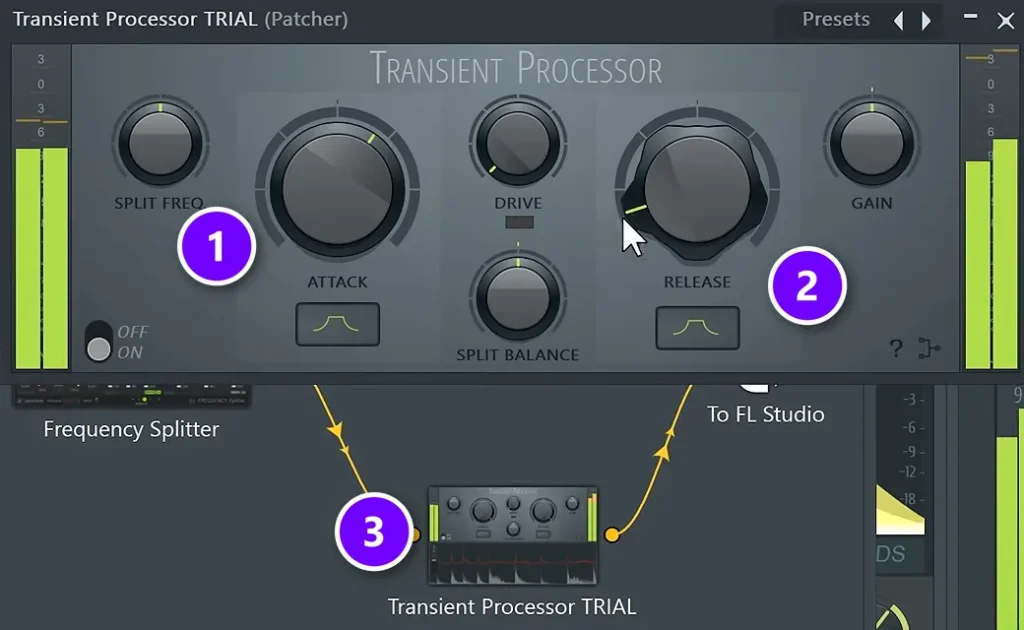
A transient shaper turns up the attack of each hit. The expansion video loads Transient Processor in a Patcher setup that splits the sound into bands, and uses it on the high band only (3). Turn ATTACK (1) up and RELEASE (2) down, and leave the mids and lows alone.
It works, but the Maximus gate from the step above sounds more natural, so that’s the first choice.
How to check that your mix is louder and still punchy
- Match the volume before you compare. Louder simply sounds better to our ears, so a fair test turns the louder version down until both read the same LUFS.
- Use a reference track in the same genre, at the same loudness.
- Watch a loudness meter like the free Youlean Loudness Meter on the master: short-term LUFS on the loudest part, and true peak.
- Listen on a phone or earbuds. If the bass disappears or the hits turn to mush, go back to steps 2 and 4.
Loud mix mistakes to avoid
- A limiter on the master while you mix. It pumps the whole song every time the kick hits.
- Boosting the highs to make the mix pop. A big treble boost tires your ears fast. If you need air, use a bell around 12 kHz instead.
- Too much sub. It eats headroom you can barely hear.
- Saving everything for the limiter. One limiter doing all the work is what kills the punch.
- Comparing at different volumes. The louder version wins every time, even when it’s worse.
- Squashing the verse and the drop to the same level. The song stops building.
DAY 6 OF THE 7-DAY MUSIC PRODUCER COURSE
Make your finished song loud and clean
Day 6 of the 7-Day course covers mastering and polishing your song: a 3-step mastering chain that makes it sound loud, clear and punchy everywhere, the inter-sample clipping mistake that ruins your sound without you knowing (plus an easy way to always avoid it), and the best export settings for streaming. You also get a mastering chain preset pack and a final mix to practice on. You get 60 days to decide if it was worth $27.
Frequently asked questions
How do I make my song louder without losing quality?
Make room before you add level. Delete parts that fight, cut the lows you don’t need, keep the low end mono, and shave peaks in small steps with clippers and gentle compression on groups. Then a limiter on the master only has to add the last few dB. Compare the result with the old version at the same loudness, so you judge the sound and not the volume.
Why does my mix distort when I turn up the master fader?
Past 0 dB the exported file clips, which sounds harsh, and any limiter or clipper in the path squashes the peaks harder, so the mix goes flat. Turn the master down instead of up, take the limiter off while you mix, and clean up the low end, because the sub hits the ceiling first.
How do I get my mix as loud as commercial tracks?
Build the loudness in the mix, not at the end. Delete what fights, tighten the low end, fill the mids and clip stray peaks on tracks and groups, then master with a limiter that only adds the last few dB. Compare with a reference track at matched loudness, so you judge the sound and not the volume.
How loud should my mix be before mastering?
There’s no fixed number. The mix should not clip when you render it, and if someone else masters the song, switch off any clipper or limiter on the master first. If you master it yourself, Mix Elite aims for around -8 to -6 integrated LUFS on the finished master for electronic music.
Does Spotify turn down loud songs?
Yes. Spotify’s loudness normalization adjusts tracks to -14 LUFS by default, so a master louder than that is turned down. Listeners can also pick Loud (-11 LUFS) or Quiet (-19 LUFS). Spotify recommends true peak below -1 dB, or below -2 dB if your master is louder than -14 LUFS.





