



“Share something small every day.”
To promote your music for free, trade money for time. Pitch every new song to Spotify’s editors through Spotify for Artists at least 7 days before release, post short videos of how you made it on TikTok, Reels and Shorts, share it in communities that allow it, collaborate with artists at your level, and collect fans’ emails so you can reach them directly.
You finished the song. You exported it, posted the link, and waited. A few likes from friends showed up, then nothing. It’s a horrible feeling, and it makes you wonder why you spent all those evenings on it.
Here’s what helps: 11 ways to get heard that cost nothing, the FL Studio export settings to use before you upload anything, and a producer tag trick from Max, the founder of Mix Elite, that keeps your name on every beat.
Table of Contents
What is free music promotion, and what actually works?
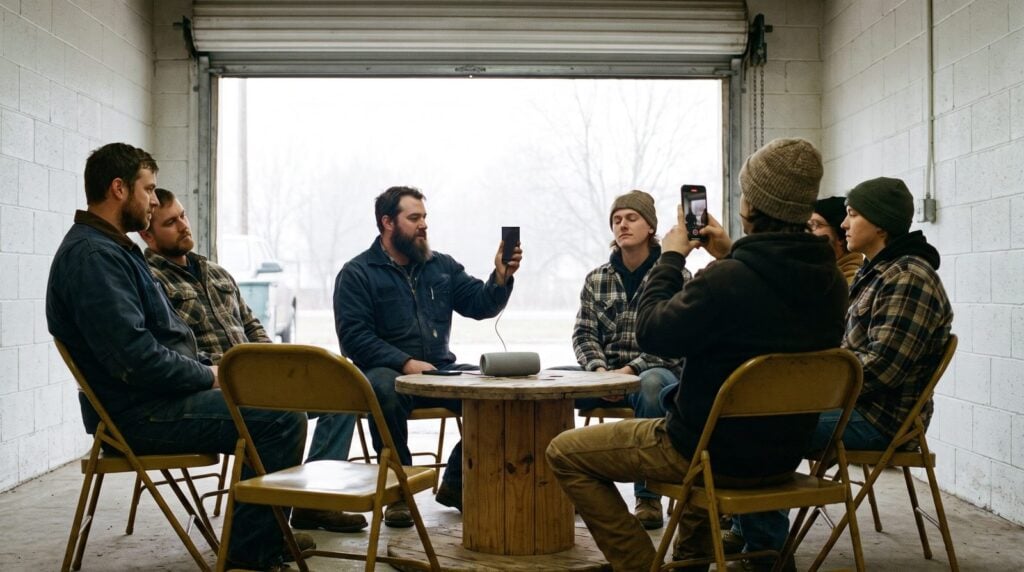
Free music promotion is everything you do to get new listeners without paying for ads, playlist spots or “promo packages”. What works is what costs time instead: pitching Spotify’s editors, short videos of how you made the song, real conversations in communities, collaborations and an email list. That sounds slow, and it is, but it’s how you build fans who actually listen.
One thing comes before all of it: a finished song you’re proud of. Promotion makes a good song travel further. It can’t save a demo. If you still have a folder full of loops, start with our guide on how to finish a song, then come back.
The good news? Releasing is now easy. As Max says in Mix Elite’s free 4.5-hour FL Studio course, “You can also release your music on all platforms like Spotify or YouTube by yourself.” The hard part is getting people to press play, and that’s what the 11 ways below are for.
Where can you promote your music for free?
The best free places are Spotify for Artists for pitching, SoundCloud and YouTube for full songs, TikTok, Instagram Reels and YouTube Shorts for short clips, Reddit and Discord for communities, free submission sites for playlists, and Bandcamp for selling directly. The number after each one points to the way below that uses it:
- Spotify for Artists: pitch new songs to Spotify’s editors and get onto your followers’ Release Radar (way 2).
- SoundCloud: post songs, beats and works in progress, straight from FL Studio (way 3).
- YouTube: the full song, plus short clips as Shorts (ways 4 and 5).
- TikTok and Instagram Reels: short videos of how you made the track (way 5).
- Reddit and Discord: producer and fan communities, if you follow their rules (way 6).
- Soundplate and DailyPlaylists: free submissions to independent Spotify playlists (way 7).
- Bandcamp: a place where fans can buy your music directly (way 10).
How do you get your first listeners without paying for ads?
Your first listeners will be people you reach yourself. Send the song personally to friends, family and other music makers, and ask each one to share it with one person who’d like it. Then reach strangers with short clips of how you made it and a Spotify pitch for every release, and invite everyone who replies onto your email list.
Answer every comment and message while your audience is small. A personal reply is what turns a curious listener into someone who comes back for the next song. The 11 ways below show how to do each part.
1. Make your song release-ready before you promote it
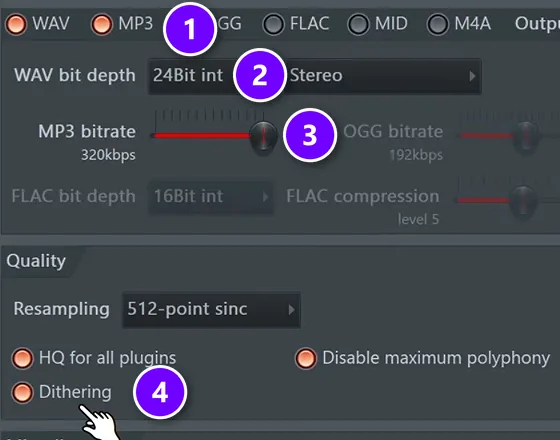
A great song exported badly sounds cheap next to everything else in a playlist. So before you post anything, master the track (our mastering guide for FL Studio walks you through it), then export it with the settings from Mix Elite’s free FL Studio course.
Go to File > Export > Wave file. Tick both WAV and MP3 so you get two files at once (1). Set the WAV to 24Bit int (2), the most common format for releasing music online. Drag the MP3 bitrate all the way up to 320kbps (3), and turn on Dithering (4), which adds a tiny bit of noise you can’t hear that helps the conversion.
The WAV goes to your distributor, the service that puts your song on Spotify and Apple Music. The MP3 is for sharing. Our guide on how to release music covers distribution step by step.
2. Pitch every release to Spotify’s editors
This is one of the strongest free tools an independent artist has, and plenty of people skip it. First, claim your free Spotify for Artists profile and add a photo, a short bio and your links.
Then send your next song to your distributor a few weeks early. Once it shows up as upcoming, go to Music > Upcoming, choose the song and fill out the pitch form. More detail gives it a better chance, so describe the genre, the mood and the instruments. Spotify says that if you pitch an unreleased song at least 7 days before release, it goes into your followers’ Release Radar playlists.
You can only pitch one song at a time, so pick the one with the strongest first 10 seconds.
Editors don’t have to pick your song, and no one can legitimately sell you a spot on their playlists. But the Release Radar spot alone is worth the five minutes it takes.
3. Upload to SoundCloud straight from FL Studio
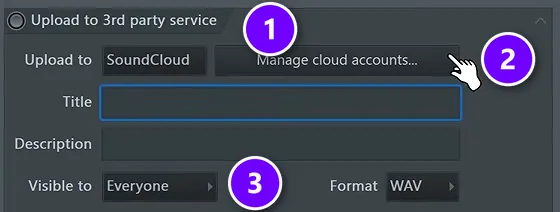
Max calls SoundCloud “like a YouTube for music”, and FL Studio can upload to it right from the export window. At the bottom of that window, open the upload section (1). In some versions it’s called Upload to 3rd party service, and in newer ones it’s Upload to cloud. Choose SoundCloud and sign in with Manage cloud accounts (2). Then add a title and description and choose who can hear it (3).
You’ll need a free SoundCloud account first, as the FL Studio manual notes. Only use this for your finished master. When you export a mix to send to mastering, leave the upload switched off.
SoundCloud is great for beats, remixes and works in progress. Producers comment, repost and follow each other there, so treat it like a community, not a storage locker.
4. Put the full song on YouTube
Plenty of people listen to music on YouTube, and an upload can be found in search for years. Upload the full song with a simple visual, your cover art or a short loop of video, and write a clear title: artist name, song name, and the genre or mood people would type in.
Add the lyrics, your links and the release date to the description. Then pin a comment that asks one simple question, so listeners have an easy reason to reply.
5. Post short videos of how you made it
Nobody wants another “new song out now, link in bio” post. They do want to see how it was made. Short vertical videos on TikTok, Instagram Reels and YouTube Shorts are free, and one good clip can reach people who have never heard of you.
Ideas that work for producers and artists:
- The moment the drop hits, filmed on your screen with the beat playing
- Before and after: the dry loop, then the finished mix
- One trick from the song, like how you made the vocal chop
- Your reaction the first time a friend hears it
- A 20-second story behind the lyrics
Two details help. Open with the best moment of the song, not a slow intro, so people stop scrolling. And if your distributor sends your music to TikTok and Instagram, use the released song as the clip’s sound, so viewers can tap through to the full track.
Post often and keep going. The first clips rarely do much, and that’s normal. You’re learning what your listeners actually stop for.
6. Share your music in communities, not comment sections
Communities are where real fans and future collaborators hang out: subreddits like r/WeAreTheMusicMakers, genre Discord servers and producer groups. Read the rules first. Many only allow self-promotion in weekly feedback threads, and they remove posts that just drop a link.
The trick is to give before you take. Leave useful feedback on other people’s tracks, answer questions you know, and share your song when someone asks for music like yours. Never paste your link under a famous artist’s post or video. It gets you ignored, and sometimes blocked.
7. Pitch independent playlist curators and blogs
Lots of independent playlists and music blogs are run by real people, and many take submissions for free. Search Spotify for playlists in your exact genre with fewer, more engaged followers. Then look for contact details in the playlist description or the curator’s profile.
Keep your pitch short and personal:
- Use their name, and mention a song on their playlist you genuinely like.
- Explain in one sentence why your song fits next to it.
- Send one link to one song. A private SoundCloud link or a Spotify link both work.
- Follow up once after a week or two, then let it go.
Expect most pitches to get no reply. Two or three yeses on small playlists can still bring you your first steady listeners.
Free submission sites help too. Soundplate and DailyPlaylists let you send songs to independent Spotify playlists at no cost. Check that a playlist has real, active listeners before you pitch it. The same short pitch works for music blogs, podcasts and local or college radio shows in your genre.
8. Promote your beats for free with a producer tag
A producer tag is a short voice clip with your name, played at the start of a beat. When your beat gets shared, reposted or rapped over, the tag keeps your name on it, and it costs nothing. The video below shows how to make a polished one in about five minutes, using only FL Studio’s built-in plugins.
Record your tag and clean it up
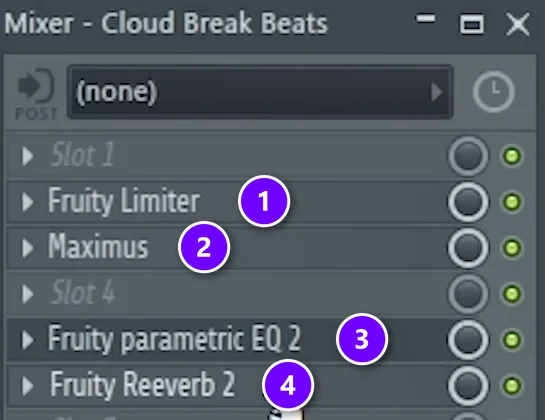
First, record the line yourself or ask a friend, because, in Max’s words, “I encourage you to record your own samples, it’s always better.” Then put the vocal on its own mixer track and add four effects. Fruity Limiter (1) makes every word equally loud. Maximus (2) tames harsh S sounds. Fruity Parametric EQ 2 (3) cuts the low end and lifts the highs. Fruity Reeverb 2 (4) comes next, for the swell.
Add a reverse reverb swell
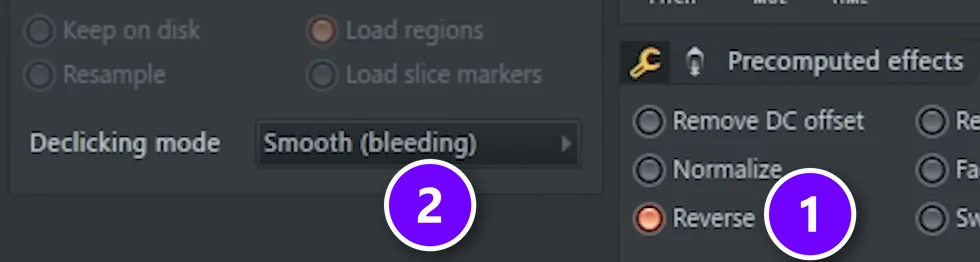
Set the reverb to fully wet with almost no dry signal, and raise the decay to about 4 seconds. Select just the first word and press Ctrl + Alt + C to render it with its reverb tail, keeping the tail set to Leave remainder. Double-click the new clip and tick Reverse (1). Then set Declicking mode to smooth (2) so the cut doesn’t click, and place the reversed swell just before the first word.
Layer a pitched-down copy
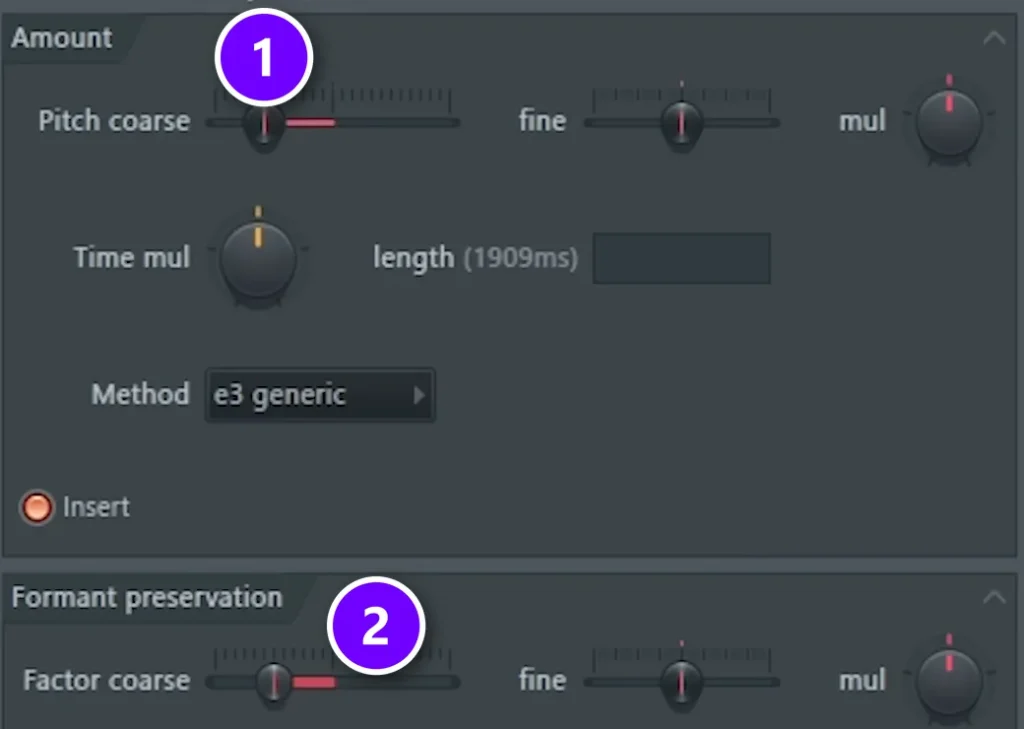
Duplicate the clip, make it unique, and open it in Edison. Press Alt + T to open the time stretcher and pitch shifter. Try minus 7 semitones on Pitch coarse (1), then settle around minus 5, and move the formant Factor coarse (2) the same way. Layered under the original, it gives the tag a deeper, heavier voice.
To finish, add a volume wobble with Fruity PanOMatic and a little distortion. Save the tag as one WAV and drop it on the first beat of every track you send out.
9. Collaborate with artists at your level
A feature puts you in front of another artist’s fans, and theirs in front of yours. Aim at people at your level, not stars. Ask producers you like for a remix swap, offer a singer a beat, or split an EP with a friend in the same genre.
Be easy to work with: send clean files, agree on credits and splits before release, and promote their work as hard as your own. And if you ever want a label behind you, read our guide on how to get signed to a record label.
10. Build an email list and a home base
Social apps can change their rules overnight. An email list is yours. Start one from your first release, even if it’s ten friends, and give people a reason to join, like an early listen, a free download or a stem for remixing.
Also set up one home base: a simple website or a free link page with your newest release at the top, your streaming links, and the signup form. On Bandcamp, fans can also buy your music directly. Put that one link everywhere you post. Spotify’s own pre-save pages, called Countdown Pages, need at least 3,000 monthly active listeners, so early on, the link page and your email list do that job.
11. Play live, then post the clips
Open mics, local shows, DJ nights and livestreams put you in front of people who are actually listening. Bring a friend to film it. One good live clip can become a week of short videos.
Releasing a body of work? Playing it live is part of the plan in our guide on how to make an album.
What should you avoid? Paid streams and fake promotion
Some “promotion” costs money and hurts you. Spotify is clear that paid services promising streams aren’t legitimate. Using them can get your music removed, and Spotify can withhold the royalties and correct the play counts.
- Anyone who guarantees a number of streams, followers or playlist adds for a fee
- Bought followers or likes that never listen
- “Exclusive” playlist deals that arrive in your DMs
- Copy-pasting your link to strangers, which trains people to ignore you
If a promo offer promises a set number of streams or a playlist spot, walk away. Real curators and editors never promise a placement.
Why is nobody listening to my music?
Usually because nobody knows it exists yet. Uploading a song doesn’t put it in front of anyone, so a first release with no plan gets almost no plays, and that’s normal. Check the song first, then give people a reason to press play: clips of how you made it, an early Spotify pitch for the next release, and real conversations in communities.
Here’s what to check, in order:
- The song. Play it right after a released track in the same genre. If yours sounds thin or quiet next to it, finish and master it before you promote it.
- The first seconds. Get to the good part quickly, in the song and in every clip you post.
- The ask. Ask for one thing per post: follow, save the song or share it with one friend.
- The path. Point every profile to one link page with the newest release on top, so nobody has to hunt for it.
How can you promote your music with little time after work?
Do a little every evening instead of everything once a month. Batch your short clips on one evening, then spend the other evenings on quick tasks: replying to comments, helping in one community thread and sending a personal pitch or two. Pitch each release to Spotify as soon as it shows up in Spotify for Artists.
With about 45 minutes a night, a week can look like this:
- One evening: film and edit three or four short clips from your newest song.
- Most evenings, 15 minutes: reply to comments and messages, then help in one community thread.
- Twice a week: send one or two personal pitches to curators, blogs or other artists.
- Once per release: pitch Spotify’s editors, update your link page and tell your email list.
The rest of your time goes into the next song. Each release gives you something new to share.
A free release plan you can copy
Here’s how the 11 ways fit around one release:
- 4 or more weeks before: finish, master and export the song, then send it to your distributor.
- As soon as it shows up in Spotify for Artists: pitch it, at least 7 days before release.
- 2 weeks before: post short clips of how you made it, and tell your email list the date.
- Release day: post the full song on YouTube and SoundCloud, update your link page, and thank everyone who shares it.
- The first week after: reply to every comment, and send your pitch to curators and blogs.
- Every week after: keep posting clips and helping in communities, and start the next song.
Then do it again. Each release can bring a few more listeners, and those few are how a fan base starts.
DAY 7 OF THE 7-DAY MUSIC PRODUCER COURSE
Release your song the right way, and get a pro’s ears on it
Day 7 of the 7-Day course is about releasing your music: the best way to put it on all streaming platforms for free, and how to avoid platforms that will take your money. You also get a form to send your track in for in-depth personal feedback from our team. The course takes you from setup to a finished, mastered song in 7 days, about 45 minutes a day, and it’s taught in FL Studio (the free trial works). It’s $27, with 60 days to decide if it was worth it.
Frequently asked questions
How can I promote my music for free?
Spend time instead of money. Pitch each new song to Spotify’s editors in Spotify for Artists at least 7 days before release, post short videos of how you made it, share it in communities that allow self-promotion, send personal pitches to independent curators, collaborate with artists at your level, and build an email list so you can reach your fans directly.
Where can I promote my music for free?
Start with Spotify for Artists, where you can pitch new songs to Spotify’s editors for free, then post on SoundCloud, YouTube, TikTok and Instagram Reels. Share in producer and fan communities on Reddit and Discord that allow self-promotion, pitch small independent playlist curators directly or through free sites like Soundplate, and build an email list so you can reach your fans without any app in the way.
How can I get my song on Spotify playlists for free?
Pitch it through Spotify for Artists before it comes out: go to Music, then Upcoming, pick the song and fill out the pitch form. If you pitch at least 7 days before release, Spotify adds it to your followers’ Release Radar. For independent playlists, contact curators in your genre directly with a short, personal message and one link.
Is paying for music promotion worth it?
Never pay for guaranteed streams, followers or playlist spots. Spotify says those services aren’t legitimate, and using them can get your music removed. The free methods on this page, like pitching editors, posting short videos and collaborating, build real listeners. Learn those first, so you know what works for your music before you spend anything.
How do I promote my beats for free?
Put a producer tag on every beat so your name travels with it, then post the beats on YouTube and SoundCloud with clear titles that name the style. Share short clips of how you made them, help other producers in communities, and send beats straight to artists at your level who make music in that style.





