



“I was watching a crowd, and everybody was waiting for the breaks to come in.”
To make a breakbeat, fit a drum break to your project tempo, slice it with Fruity Slicer and play the slices in a new order. To program one from scratch, put the kick on beat 1 and off the beat after beat 3, the snare on beats 2 and 4, then add quiet ghost snares and a little swing.
Those few bars where only the drums play have powered hip-hop, jungle and drum and bass for decades. Here’s how to make breakbeats in FL Studio, whether you chop a real break or program your own, with the exact clicks from Mix Elite videos. You’ll learn where a break comes from, the classic pattern, the right tempo, why producers slice breaks, rebuilding a break with your own drums, fills, how to fix a stiff groove and that dusty old-sampler sound.
Table of Contents
What is a breakbeat?
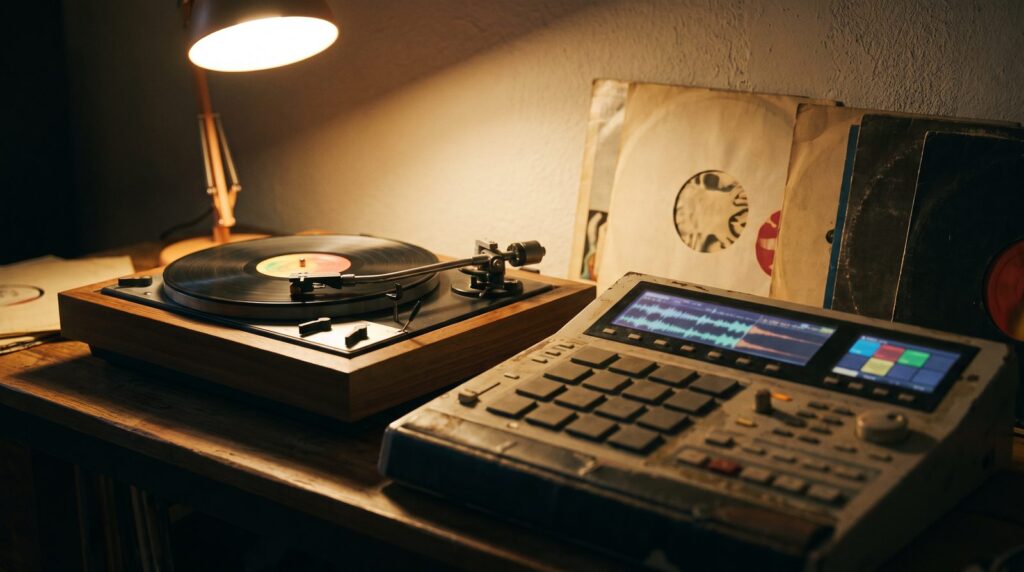
A breakbeat is a drum groove taken from the break of a song. The break is the short part where the band stops and the drummer plays alone. Producers sample that drum solo, which means they record it into a sampler or a computer, and then loop it, chop it and rearrange it.
Today the word also means any drum pattern with that broken, syncopated feel, even one you program yourself. It’s also the name of the dance music built on those beats, often just called breaks. Syncopated means some hits land between the main beats, so the groove pushes and pulls instead of marching. That’s the sound you’re after.
It started with DJs. In 1973, DJ Kool Herc used two turntables to repeat the breaks of funk records over and over so people could keep dancing. Hip-hop producers then sampled those breaks. Later, jungle, drum and bass, big beat, UK garage and the breaks scene built whole styles on them. A few breaks got used again and again:
- “Amen, Brother” by The Winstons (1969). The Amen break is one of the most sampled drum loops ever and a staple of jungle and drum and bass.
- “Funky Drummer” by James Brown (1970), played by Clyde Stubblefield.
- “Think (About It)” by Lyn Collins (1972).
- “Apache” by the Incredible Bongo Band (1973).
What does a breakbeat drum pattern look like?
Start with what it isn’t. A house beat puts the kick on every beat, which producers call four on the floor. A breakbeat breaks that up. The snare stays on beats 2 and 4, but the kick plays on beat 1 and then skips ahead and lands off the beat. That gap is the whole feel.
Here’s a classic starting point. In FL Studio’s step sequencer, one bar has 16 steps: 4 beats with 4 steps each.
- Kick: steps 1 and 11. Beat 1, then off the beat after beat 3
- Snare: steps 5 and 13. The backbeat on beats 2 and 4
- Ghost snare (quiet): steps 8 and 10. Soft hits that make it roll
- Closed hi-hat: steps 1, 3, 5, 7, 9, 11, 13, 15. A steady pulse that holds it together
Ghost notes are snare hits played much quieter than the main ones. They make a break sound like a drummer instead of a drum machine. Make the pattern 2 bars long and change something in bar 2, like an extra kick near the end. In Mix Elite’s free 4.5-hour FL Studio course, Max, the founder of Mix Elite, puts the rule simply: “our drum pattern, especially the kick, should be at least two bars long.”
How to program a breakbeat in the Channel Rack
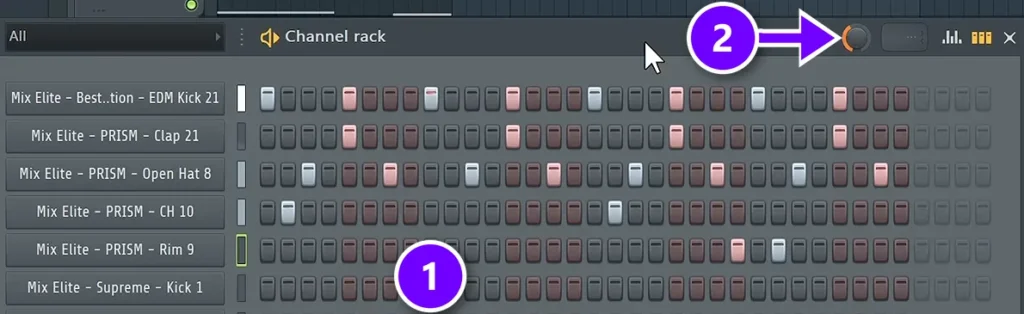
Make a new pattern and click the steps to switch them on (1). Each row is one sound and each button is one step. The colors split the buttons into groups of 4, and each group is one beat. Always start with a kick on beat 1, because it shows people where the beat starts.
Then add swing with the knob at the top of the Channel Rack (2). Swing delays the notes that sit between the beats and the off-beats by a few milliseconds, so stiff 16th notes start to bounce. The course uses about 40% on a house beat. On a break, turn it up slowly and stop as soon as it grooves.
For the ghost notes, open the snare in the Piano roll and drag their bars down in the velocity lane at the bottom. Velocity is how hard each note is hit. Lower every other hi-hat a little too, so the loop sounds played rather than pasted.
What BPM is breakbeat?
There’s no single breakbeat tempo. The breaks family runs from about 110 to 175 BPM (beats per minute), and the same break can work slow or fast:
- Hip-hop built on breaks: About 85 to 100 BPM
- Club breaks (breakbeat dance music): About 125 to 140 BPM
- Jungle and drum and bass: About 160 to 175 BPM
Old funk breaks were played by real drummers, often slower than dance music, so producers speed them up. That’s how a laid-back drum solo becomes a fast jungle loop. Set your project tempo first, then fit the break to it, which is step 1 below.
Why do producers slice breaks instead of using one-shots?
Because a recorded break carries feel that single drum hits don’t: one drummer playing one kit in one room, with natural timing drift and hits that vary in strength. Slicing keeps that feel and adds control. Each hit lands on its own key, so you can rearrange the hits, swap a weak kick and fit the break to any tempo.
One-shots, single recorded hits, win when you want machine-tight timing or full control of every note. You can also mix the two: a sliced break for the groove, plus your own kick or snare where the break is weak. Both ways are below.
How to make breakbeats in FL Studio, step by step
Here’s the whole process. Steps 1 to 3 chop a sampled break, steps 4 and 5 rebuild a break with your own drums, and the last two finish it off:
- Get a break and fit it to your project tempo.
- Open the break in Fruity Slicer.
- Slice it and play the hits in a new order.
- Copy the break’s rhythm into MIDI with Time Warper.
- Rebuild the groove with your own drums in FPC.
- Add a fill every few bars.
- Give it old-school grit in Edison.
Step 1: Get a break and fit it to your tempo
Pick a break that sounds good on its own, with a clear kick and snare and not much else going on. Royalty-free drum loop packs are the easy, safe choice. Sampling a famous break from a record is a copyright risk if you release the song without clearing it.
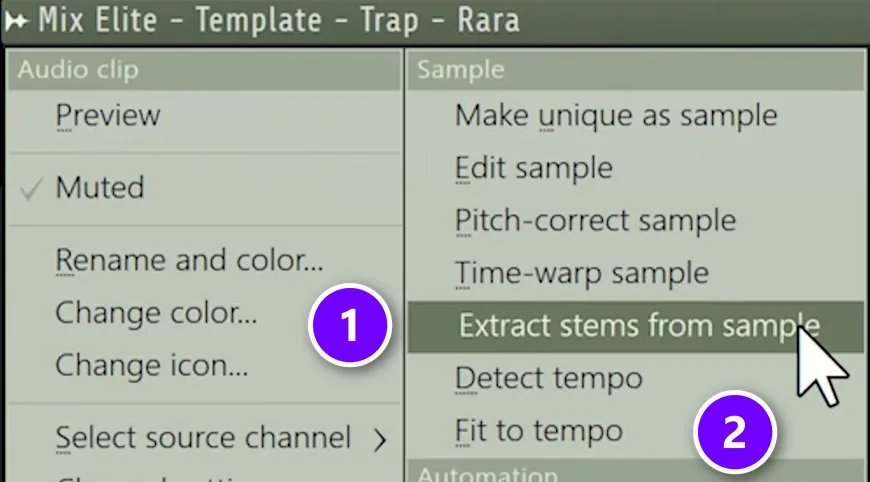
If the drums you love sit under a full song, FL Studio can pull them out. Drag the audio file into the Playlist, click the small icon at the top left of the clip and choose Extract stems from sample (1). Tick Drums, click Extract, and the drums land on their own track. Now you have a clean break.
The same menu has Fit to tempo (2). Pick the tempo marked “(project)” in the pop-up and the loop stretches to your song’s tempo. Detect tempo, right above it, tells you the loop’s own BPM.
Step 2: Open the break in Fruity Slicer
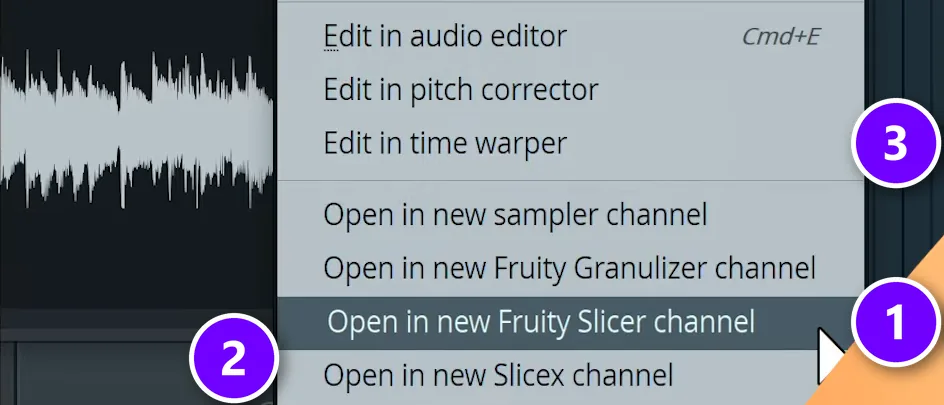
Double-click the clip to open its channel settings, right-click the waveform and choose Open in new Fruity Slicer channel (1). Fruity Slicer is FL Studio’s beat slicer. It cuts a loop into single hits and puts each hit on its own key.
The same menu has Open in new Slicex channel (2), a bigger slicer covered below, and Edit in time warper (3), which you’ll use in step 4. Once a break is sliced, it follows your project tempo, because every slice plays as its own note.
Step 3: Slice it and play the hits in a new order
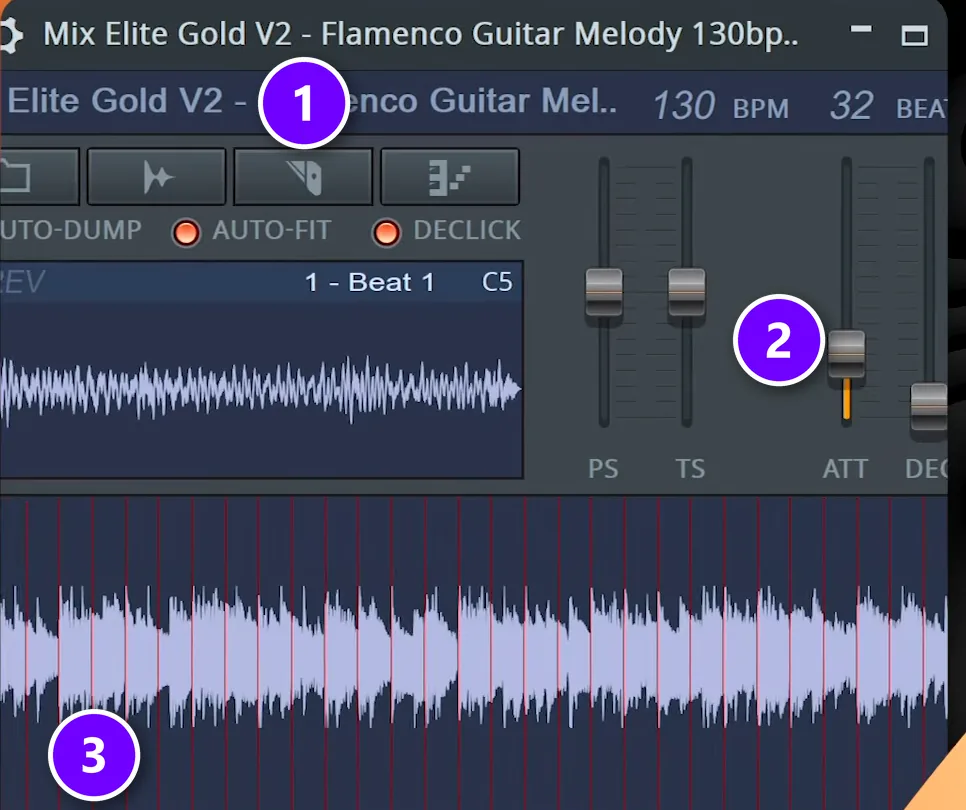
Click the slicing button (1) and pick a mode. Dull, Medium and Sharp auto-slicing cut where FL Studio hears a hit, and 1/4 beat or 1/2 beat cut on an even grid. If a kick and a snare end up in the same slice, try another mode.
Hear clicks between the slices? Raise the ATT (attack) and DEC (decay) sliders (2) a little, or switch on Declick. Every slice (3) now plays from its own key in the Piano roll. With Auto-dump on, Fruity Slicer even writes the original break there as notes, ready to move.
Now play with it. Move a snare to a new step, repeat a kick, cut a hit short or leave a gap. Keep most of the bar the same and change the end, the same idea the course uses for hi-hats: change something every 4 beats, so the ear gets used to the groove and then gets a surprise.
Fruity Slicer can also dump the slices in Random or Reverse order. Try it a few times, keep the one bar you like, and fix the rest by hand.
Slicex: the same job with more control
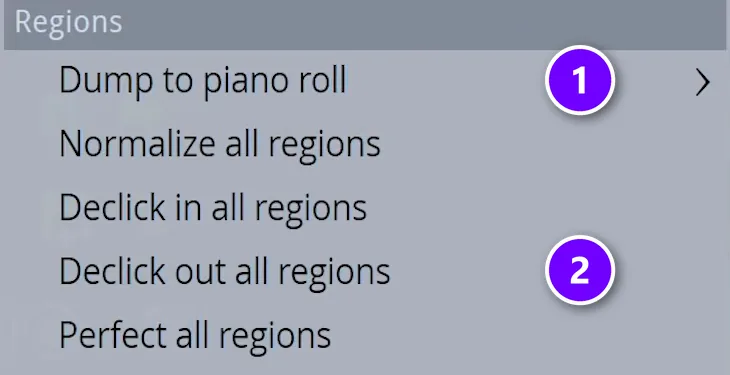
Slicex is FL Studio’s bigger slicer, and it comes with the Producer Edition and up. Open the break in it from the same right-click menu. It slices on the hits and maps each slice to its own key, like Fruity Slicer. Two items in its Tools menu are worth knowing for drums:
- Dump to piano roll (1) writes the slices out as notes, so you can rearrange them.
- Declick out all regions (2) adds a tiny fade to the end of every slice. FL Studio’s manual says this usually beats Perfect for drum loops, because it leaves the start of each hit untouched.
You can also give each slice its own mixer track. Open a slice’s region settings and scroll the number next to Out with your mouse wheel. Then you can EQ the kicks apart from the snares.
Step 4: Copy the break’s rhythm into MIDI
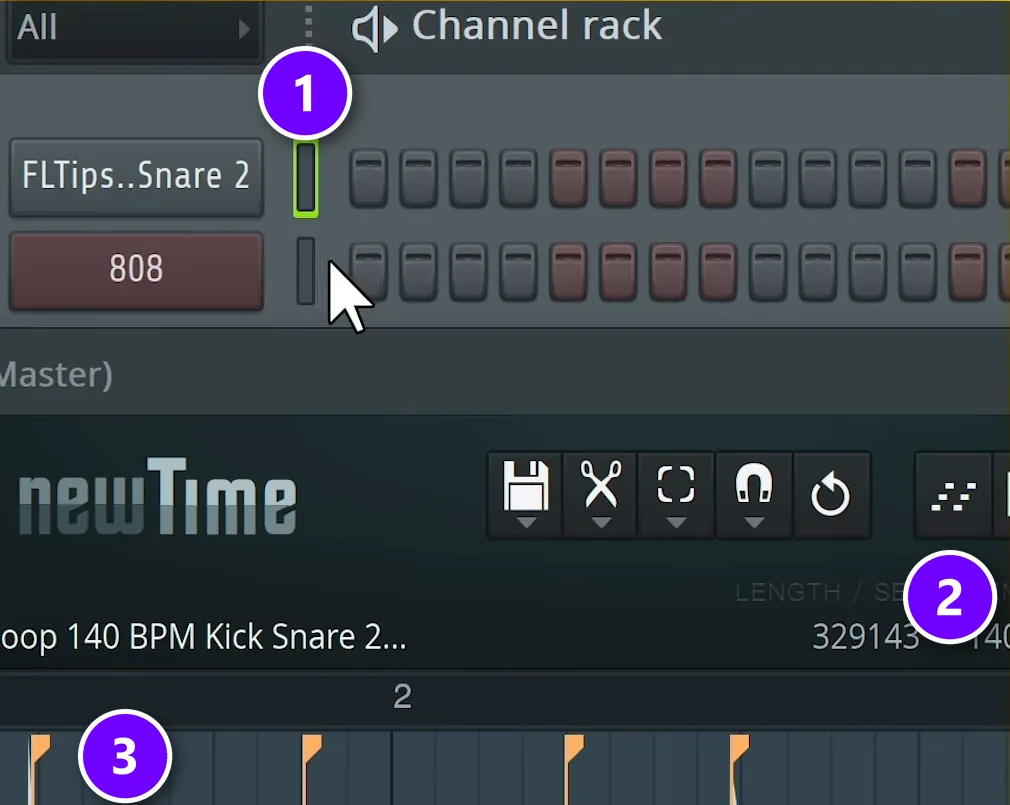
Sometimes you love a break’s groove but not its sounds. Time Warper can turn the rhythm into notes. Right-click the break’s waveform and choose Edit in time warper. In the Channel Rack, select the channel that should get the notes (1), then click the send-to-piano-roll button (2). The notes land on the hits, the markers you see on the waveform (3).
This works best with FPC, FL Studio’s drum pad plugin, because you can drag each note to the pad that should play it. Notes under a kick go to your kick pad, and notes under a snare go to your snare pad.
Step 5: Rebuild the groove with your own drums
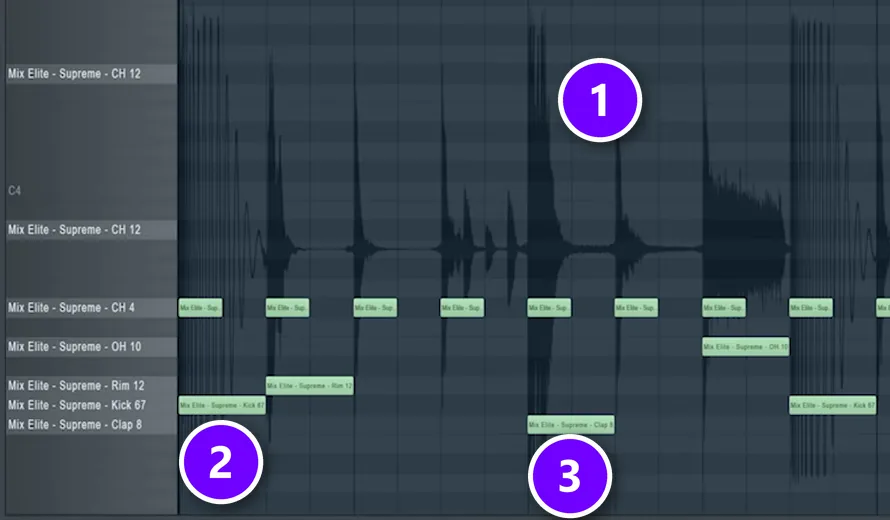
This is how you remake a break without using a single sound from it. In the Mix Elite video below, the drums are pulled out of a beat and then rebuilt in FPC with new samples. Open FPC in the Channel Rack and load your own kick, clap or snare, hats and a rim onto the pads. Then open FPC’s Piano roll and drag the drum loop into it.
The loop’s waveform (1) now shows behind the grid, so you can see every hit. Place a kick (2) under each kick peak and a clap or snare (3) under each backbeat, then fill in the hats. Copy the loud and soft hits with velocity. The video also shortens an open hat by lowering its attack and release, so it cuts off quicker.
Can’t tell the hits apart? Open the loop in Edison’s spectrum view. Kicks show up in the lows, claps in the middle and hats at the top. As the video puts it, “doing remakes and recreating tracks is actually one of the best ways to learn quick.”
Step 6: Add a fill every few bars
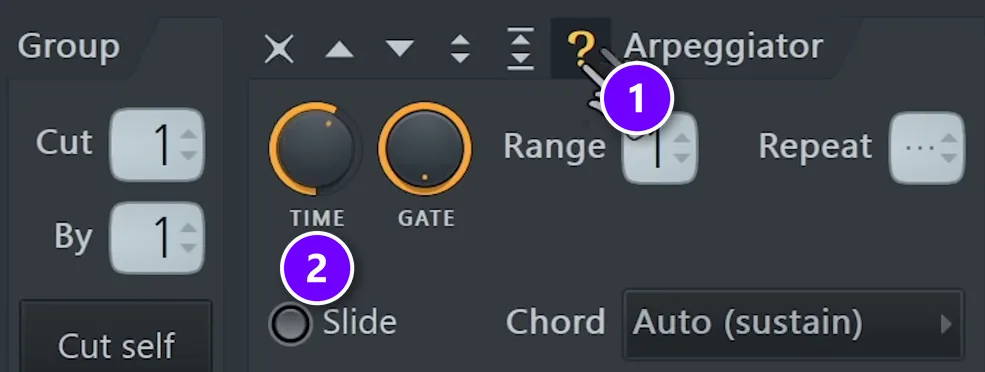
A fill is a short burst of drums, usually at the end of 4 or 8 bars, that tells the listener a change is coming. Fills keep a loop alive. They can feel so random that it’s tempting to just grab a fill sample, so a Mix Elite video lets FL Studio roll the dice instead:
- Open FPC in the Channel Rack, choose Presets > Empty and drag in a few drum samples, like toms and percussion. Short, clicky ones work best, so shorten their envelope.
- In the channel settings, open the Miscellaneous tab and click the random arpeggiator button, the question mark (1).
- Right-click the arpeggiator’s TIME knob (2), create an automation clip for it and draw it in steps, so the speed of the fill changes as it plays.
- Fill the Piano roll with a note for every sample and play it. Each pass comes out different.
- Put effects on the whole group. The video stacks Fruity Convolver for room, soft compression, OTT and Soundgoodizer, then ends the fill with a snare.
When a take sounds right, record it: select the Master in the Mixer, press Shift + E to open Edison and play the part. Then swap the samples and roll again for the next fill.
Step 7: Give it old-school grit
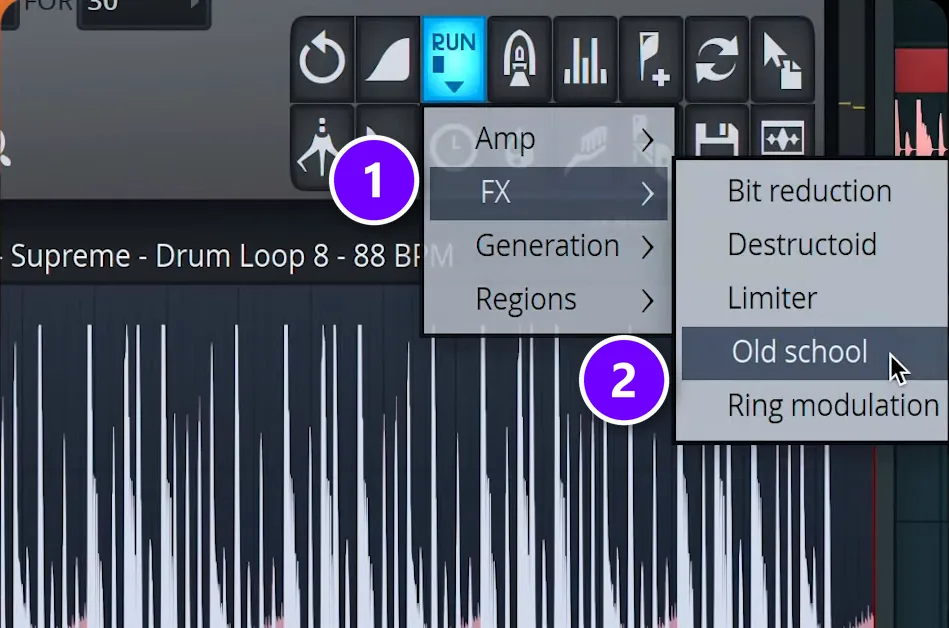
A clean break can sound too modern next to old records. Edison, FL Studio’s audio editor, has a quick fix. Open the drum loop in Edison, click the Run script button, then choose FX (1) and Old school (2). It lowers the sample rate and the bit depth, which gives the filtered, dusty sound of old samplers.
Turn on Edison’s spectrum view to see what it changed. Pitch the loop down afterwards and it makes a great drum switch-up, a short change in the beat before the next section.
Why do my chopped breaks sound stiff and robotic?
Usually because every chop now sits exactly on the grid and hits at the same volume, which erases the drummer’s timing and dynamics. Keep more of the break’s original timing, don’t quantize everything to 100%, keep the quiet ghost notes, vary the velocity and add a little swing.
- Start from the original timing. With Auto-dump on, Fruity Slicer writes the break into the Piano roll as notes, right where the drummer played them. Move a few notes and leave the rest alone.
- Don’t snap everything to the grid. Full, 100% quantizing is a common groove killer. Nudge single hits by ear instead.
- Keep ghost notes with their hits. Slice the main hits, like the kick, the snare and clusters of hats, and keep groups of quiet ghost notes together, so the rolls between the big hits survive.
- Vary the velocity. Turn the ghost notes and every other hi-hat down a little, so no two hits in a row land exactly the same.
- Add a little swing. On a programmed pattern, the Channel Rack’s swing knob delays the notes between the beats, as shown above. Turn it up slowly, because many breaks already swing.
Max puts it simply in the course: “varying the velocity of your hats will also bring them to life, so you don’t want to sound too robotic.” It doesn’t have to be perfect, he adds, because imperfect sounds more human.
How do you make a breakbeat hit hard?
A sampled break is a whole drum kit in one file, so you can’t turn up the kick without the hats. Slicing fixes that. Every hit gets its own key, and in Slicex its own mixer track. After that, it’s drum mixing:
- Swap a weak kick instead of stacking one on top. Max’s layering rule is blunt: “you never layer kicks.” Mute the break’s kick slices and program your own kick in their place.
- Layer the snare or clap. Add a second snare or clap for punch, and a brighter hat, with the two layers panned a little apart.
- Glue it on one drum bus. Send every drum to one mixer track and compress it there, so the break and your new hits sound like one kit. The settings are in our guide to hard-hitting drums in FL Studio, and how to mix drums covers EQ and reverb.
- Add a little dirt. Classic breaks were sampled on gritty 12-bit samplers like the E-mu SP-1200, so some saturation or distortion often sounds right.
Once the drums work, the break needs a song around it. Our guide to structuring a beat lays out the bars, and how to make beats walks through a whole first beat in FL Studio.
Breakbeat mistakes to avoid
Don’t loop the same 2 bars for a whole song. Even a great break gets boring when it never changes. Change something every 4 to 8 bars and drop a fill before each new section.
- Clicks between slices. Raise ATT and DEC a little or switch on Declick.
- A second kick stacked on the break’s kick. They fight, so swap the kick instead.
- Chopping until the groove is gone. Keep most of the original bar and change the end.
- Skipping the tempo fix. A break that isn’t fit to the project drifts off the grid.
- Too much swing on a break that already swings. Turn it up slowly.
- Releasing a song with an uncleared famous break. Use royalty-free loops or rebuild it with your own sounds.
DAY 3 OF THE 7-DAY MUSIC PRODUCER COURSE
Turn your break into a finished beat
Day 3 of the 7-Day course is all about writing drums and arranging your track: how to build drum patterns in seconds, even if you have no feel for rhythm, and one simple tactic to turn ideas into full songs in minutes, not days. You also get the 2025 Producer Toolkit sound pack. It’s taught in FL Studio (the free trial works), about 45 minutes a day, and on day 7 a pro gives you personal feedback on your finished track. It’s $27, and you get 60 days to decide if it was worth it.
Frequently asked questions
Is breakcore the same as breakbeat?
No. Breakcore is an extreme offshoot of breakbeat music. Both are built on chopped drum breaks, but breakcore runs them faster and harder, with heavy distortion, glitchy edits and sudden switches. Breakbeat is the wider family, from hip-hop at about 90 BPM to drum and bass at about 170 BPM. You make both with the same tools: a slicer, the Piano roll and a lot of chopping.
What BPM is breakbeat?
Breakbeat has no single tempo. Breaks tracks run from about 110 to 175 BPM. Club breaks usually sit around 125 to 140 BPM, hip-hop that samples breaks around 85 to 100 BPM, and jungle and drum and bass around 160 to 175 BPM. Set your project tempo first, then fit the break to it with Fit to tempo in the clip menu.
How do you chop a breakbeat in FL Studio?
Double-click the break to open its channel settings, right-click the waveform and choose Open in new Fruity Slicer channel. Pick a slicing mode with the slicing button, raise ATT and DEC a little to stop clicks, then rearrange the slices in the Piano roll. Slicex works the same way and comes with the Producer Edition and up.
Why do my chopped breaks sound stiff and robotic?
Usually because every chop now sits exactly on the grid at the same volume, which erases the drummer’s timing and dynamics. Start from the break’s original timing (Fruity Slicer’s Auto-dump writes it into the Piano roll), avoid quantizing everything to 100%, keep ghost notes with their hits, vary the velocity and add a little swing.
Why do producers slice breaks instead of using one-shots?
A recorded break carries feel that one-shots don’t: one drummer playing one kit in one room, with natural timing drift and hits that vary in strength. Slicing keeps that feel and adds control, because each hit lands on its own key. One-shots are better when you want machine-tight timing or full control of every hit.





