


“You should go double your vocals. John Lennon did it on everything.”
Double tracking vocals means recording the same vocal part a second time and playing both takes together. Sing the double on a new track while the finished lead plays in your headphones, matching every word’s timing and pitch. The tiny differences between two real takes make the voice sound thicker and wider than one take or a copy-paste can.
Your vocal sounds great on its own. Then the beat comes in, and suddenly it’s thin, small and stuck in the middle of the speakers. Before you reach for another plugin, try the trick engineers have leaned on for decades. Sing it again. Below is how double tracking works, when to use it, how to record tight doubles in FL Studio with screenshots from Mix Elite’s videos, and how to fake a double when you only have one take.
Table of Contents
What is double tracking in music?
Double tracking means recording the same part twice and playing both recordings at the same time. With vocals, the singer or rapper performs a line, then performs it again on a second track, matching the words, timing and pitch as closely as they can. The two takes blend into one thicker, wider voice.
The key word is “again”. A real double is a new performance, not a copy. Paste the same take onto a second track and you only get the same voice, louder. Nudge that copy a little to fake a second singer and it can start to sound hollow and swirly instead, an effect engineers call phasing.
In Mix Elite’s vocal layering video, Max, the founder of Mix Elite, points out the advantage of real takes over copies: “recording them twice means that you lower phasing issues to the complete minimum.” You’ll also run into a few related terms:
- Single tracking: one take of the vocal. It sounds direct and close, which suits quiet, personal verses.
- Double tracking: two takes of the same part, played together.
- Triple or quad tracking: three or four takes stacked for an even thicker sound.
- Harmonies: extra vocals on different notes. Doubles sing the same notes as the lead.
- Ad-libs: short extra words or shouts between lines, not copies of the lead.
Why does double tracking make vocals sound fuller?
Nobody can sing a line exactly the same way twice. Each take starts a few milliseconds earlier or later, sits a hair sharper or flatter, and breathes in slightly different places. When both takes play together, your ear hears those tiny differences as one wider, richer voice, the same way a choir sounds bigger than one singer.
Doubling also hides small flaws. A slightly sour note on one take gets softened by the other, so a doubled vocal often sounds more confident than either take alone. And once the takes are spread left and right, the voice fills the speakers instead of sitting in one spot in the middle.
There’s a catch, and it’s timing. As Max puts it, “the more on time and in the groove they are the better it will sound.” Tiny differences make a vocal full. Big ones make it messy.
Who made double tracking famous?
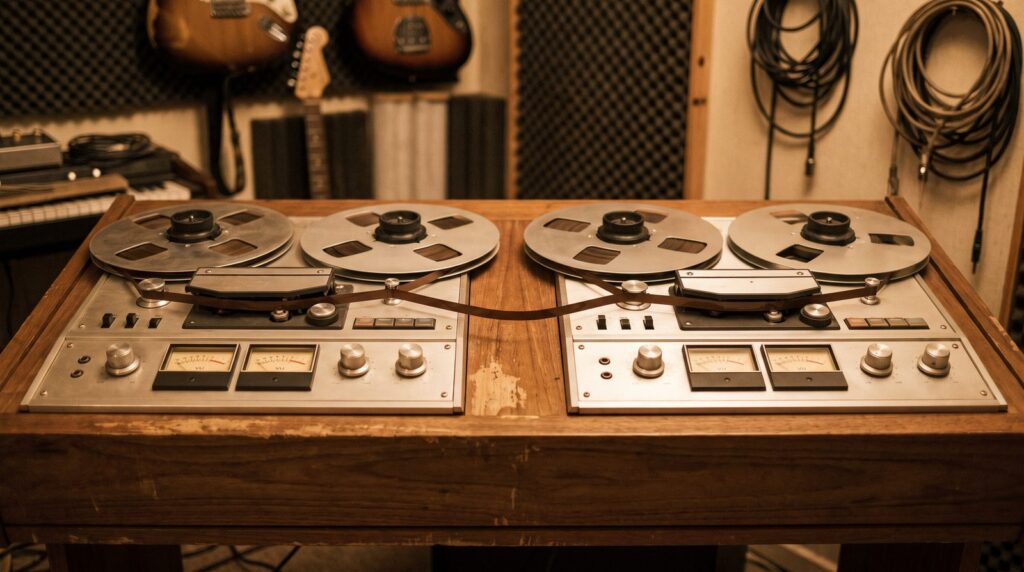
Singers doubled their voices on tape long before computers, and the Beatles made the sound famous in the 1960s. Singing every line twice took time, so Abbey Road engineer Ken Townsend came up with a shortcut: artificial double tracking, or ADT. According to Abbey Road Studios, the original setup used two tape machines to copy the voice with a short delay, so one take could sound like two.
You’ll also hear it called automatic double tracking. Either way, ADT means one recording dressed up to sound like two.
Real doubles never went away, though. When it came time to double Kurt Cobain’s vocals on Nirvana’s Nevermind, producer Butch Vig won him over by pointing out that John Lennon did it on everything. Vig knew Cobain loved Lennon, as he recalled in an interview reported by Guitar.com. That’s the story behind the quote at the top of this page.
Should you double track vocals?
Usually, yes, but not everywhere. Doubles make a part feel bigger and stronger, so they work best where the song needs a lift. A common plan is a single vocal in the verse and doubles in the chorus, and Abbey Road’s own guide suggests using doubles mainly in choruses so they stand out against a single verse.
Double it when:
- The chorus or hook needs to feel bigger.
- A rap line or punchline needs extra weight on its key words.
- The vocal sounds thin next to a loud beat.
- You want a wide, polished pop or rock sound.
Keep it single when:
- The verse is quiet and personal, like a ballad.
- Every breath and detail of the voice carries the feeling.
- The lead isn’t finished yet. Fix the lead first.
In rap, a common move is to double only key words or the ends of lines. The lead stays clear, and the words that matter hit harder.
Double tracking vocals in FL Studio, step by step
To double track vocals, record and polish a dry lead first. Then sing the same part again on a new track while the lead plays in your headphones, matching where every word starts and ends. Record three or four passes, keep the tightest take for each line, and add a second double for the other side on big choruses.
The FL Studio steps below come from Mix Elite’s videos. If you’ve never recorded in FL Studio before, Mix Elite’s vocal recording tutorial covers the setup in detail.
Step 1: Record a clean, dry lead
Everything copies the lead, so get the lead right first. Record it dry, with no effects, so you can shape every take the same way later. Mix Elite’s free 4.5-hour FL Studio course puts it simply: always record the vocal raw, with no effects applied.
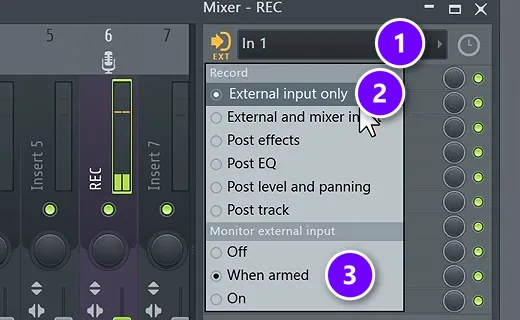
In the mixer track your mic is on, pick your mic’s input (1). In the menu next to it, keep Record on External input only (2), so FL Studio records just the voice, without the track’s effects. Set Monitor external input to When armed (3) if you want to hear yourself while you sing. Then click the record button, choose Audio, into the playlist as an audio clip, and record.
Before you double it, comp the lead, which means combining the best parts of several takes into one strong take. Tune it gently if it needs it, because the doubles will follow it. Our guides to recording vocals like a pro and tuning vocals in FL Studio cover both.
Step 2: Sing the double with the lead in your headphones
Now record the same part on a new track while the finished lead plays in your headphones. The lead is your guide, so match it word for word:
- Start and end every word at the same moment as the lead.
- Hold long notes exactly as long, no longer.
- Copy the lead’s accent, energy and vowel sounds.
- Use the same mic, the same distance and the same input level.
- Keep breaths and hard consonants soft, or leave them out.
- Don’t add new ad-libs or melody changes. Those belong on their own track.
A pro tip from the layering video applies here too. “Never layer S’s in your harmonies or doubles,” Max says. The lead’s S sounds are enough. Sing them softly on the double, or cut them out later, so they don’t stack into a harsh hiss.
Step 3: Record three or four passes and keep the tightest
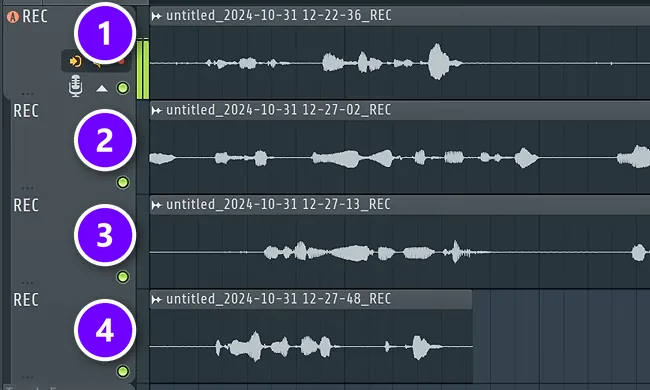
Don’t stop at one try. Record a couple of takes even if you think the first one was perfect. FL Studio keeps every pass on its own track, like takes 1 to 4 in the screenshot, so nothing gets lost when you go again.
Then pick the tightest take for each line. Cut the takes into lines with the slice tool, keep the best version of each, and mute or delete the rest. If a word starts a little late, drag that piece slightly left until it lines up with the lead.
Step 4: Record a second double for the other side
For a big chorus, record one more pass the same way. With two doubles, one can sit on the left and one on the right while the lead stays in the middle. That stack is what most people mean by a doubled pop or rock vocal.
Why do my double tracked vocals sound messy and out of time?
Usually because the takes don’t start, end or hit their consonants together, or the doubles are too loud. Match each line or word to the lead, cut or soften the double’s S sounds, and trim long notes so both takes end at the same moment. Then mix the doubles a little under the lead, so you feel them more than you hear them.
In FL Studio, cut the double with the slice tool and drag each piece until it starts with the lead. For a single word, open the clip in Newtone (Pitch correct sample in the clip menu) and drag the edge of that word’s note left or right, holding Alt as you drag. The layering video then pushes the doubles back in the mix: an EQ that cuts their lows and highs, hard compression around 8:1 so the quiet words don’t pop out, and a transient shaper with the attack turned all the way down.
If a line still sounds messy after that, record it again and keep the tightest pass, as in Step 3.
How many vocal doubles do you need?
One good double is often enough to thicken a hook. Two doubles, one left and one right, give you the classic wide chorus. Some pop and hip-hop hooks stack even more takes, plus octave doubles (the same line sung an octave higher or lower) and whispered doubles for texture.
More isn’t automatically better. Every extra take adds a little blur to the timing, so add layers one at a time and listen. If the words start to sound smeared, mute the last layer. The goal for layers is to feel them more than you hear them.
Is it better to record a second take or duplicate the vocal and add delay?
Record a second take whenever you can. A duplicate is the same recording, so on its own it only makes the voice louder, and a copy shifted by a short delay can sound hollow and phasey, especially in mono. A real take has its own tiny differences in timing and pitch, and that’s what sounds full.
Fake it only when a second take isn’t possible, like when the singer has gone home or you only have one acapella. The three tricks below get you close.
How to fake a double with artificial double tracking (ADT)
Artificial double tracking, or ADT, fakes a second take from one recording. A copy of the vocal plays back with a short delay, and its timing or tone is nudged a little, so the two sound like separate takes. Ken Townsend built the first version at Abbey Road for the Beatles. In FL Studio, a stereo delay, a formant shift or an ADT plugin does the same job.
It won’t sound quite as natural as a real double, but it gets you close. Here are three ways to do it.
Widen a copy with FL Studio’s stereo delay
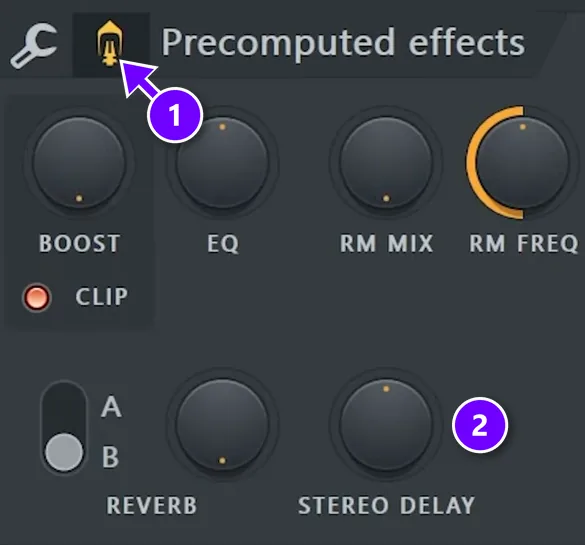
Copy the vocal clip onto a new track, right-click the copy and choose Make unique, then double-click it to open its sampler settings. In Precomputed effects, click the small button next to the wrench (1) to show the knobs, then turn up STEREO DELAY (2). It delays the left and right sides by slightly different amounts. Your brain hears a wider voice. A Mix Elite short shows the whole trick in under a minute and calls it the Haas effect.
Make the copy sound like a new take with Newtone
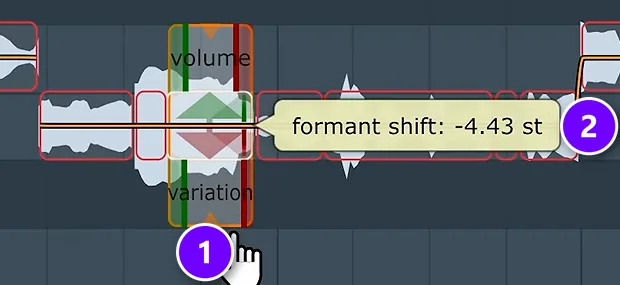
A plain copy sits too close to the lead and can get you into trouble. The fix from Mix Elite’s layering video uses Newtone, FL Studio’s pitch editor, to change the formant of the copy. The formant is the tone color of a voice, so moving it makes the copy sound like a slightly different singer.
Open the copy in Newtone by choosing Pitch correct sample from the clip menu. Pick the advanced edit tool and drag a note’s formant down (1). The tooltip shows how far you’ve gone (2): here, 4.43 semitones down. In Producer Edition, Newtone runs as a demo that can’t export, as Mix Elite’s free FL Studio course points out. The video below builds full layers from a single vocal:
Use an ADT plugin
Plugins can do it in one step. Abbey Road Reel ADT by Waves recreates the original tape trick, and Abbey Road’s guide suggests playing with the delay time and the pitch movement so the fake double moves like a real one. Whatever you use, check the result in mono. A fake double that sounds wide in stereo can turn thin or hollow when both sides add up.
How do you mix vocal doubles?
Mixing doubles is a topic of its own, and two of our guides cover it step by step. The short version: keep the doubles quieter than the lead, take out some of their low end and harsh S sounds, and spread them left and right so the lead keeps the center.
For the full chain with exact settings, see the doubles section of our hip hop and R&B vocal mixing guide and our guide on how to mix background vocals. Our guide to mixing vocals puts every step in order.
Can you double track guitars and other instruments?
Yes, and the idea is the same. Rock and metal producers often record the rhythm guitar part twice and pan one take hard left and the other hard right. The guitars sound huge, and the middle stays open for the vocal. Acoustic guitars and synth parts can be doubled the same way. Just like with vocals, play the part again instead of copying it, so the two takes are slightly different.
Common double tracking mistakes
- Doubling a lead that isn’t finished yet.
- Copying and pasting the lead instead of singing it again.
- Letting the doubles drift late, so the words smear.
- Stacking every S, T and breath until the vocal hisses.
- Making the doubles as loud as the lead, so it stops sounding like one person.
- Doubling every line, so the chorus has nothing to stand out from.
Next time you record, try one simple test. Record the chorus twice, line the takes up and play them together. If the hook suddenly sounds like a record, you’ve found a new habit.
DAY 5 OF THE 7-DAY MUSIC PRODUCER COURSE
Record a lead worth doubling
Day 5 of the 7-Day course is about recording and mixing vocals: setting up your room, the best recording equipment for every budget, the V.O.C.A.L. mixing formula and 10 copy-and-paste vocal processing chains, plus practice acapellas if you don’t have a singer yet. It’s taught in FL Studio (the free trial works), about 45 minutes a day, and on day 7 a pro gives you feedback on your finished track. It’s $27, and you get 60 days to decide if it was worth it.
Frequently asked questions
What is double tracking in music?
Double tracking means recording the same part twice, such as a vocal or a guitar, and playing both takes at the same time. Because nobody performs a part exactly the same way twice, the small differences in timing and pitch make it sound thicker and wider than a single take.
Is it better to record a second take or duplicate the vocal and add delay?
Record a second take whenever you can. A duplicate is the same recording, so it only gets louder, and a delayed copy can sound hollow from phasing, especially in mono. A real take has its own tiny timing and pitch differences, which is what sounds full. With only one take, fake it with a stereo delay, a formant shift or an ADT plugin.
How do you fix double tracked vocals that sound messy?
Line the double up with the lead: slice it into lines or words and nudge each piece until it starts with the lead, trim long notes so both end together, and cut or soften the double’s S sounds. Then keep the doubles quieter than the lead. If a line is still loose, record it again.
What is artificial double tracking (ADT)?
ADT, short for artificial or automatic double tracking, is a way to fake a double from one take. Abbey Road engineer Ken Townsend developed it in the 1960s with two tape machines, and the Beatles used it. Today, plugins and stock tricks like a short stereo delay do the same job inside your DAW.
Should you double track vocals?
Usually, yes, where the song needs a lift. Doubles make a chorus or hook feel bigger and help a thin vocal stand up to a loud beat, while a single take keeps quiet, personal verses close. In rap, many songs double only key words or the ends of lines, so the lead stays clear.





