“I make sure that all my instrumentation is outside of the frequency of the vocals, and I want to make sure that the vocal frequencies add something to the body of the song.”
To mix a hip hop beat, set the levels with the kick loudest, cut the low end out of the melody, glue the drum bus, duck only the 808’s lows each time the kick hits and sidechain the melody to the kick. Then make room for the vocal and check the mix loud; in that order, the low end stays punchy instead of muddy.
Your beat sounds great at low volume. Then you turn it up, and the kick vanishes into the 808, the hats get spiky and the melody turns into one flat wall. You add plugins, and somehow it gets worse.
Mixing a hip hop beat doesn’t need more plugins. It needs the right order. Below is how Max, the founder of Mix Elite, mixes a trap and hip hop beat from start to finish in FL Studio: the order, the settings and the few extra tools that matter, with screenshots from the video.
Table of Contents
What makes hip hop mixing different?
In most hip hop, the drums and the low end carry the song. The kick and the 808 both live in the same low range, roughly 40 to 100 Hz, so they fight unless each one gets its moment. On top sits the vocal, which has to stay clear even on a phone speaker. Everything else in the beat is there to support those three.
Max sums up mixing in one line: “Mixing is about managing focus. That means whatever is the loudest, most in the front, is in the focus, and we cannot have everything in the focus, right. Volume is what drives the focus.” In a hip hop beat, the kick, the 808 and the vocal get the focus. The rest sits a step behind.
Mix Elite’s free 4.5-hour FL Studio course splits every mix into four parts, the Holy Quad, Mix Elite’s mixing formula: volume, EQ, dynamics and space. The steps below follow the same idea, in the order a beat gets mixed. If mixing is new to you, our guide on how to mix a song covers the basics first.
How do you mix a hip hop beat, step by step?
Mix a hip hop beat in this order: buses, levels with the kick loudest, claps and hats, drum-bus glue, the kick and 808, then the melody. Make room for the vocal last and check everything loud. Cutting the lows out of the melody and background layers leaves the bottom to the kick and 808, so it never turns to mud.
- Group the beat into buses: drums, instruments and vocals.
- Set the levels before any plugin, with the kick as the loudest drum.
- Shape and pan the claps, hats and percussion.
- Glue the drum bus with saturation or about 2:1 compression.
- Make the kick and 808 hit together by ducking only the 808’s lows on each kick.
- Mix the melody: sidechain it to the kick and cut its low end.
- Leave room for the vocal.
- Check the mix loud with OTT and a soft clipper.
Before you mix: set up these four things
- Keep the master empty. No limiter and no clipper while you mix. FL Studio’s default template puts a limiter on the master, and it squashes the kick and hides your mistakes.
- Pick a reference track. Choose a finished song you love in the same style, and switch between it and your beat at the same volume.
- Mute the vocals for now. Mute and lock the vocal tracks first, mix the beat, then bring the vocal back.
- Color and name everything. Make the drums red and give the 808, the melody and the vocals their own colors, so the mixer is easy to read at a glance.
Step 1: Group your beat into buses
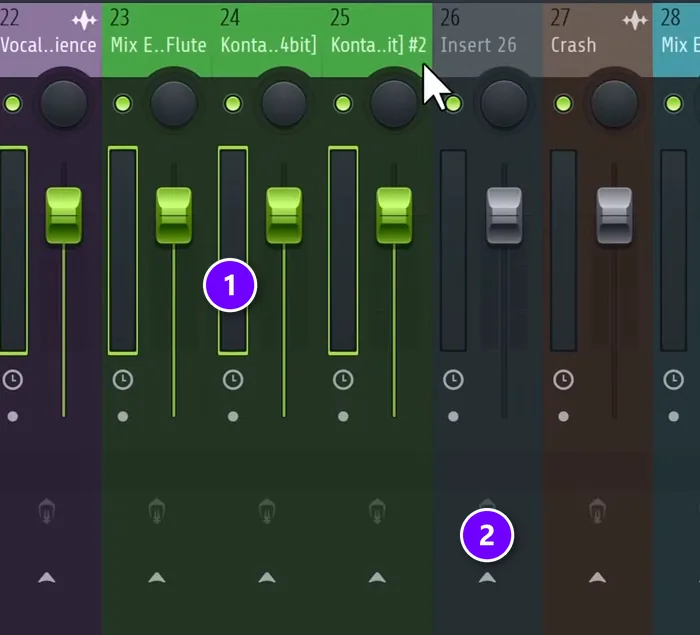
A bus is a mixer track that collects similar sounds, so you can treat them as one. Set up a drum bus and an instrument bus, plus one for the vocals. The 808 stays out of the drum bus, because it gets its own treatment later.
- In the Channel rack, double-click any channel’s select button to select every channel, then press Ctrl + L. Each sound gets its own mixer track, colors included.
- Hover over an empty mixer track and hold Shift while you scroll, to move it next to your drums.
- Select the tracks you want to group, like all the melody tracks (1). Then hold Ctrl and click the small arrow at the bottom of the empty track (2). They now play only through that track.
- Name it Drum bus and give it a stronger color. Repeat for the melody and the vocals.
Step 2: Set the levels before you touch a plugin
Play the busiest part of the beat and turn down whatever sticks out. In the video, the first moves are pulling down a vocal sample layer and the crash, then leveling the drums one by one.
The kick should be the loudest drum. Drum samples usually come normalized, which means each one-shot is as loud as it can be. That’s why the open hats and percussion nearly always need to come down, while trap drums otherwise come out of the box pretty well balanced.
Mute each sound for a second, too. If the beat sounds better without it, delete it. Mix Elite’s free course calls over-producing a common beginner mistake, because more sounds only means more to mix. The full method is in our mix balancing guide.
Step 3: Shape the claps, hats and percussion
Layered claps are normal in hip hop, and every layer should have its own job. In this beat, one clap layer is bright and wide, and another brings the body in the mids. The main clap gets a cut in the low mids, since another layer already covers the body, plus a small boost on top so it cuts through.
Pushing one clap layer a few milliseconds late, called pre-delay, sounds great in hip hop. On this trap beat the claps stay tight instead, so they slice through the mix.
Then pan the small stuff. Move the percussion slightly off center and put one hat a little to the side. In Mix Elite’s free course, the shaker sits about 10% left and the hat about 10% right, with the clap layers spread slightly left and right. The kick, the 808, the snare and the lead vocal stay in the middle.
Judge hats and percussion with the whole beat playing, never in solo. Nobody will ever hear your hat on its own, so a hat that sounds odd alone can be perfect in the mix.
Step 4: Glue the drum bus
Glue makes separate drum hits sound like one kit played in one room. There are three tools for the drum bus, and the right one depends on the beat and how much time you have. Pick one, not all three.
Option 1: Saturation
Saturation is gentle distortion. It thickens the drums and brings up the quiet details. Try Soundtoys Decapitator at about 3 on the drive, or up to the point where the kick starts to go wild. Stock and free options work too: Fruity Fast Dist in FL Studio, or the free Softube Saturation Knob.
Option 2: Glue compression
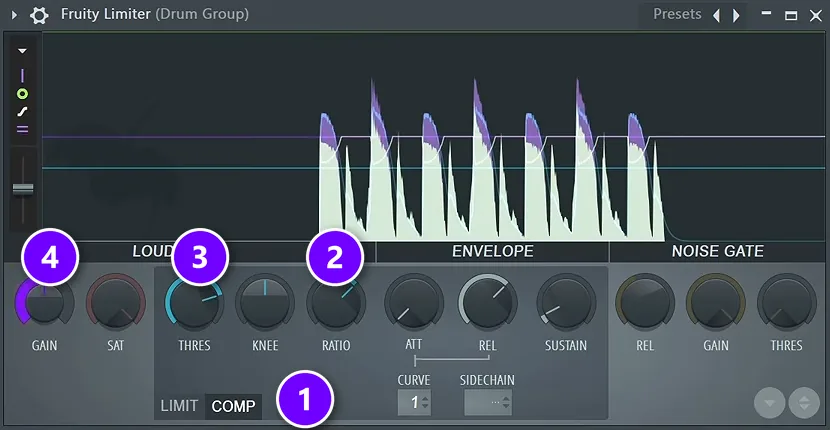
A bus compressor that works just a few dB pulls the kit together. One example is Cytomic’s The Glue, with a few dB of gain reduction, the makeup gain off and a fast attack. The stock way, from Mix Elite’s free course, is Fruity Limiter in compressor mode:
- Put Fruity Limiter on the drum bus and switch it to COMP (1).
- Start with a ratio of 2:1 (2).
- Lower the threshold (3) until it takes 3 to 4 dB off the loudest hits.
- Turn the gain up by about 3 dB (4) to win back the lost level.
Option 3: Parallel compression
Parallel compression squashes the drums hard and blends that under the clean sound. The quick version is the threshold all the way down, the ratio all the way up and the gain up, then the mix knob down until the drums get thicker without losing their snap. With a slower attack, the same trick starts to act like a transient shaper.
Bring back the kick’s punch
Saturation and compression can flatten the kick. When that happens, put a transient shaper on the kick itself, which sharpens the start of every hit. FL Studio has one built in, called Transient Processor, and there are plenty of free ones.
Duck the open hats under the kick
Loud open hats can make the kick feel weak. Group the open hats into their own small bus, which still feeds the drum bus, and sidechain that bus to the kick with Fruity Limiter. Set the ratio all the way up and the release way down, so the hats dip for a split second on every kick. It’s not a usual move, but the kick hits harder.
Give the saturation something to grab
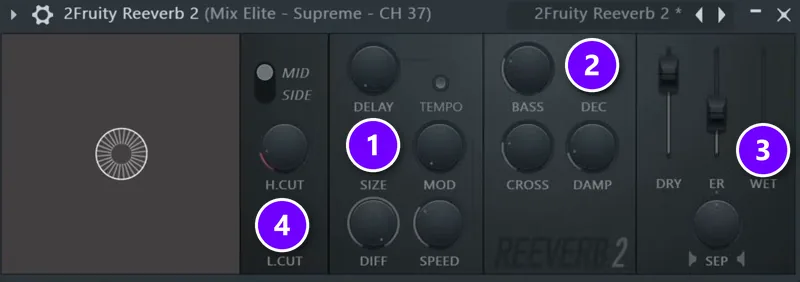
Very dry drum samples have nothing underneath for the saturation to pick up. The trick is a tiny room reverb on the dry hats: Fruity Reeverb 2 with the size all the way up (1), the shortest decay (2), very little wet (3) and the low cut at about 1 to 2 kHz (4), so it doesn’t get dirty. Valhalla Room at about 5% with a very short decay does the same job.
Step 5: Make the kick and 808 hit together
This is the heart of hip hop mixing. The kick and the 808 share the same low notes, so when they land together they stack into one loud, blurry spike. You hear it as mud. The fix is to give the kick the first split second and the 808 the rest.
Make the 808 longer with a limiter
Put a limiter on the 808 to tame its attack and bring up the tail. The 808 sounds longer, and it hits harder in the mix. For extra grit, you can add a layer of noise from Patcher’s noise preset and distorts it, so it blends with the 808.
Duck only the 808’s low end when the kick hits
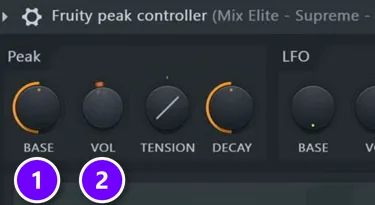
Normal sidechain compression turns the whole 808 down on every kick, and Max finds that it wrecks the 808. His better way dips only the lows the two share, with two stock plugins:
- On the kick’s mixer track, add Fruity Peak Controller. Set BASE to 50% (1) and VOL to -100% (2), so its output dips on every kick.
- On the 808’s track, add Parametric EQ 2 and use band 1, the low shelf.
- Right-click that band’s level, choose Link to controller, pick the Peak controller on your kick and click Accept.
- Play the beat. The 808’s lows now dip for a moment on every kick and come straight back.
To check it, put an oscilloscope on the master (Xfer’s LFO Tool shows the wave too) and cut the highs, so you only see the low end. Where the kick and 808 clash, the wave spikes. Adjust the VOL until the spike is gone without leaving a hole. If you own Soothe, its sidechain mode aimed at the low end does a similar job. Our guide on how to mix kick and 808 covers this in full detail.
Step 6: Mix the melody and the instruments
Sidechain the instrument bus to the kick
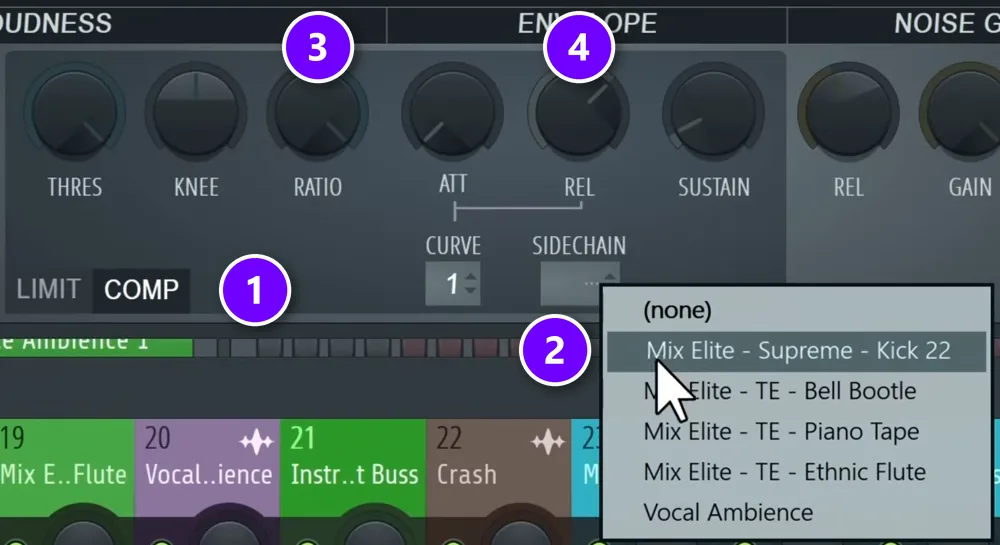
Next, make the whole melody dip a little on every kick. Select the kick’s mixer track, right-click the arrow at the bottom of the instrument bus and choose Sidechain to this track. (Or left-click the arrow and turn the new send knob all the way down, so you don’t hear the kick twice.) Then put Fruity Limiter on the instrument bus, switch it to COMP (1), pick the kick in the SIDECHAIN menu (2) and turn the ratio all the way up (3). Lower the threshold until you like the balance.
Watch the release (4). Max’s rule: “don’t go lower than 100 milliseconds on the compressor release time to avoid any artifacts.” How much it should duck depends on how hard you want the beat to hit, so don’t overdo it. Route your crashes into the instrument bus too, so they duck with the melody. Our sidechain guide shows two more ways to set it up.
Cut the low end out of the instruments
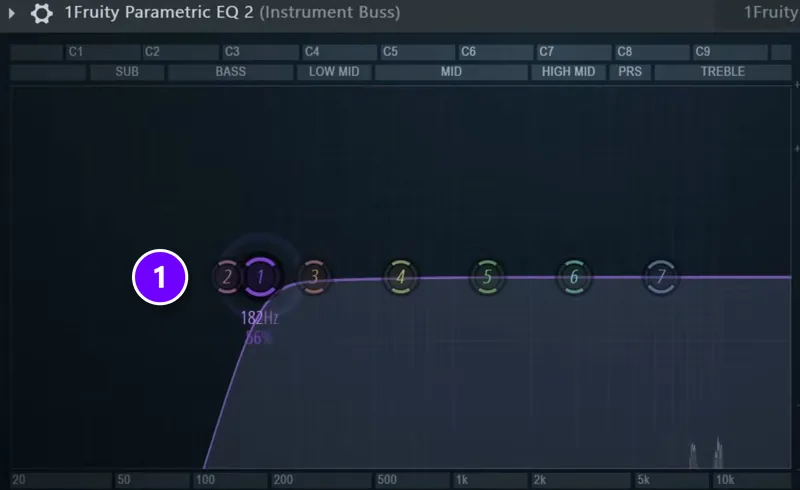
Cut the low end out of the whole instrument bus with Parametric EQ 2, so the kick and the 808 own the bottom. The rule of thumb is everything under about 100 Hz. On this beat the low cut (1) ended up near 180 Hz.
Background layers get the same treatment. Cut their lows and add a little reverb to push them back. As Max puts it, “the lower the frequencies the more in your face they are.” Pan them slightly to one side too, and route them into the instrument bus, so they duck with the kick.
Add depth, grit and movement
A dry, static melody sounds cheap. On the middle layer of this melody, the chain is Decapitator at about 4, then an EQ that removes the frequencies the layer doesn’t need, then a short room reverb to blend the attacks. XLN Audio RC-20 with a vintage preset adds noise and wobble for life, and the humanizer preset in Patcher is a free way to get a similar feel.
For movement, put a tremolo on the layer, using LFO Tool or Soundtoys Tremolator set to 1/4 notes. Shifting the phase makes the volume swells drag or bounce against the beat. To brighten the main layer, add a copy an octave up with Patcher’s pitch shifter, or use Soundtoys Crystallizer.
Step 7: Leave room for the vocal
With the beat mixed, unmute the vocals. A hip hop beat exists for the vocal, as Hank Shocklee says in the quote at the top, so the vocal should sit on top without a fight.
- If the vocal gets buried, turn the instrument bus down a dB or two before you reach for EQ.
- Keep the melody’s low end cut, so the body of the voice has room.
- Mix the vocal on its own bus, with its own chain of plugins.
The full vocal chain, from tuning to compression to reverb, is in our guide on how to mix hip hop vocals.
Step 8: Check your mix loud
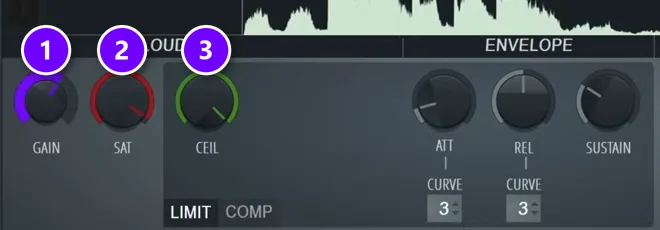
Beats get judged loud, so preview the mix the way it will sound after mastering. Put OTT on the master at about 10 to 15%, which works like multiband compression. Then add Fruity Limiter as a soft clipper: gain turned up (1), saturation down (2) and the ceiling all the way up (3).
Now problems jump out. On this beat, the claps and an off-beat snare suddenly sounded too loud, and the tremolo on the melody was too subtle. Fix what you hear, then bypass the preview chain so the master is empty again before you master for real.
How do you make a hip hop mix loud and punchy without clipping?
Build the loudness in the mix, not on the master. Delete parts that fight for room, sidechain to the kick, clip the drum peaks on their own tracks or bus, and keep everything under 100 Hz in mono. Then master with a clipper before a true-peak limiter set to about -0.3 dB, and aim for roughly -8 to -6 integrated LUFS.
Mix Elite’s video on loud, clean masters puts it plainly: these mix moves give you about 80% of a clean mix, before mastering even starts.
- Delete what fights for room. Fifty melodies and a sub can’t all be loud, because they share the same headroom.
- Go easy on the sub. Low frequencies carry the most energy, and pro tracks have less sub than you might think.
- Sidechain for the priority. Not just the 808 to the kick, but anything that gets in the way of the main sound.
- Clip the peaks on tracks and groups. A clipper on a loud drum or on the drum bus tames the spikes before they reach the master.
- Keep everything below 100 Hz in mono. Stereo lows can cancel out on mono speakers and leave spots in a club with no bass at all.
Then measure with a LUFS meter. The peak meter in FL Studio says nothing about how loud a song feels, and LUFS does. The target in that video is at least -8 to -6 integrated LUFS. Spotify’s -14 LUFS is only the level it plays songs back at, so it isn’t a number you have to master to.
Hip hop mixing and mastering: what’s the difference?
Mixing balances the parts of a beat against each other. Mastering is the last step on the finished mix: it makes the song loud, even and ready for streaming. Mastering can’t save a weak mix. It’s the cherry on top, not the place to fix problems.
Mix Elite’s loud-master chain works the same for trap and hip hop as it does for EDM. It runs in this order:
- A low cut on the master, just under the lowest note in the song and never below 30 Hz.
- A low cut on the side channel with a mid-side EQ, so everything under about 120 Hz is mono.
- A clipper like the free GClip: push it until you barely hear the knock of the drums change, then back it off 10%.
- Multiband compression in Maximus, with makeup gain on each band, to even out the lows, mids and highs.
- A limiter with true peak on and the ceiling at about -0.3 dB. Raise its gain until you hear distortion, then stay just below it.
The clipper goes before the limiter for a reason. A limiter tries to stay clean, so it softens a big kick or snare hit to fit it under the ceiling. A clipper just chops the peaks off, which barely changes the sound but stops them from tripping the limiter.
Get the mix right first. Then follow our guide to mastering in FL Studio.
Hip hop mixing mistakes to avoid
- A limiter on the master while you mix. It squashes the kick and hides problems until it’s too late.
- Layering two kicks. Never layer kicks. Layer claps, hats or percussion instead.
- Normal sidechain on the whole 808. Duck only its low end, and only when the kick hits.
- A sidechain release under 100 ms. It causes clicks and pumping artifacts.
- Reverb with the low end left in. Low-cut every reverb, or the beat turns muddy.
- Mixing loud for hours. It can damage your hearing, so keep the volume a little lower than you’d like and check loud only for short moments.
DAY 4 OF THE 7-DAY MUSIC PRODUCER COURSE
Mix your next beat with a simple formula
Day 4 of the 7-Day Music Producer Course is all about mixing: the simple ‘Holy-Quad’ mixing formula, the ‘Mix Murdering’ mistakes most beginners make, and the volume mistake that quietly caps how good a song can sound. You also get a mixing checklist and a premium mixing and production template. It’s taught in FL Studio (the free trial works), our students finish trap, hip-hop, house and pop tracks, and it’s $27, with 60 days to decide if it was worth it.
Frequently asked questions
How do you mix a hip hop beat in FL Studio?
Route the drums and the melody into their own buses and set the levels with the kick loudest. Glue the drum bus with Fruity Limiter in COMP mode at about 2:1, duck the 808’s low end with Fruity Peak Controller linked to a Parametric EQ 2 low shelf, and sidechain the instrument bus to the kick. Then check the mix loud with a soft clipper on the master.
Why does my kick clash with my 808?
Both live in the same low range, roughly 40 to 100 Hz, so when they land together they stack into one blurry spike that sounds like mud. Give the kick the first split second: duck only the 808’s low end on every kick with Fruity Peak Controller linked to a Parametric EQ 2 low shelf, instead of turning the whole 808 down.
How do you make a hip hop mix loud without clipping?
Build the loudness in the mix: delete parts that fight for room, sidechain to the kick, clip the peaks on the drum tracks and keep everything under 100 Hz in mono. Then master with a clipper before a true-peak limiter set to about -0.3 dB. Mix Elite’s loud masters aim for at least -8 to -6 integrated LUFS.
Should you mix the beat before the vocals?
Yes. Mute the vocals first, mix the beat on its own, then bring the vocals back and mix them on their own bus. That way the beat is clean and balanced before the vocal arrives. Once the vocal is back, adjust the beat around it, for example by turning the instrument bus down a little.
What’s the difference between mixing and mastering hip hop?
Mixing balances the parts of the beat against each other with levels, EQ, compression and space. Mastering is the last step on the finished stereo mix: a low cut, a clipper, multiband compression and a true-peak limiter make it loud and ready for streaming. Mastering can’t save a weak mix, so fix problems while you mix.