


“To be a successful creator you don’t need millions.”
To sell sample packs, build a small, focused pack of your own sounds, export them as 24-bit WAV files in clearly named folders, and add a short royalty-free license. Then sell it yourself on Gumroad, Payhip or your own store, list it on a marketplace like BeatStars or Airbit, or apply to Splice or Loopmasters, which review every submission first.
Somewhere on your drive there’s a folder of sounds you made and never used: drums you tweaked for an hour, presets nobody else has, loops that never became songs. Other producers would happily pay for some of them.
The selling part is the easy bit. The hard part is making a pack people trust enough to put in a song they release. Below you’ll learn how to sell sample packs from start to finish, with each platform’s rules and fees checked on its own site in October 2026, and the way Mix Elite builds and sells its own packs.
Table of Contents
How to sell sample packs in 7 steps
- Pick one style and one job for the pack.
- Export clean WAV files of your best sounds only.
- Name and sort every file, then make a demo track and a cover.
- Write a short royalty-free license.
- Set a price that fits your genre.
- Choose where to sell: a marketplace, your own shop, or both.
- Market it with music made from the pack itself.
Can you make money selling sample packs?
Yes, if you treat it like a shelf, not a single launch. A good pack can keep selling for years once people can find it, and every new pack sends buyers to the ones before it. Plan for a catalog.
There are two ways to sell. A marketplace such as Splice or Loopmasters already has the buyers, but it reviews your work and sets the rules. Selling on your own, through a simple shop like Gumroad or Payhip or a store on your own site, lets you keep more of each sale, but you have to bring every buyer yourself. You can also do both.
What makes a sample pack sell?
Buyers want sounds that drop straight into a track and make it better. Three things decide whether yours do.
Pick one style and one job
Max, the founder of Mix Elite, puts it simply: “In the music production community, buying sample packs in specific styles is pretty common.” A pack called “Melodic Techno Drums” tells a buyer in two seconds whether it’s for them. A pack called “My Sounds Vol. 1” doesn’t. So pick one genre, then one job inside it: drums, melody loops, vocals or presets.
Ship only your best sounds
More files don’t make a better pack. “It’s much better to have a few great sounds than lots of okay ones,” Max says, and that goes double for your buyers, because every weak sound is one more file they have to skip. Cut anything you wouldn’t use yourself.
Add presets and MIDI
Samples are only one part of a pack. When Mix Elite launched its Memoriam Serum preset pack, each preset came with a MIDI song starter (a short MIDI idea that shows how to play it), every preset had four macro knobs, and none of them were allowed to sound stock. MIDI files give buyers a way in when a loop doesn’t fit their key. New to making your own sounds? Start with our guide to the fundamentals of sound design.
The video below builds three Serum patches from scratch, the same sounds that went into that pack. It’s a good model for the kind of work that goes into every preset you sell.
How to make a sample pack in FL Studio
Export every sound as a WAV file, 24-bit at 44.1 or 48 kHz. Trim the silence before each one-shot, make sure every loop repeats without a click, and name each file with the pack name and the sound, adding the tempo and key for loops. Then sort the files into one folder per type of sound.
Once you know what goes in, building the pack is mostly careful exporting and naming. Here’s the order to do it in.
Export clean WAV files
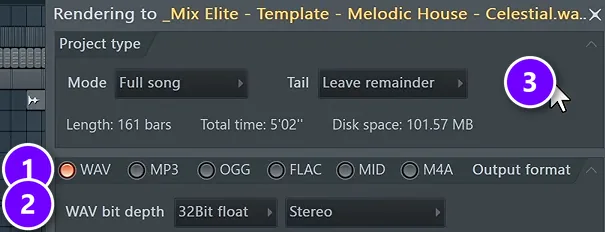
Render every sound with File > Export > Wave file (Ctrl + R). Choose WAV (1), then set the bit depth (2). Mix Elite’s free FL Studio course exports release files as 24-bit WAVs, the most popular format for releasing music online, so 24-bit is a safe choice for a pack too. The window in the picture shows 32-bit float only because that file was a mix on its way to mastering.
Then set Tail (3). As FL Studio’s manual explains, Leave remainder keeps reverb and delay tails, which suits one-shots. Wrap remainder folds the tail at the end of a loop back onto its start, so the loop repeats without a gap. Trim any silence at the start of each one-shot so it hits right on the grid. Then play every loop on repeat and listen for a click where it wraps around.
What sample rate and bit depth should a sample pack use?
Use 24-bit WAV files at 44.1 kHz or 48 kHz, and keep the same setting for every file in the pack. Loopmasters says the packs it sells almost always come in one of those two, and most of its own samples are 44.1 kHz, 24-bit. Skip MP3: it’s compressed, and producers expect full-quality files.
Name and sort every file
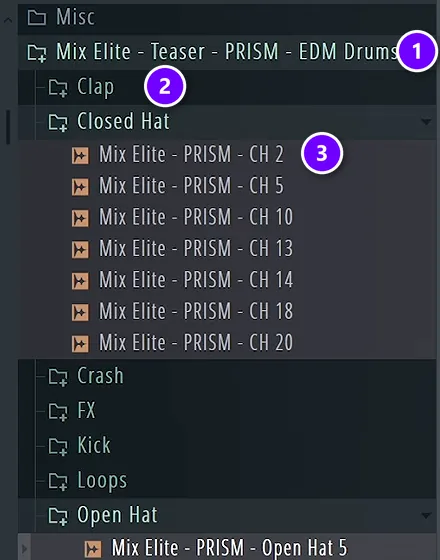
Buyers judge a pack by its folders before they hear a single note. Here’s a teaser of Mix Elite’s PRISM drum pack in FL Studio’s Browser: one main folder with the pack’s name (1), a folder for each type of sound (2), and file names that repeat the pack name plus what the sound is, like CH 2 for the second closed hat (3).
For loops, put the tempo and the key in the file name too, for example Prism_Chord_Loop_124_Fmin.wav. Producers search by those two things, and so do the filters on Splice and Loopcloud. Want to see it from the buyer’s side? Here’s how producers add sample packs to FL Studio.
Make a demo and a cover
Your demo track is your sales pitch. Build a short track that only uses sounds from the pack, so buyers hear what they could make with it. Mix Elite did exactly this with its future bass pack: a YouTube video builds a whole future bass drop using nothing but sounds from it. Finish with a square cover that still reads clearly as a small tile in a shop.
How to license your sample pack
Every pack needs a short license: a text or PDF file in the download that says what buyers may do. Without one, a careful producer won’t risk using your sounds in a song they release.
What royalty-free means
Royalty-free means the buyer pays once and can then use your sounds in their own music, including songs they sell or stream, without paying you again or asking permission. That’s the standard on the big platforms. Splice’s license, for example, covers commercial and non-commercial use, and it stays valid even after a subscription ends.
What your license should say
The big stores use the same few rules, and yours can too. The Loopmasters license forbids reselling or sharing its sounds, as they are or changed, and using them in competing products such as other sample libraries. It also bans using them to train AI. Splice says the same about putting its sounds into new sample packs. Cover these five points in yours:
- Allowed: use in the buyer’s own songs, beats and videos, released or not.
- Not allowed: reselling, sharing or giving away the sounds, alone or inside another pack or library.
- AI: whether the sounds may be used to train AI tools.
- Credit: whether you want a credit, or whether it’s optional.
- Contact: an email address for license questions.
This isn’t legal advice. Once your catalog grows, it’s worth having a music lawyer read your license.
Only sell sounds you own
This is the rule that can sink a pack. Everything in it has to be yours. You can’t use sounds from someone else’s pack, even chopped or processed, because their license forbids it, as the Loopmasters terms above show. The same goes for samples lifted from records, and our guide on how to clear a sample explains why. Splice is strict here too: anything it sells must never have been licensed before, and you must be able to show where it came from, such as your project files.
Keep the project file for every sound you sell. If anyone ever asks where a sound came from, the project is your proof.
How much should you charge for a sample pack?
Look at what similar packs in your genre cost, then price yours in that range. For real numbers, here’s what packs cost in our own store right now:
- Beat Essentials Sample Pack: $19
- Memoriam Vol. 1 Serum presets: $27
- Supreme Drums: $37
- Gold Kit Vol. 1 melody loops: $47
- All MIDI Packs Bundle: $47
On Splice you don’t set a price per sound. Subscribers pay with credits: a sample costs 1 credit, and MIDI files and presets cost up to 3. Loopcloud also runs on a monthly plan with points, so on both, the platform decides what a download costs.
With your own shop, try two pricing moves. The first is a free sample of the pack. Soon after Memoriam came out, Max said this in his Serum sound design video: “You can of course download every sound we make today in our free lite version of Memoriam Volume One pack.” The free version proves the quality, and the full pack is one click away. The second is a bundle of several packs for less than their total, like the MIDI bundle above, which gives past buyers a reason to buy again.
Where to sell sample packs
Sell on a marketplace that already has buyers, like Splice, Loopmasters, BeatStars or Airbit, or in your own shop on Gumroad, Payhip or your own site, where you keep more of each sale but bring every buyer yourself. You can also do both.
Here are the main options, checked on each company’s own site in October 2026. Fees and rules change, so check again before you sign up.
How to sell samples on Splice
Splice Sounds is a subscription library where producers download single sounds with monthly credits. You can’t simply upload a pack. Sound designers and sample labels apply through Splice’s submission form, and its content team checks the sounds against Splice’s quality principles: original, described accurately and useful to its users. If they’re interested, they get in touch.
Two rules matter before you apply. Everything you send becomes royalty-free for Splice’s subscribers, so it can’t have been licensed anywhere before. You also need to be able to show where each sound came from. Splice doesn’t list its payout terms on that page, so ask before you sign anything.
Loopmasters and Loopcloud
Loopmasters has been making sample libraries since 2003, and it sells packs from its own label and a long list of partner labels. It’s part of the Beatport Group, and its Loopcloud app lets subscribers download single sounds with monthly points.
Loopmasters doesn’t list an upload form for new sellers. Its about page invites top sample makers to get in touch, and you can also start smaller. Yakov Morozov designed sounds for Loopmasters before he launched his own label, Singomakers, as he explains in an interview on the Loopmasters blog. Making packs for an existing label is a solid way in.
BeatStars and Airbit
BeatStars and Airbit are marketplaces built for selling beats, and both let you sell sound kits too. On BeatStars, selling unlimited sound kits takes its Growth plan or higher. On Airbit, sound packs need the Platinum plan, and Airbit dropped its marketplace commission in 2023, so you keep your sales minus PayPal or Stripe fees. Plan prices change, so check both pricing pages before you pay.
Gumroad
Gumroad is the quickest way to start selling on your own. There’s no monthly fee. It keeps 10% + $0.50 of each sale you bring in yourself, and 30% of sales that come through its own Discover marketplace. Upload a ZIP of your pack, set a price and share the link. Since 2025, Gumroad also collects and pays sales tax and VAT on your sales worldwide.
Payhip
Payhip works the same way and is built for digital downloads. Its free plan keeps 5% of each sale, the Plus plan costs $29 a month with a 2% fee, and the Pro plan costs $99 a month with no fee. PayPal and Stripe still charge their own fees on every plan. Payhip also collects and pays EU and UK VAT for you, which matters as soon as buyers come from Europe.
Your own store
On your own site you control everything: the price, the page and the list of buyers you can email about your next pack. Mix Elite sells its packs this way, on its own sounds page. On WordPress, the free WooCommerce plugin can sell downloadable products and sends buyers their download links after they pay. On Shopify, the free Digital Downloads app does the same job.
The catch is traffic. A store nobody visits sells nothing, so your own shop needs a steady way to bring producers in. That’s the last step.
Where should you sell your first sample pack with no following?
Start where buyers already browse: BeatStars or Airbit, plus Gumroad, whose Discover marketplace can bring you new buyers for a 30% cut. Splice and Loopmasters review every pack first, so apply once you have a strong one, or make packs for an existing label. Meanwhile, give away a free sampler to start an email list.
Keep a shop of your own as well, because that’s where buyers stay yours. Point every video, post and free download to it. Mix Elite’s own shorts end the same way, with a link to a free sample pack, while the paid packs sit on its sounds page.
How to market a sample pack
Producers buy sounds they’ve already heard at work. The simplest way to show them is to make things with the pack itself.
- Tutorials made with the pack. Mix Elite’s future bass drop video used only sounds from the pack, so every viewer heard it in action.
- A free sampler. Give away a small part of the pack, like Mix Elite’s free lite version of Memoriam, so people can try the sounds in their own projects.
- Short demo clips. Play a few loops over a simple beat in a short video.
- An email list. Ask everyone who grabs the free sampler for an email address, so you can tell them about the next pack.
- Producer communities. Share your free sampler where producers hang out, follow each group’s rules and answer questions as yourself.
Then keep going. Each new pack gives past buyers something new, and each free sampler reaches people who haven’t heard of you yet. If you’d rather put out songs made with your sounds first, our guide on how to release music walks you through it.
DAY 7 OF THE 7-DAY MUSIC PRODUCER COURSE
Your demo track sells your pack. Make it count.
Before anyone buys your sounds, they hear a song made with them. The 7-Day Music Producer Course takes you from setup to a finished, mastered track, one step a day, taught in FL Studio (the free trial works). Day 7 is about releasing: the best way to put your music on all streaming platforms for free, plus in-depth personal feedback on your track from our team. It’s $27, and you get 60 days to decide if it was worth it.
Frequently asked questions
What format should a sample pack be in?
WAV files, 24-bit at 44.1 or 48 kHz, with the same setting for the whole pack. Trim the silence before each one-shot, check that every loop repeats without a click, and put the tempo and key in each loop’s name, like Prism_Chord_Loop_124_Fmin.wav. Sort the files into one folder per type of sound.
How much should I charge for a sample pack?
Look at similar packs in your genre and price yours in that range. In our own store, packs currently run from $19 to $47. On Splice and Loopcloud you don’t set the price, because subscribers pay with credits or points. On your own shop, a free lite version and bundles help.
Do I need a license for my sample pack?
Yes. Add a short license file that says buyers may use the sounds royalty-free in their own music, including released songs, and that they may not resell, share or repack them. Without clear terms, careful producers won’t risk using your sounds in a release. Once your catalog grows, have a music lawyer check it.
Where should I sell my first sample pack?
With no following yet, start where buyers already browse: BeatStars, Airbit, or Gumroad’s Discover marketplace, which keeps 30% of the sales it brings you. Selling direct on Gumroad costs 10% + $0.50 a sale, and Payhip’s free plan keeps 5%. Splice and Loopmasters review every pack before they take it.
Can I sell my samples on Splice?
Yes, if Splice accepts them. Sound designers and sample labels apply through a submission form, and Splice’s content team reviews the sounds against its quality principles. Everything you send must be original and never licensed anywhere before, and you need to be able to show where it came from, such as your project files.





