



“…if you don’t think the sound you’re getting is bright enough, use a brighter mic rather than trying to EQ.”
The vocal recording tips that matter most: record in a quiet spot with soft things around you, like a closet full of clothes or a duvet hung behind the singer. Put a cardioid mic at mouth level, one or two fists (4 to 8 inches) away, with a pop filter in between, and set the gain so the loudest line peaks around -12 to -6 dB, never in the red. Then record the vocal dry, sing several takes, and comp the best lines into one.
Your beat sounds great. Then you record a vocal over it, and it sounds like a voice memo: thin, echoey, with a pop on every P. Sound familiar? The good news is that most of that has nothing to do with the price of your mic.
Max, the founder of Mix Elite, puts the order like this: “great vocals start with great singing or rapping skills.” Then comes the recording, and only then the mix. This guide covers the recording part for any mic, interface and DAW: the room, the mic, the distance, the level, the performance, and how to turn a pile of takes into one great vocal.
Table of Contents
What do you need to record vocals at home?
Less than you think. A decent mic, an audio interface and closed-back headphones do most of the work, and a quiet spot with little echo matters more than any of them. Here’s the full list:
- A microphone. A condenser mic is the usual pick for singing. Our list of the best microphones for singing has picks at every price.
- An audio interface. It connects the mic to your computer and has the gain knob you’ll set later. Condenser mics need 48V phantom power, which almost every interface has.
- An XLR cable to connect the two.
- A mic stand, a pop filter and a shock mount. The stand keeps the mic still, the pop filter stops the bursts of air on P and B sounds, and the shock mount stops bumps from the floor.
- Closed-back headphones, so the beat doesn’t leak from your headphones into the mic.
- A quiet spot with little echo. More on that next.
- A DAW, the music software you record into. Every tip here works in any DAW.
On a tight budget, spend on the mic and the interface first. Our guide to the best budget microphones shows which cheap mics hold up for vocals.
The recording chapter of Mix Elite’s free 4.5-hour FL Studio course walks through this whole setup, from the room to the gain knob. It starts at 3:09:41 in the video below, and the first few minutes cover the room, the mic, the distance and the gain.
How do you treat a bedroom for vocal recording on a budget?
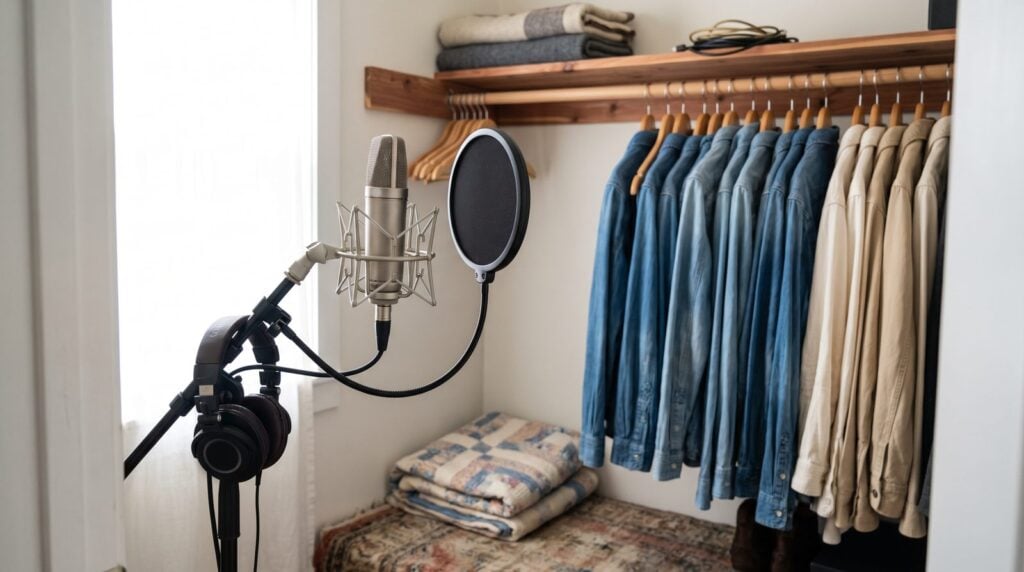
Make it quiet first: turn off fans and air conditioning. Then kill the echo by hanging something soft and heavy, like a duvet or moving blankets, on the wall behind the singer, and put a rug on a hard floor. A closet full of clothes works too, and it costs nothing.
The room matters more than you think. Max puts it plainly: “it doesn’t have to be big space, but it just needs to be quiet with no background noise.” That means no fans, no air conditioning blowing into the mic and no fridge humming in the next room.
Next, the room shouldn’t echo. Hard walls, windows and bare floors bounce your voice back into the mic, and you can’t take that bounce out later. Here’s how to fix it without building anything:
- Do the clap test. Clap once where you’ll sing. If you hear a ring or a flutter after the clap, that spot needs more soft stuff around it.
- Cover the wall behind the singer first. Most vocal mics are cardioid, which means they hear the front and ignore the back. So the wall behind you bounces your voice straight into the front of the mic. Sound On Sound suggests a thick duvet, hung an inch or two away from that wall.
- Use a closet. Rows of hanging clothes soak up echo for free, which is why even your closet can work as a vocal booth.
- Soften the floor and windows. A rug on a hard floor, closed curtains and a sofa all help, as Rode’s home vocal guide points out.
- Try a vocal booth or reflection filter. It’s a small shield that wraps around the mic. It won’t fix a noisy room, but it helps in an echoey one.
- Stay out of corners, where the bass builds up and makes the vocal boomy.
Why do home recorded vocals sound muddy and amateur?
Usually it’s the room or the distance, not the mic. Echo from bare walls clouds the vocal, singing too close boosts the bass, and singing too far away makes the voice thin and distant. Fix those first, then mix it, because no raw vocal sounds finished.
A good condenser can make it worse. It hears every bit of the room, so in an untreated bedroom it records all the echo too. That’s why the room fixes above come before any mic upgrade.
Distance is the other half. Directional mics boost the bass as you move in, mostly below 200 Hz, as Neumann explains. That’s called the proximity effect. A little adds warmth. Too much sounds boomy. Go too far the other way and the low end never makes it into the recording. In his video on balanced vocals, Max points out that boosting it back later only adds mud, because the data simply isn’t there.
Condenser or dynamic: which mic is best for vocals?
In a quiet, treated room, a condenser mic is the best pick for vocals, because it catches the small details of a voice. In a noisy or echoey room, a dynamic mic often sounds better, because it mostly hears what’s right in front of it. Either way, use the cardioid pattern.
A condenser picks up whispers, breaths and every change in volume, so it sounds the most like a real person standing in front of you. The catch? It hears the room too. A dynamic mic is the one you see at live shows and on podcasts. It forgives a bad room, and the sound is a little less detailed.
Every mic also colors your voice in its own way, like a built-in EQ you can’t switch off. Condenser mics usually sound a bit brighter out of the box than dynamic ones. That’s why it’s worth trying a few mics on your own voice before you buy, and our vocal microphone guide is a good place to start.
If your mic has a pattern switch, set it to cardioid. It picks up the front and rejects sound from behind and the sides, which cuts down room sound, as Shure’s vocal miking guide notes.
How far should you be from the mic when recording vocals?
About one or two fists away, roughly 4 to 8 inches (10 to 20 cm), with a pop filter in between. Get as close as you can without pops, and keep the same distance for the whole take, because a mic hears your voice differently at every distance.
Where should you place the mic?
Placement is free, and it changes the sound more than a new mic would. Start here:
- Find the front of the mic. Many condenser mics are side-address, which means you sing into the side, not the top. The front usually has the logo. Mix Elite’s free course calls this out because so many people get it wrong.
- Set it at mouth level, on a stand with a shock mount. Never hold a condenser mic in your hand.
- Stand one or two fists away from the mic, about 4 to 8 inches (10 to 20 cm).
- Put the pop filter in between, a couple of inches in front of the mic.
- Keep that distance for the whole take. Moving around makes the level and the tone jump.
Should you move closer for quiet parts and back for loud ones?
Trained singers do. Shure notes that singers lean in on quiet lines and pull back when they belt, and that studio vocals are usually recorded 6 to 12 inches from the mic. At home, the simpler rule works better: pick one distance and hold it. If the chorus is much louder, set your gain for the chorus, or step back a little for the whole chorus and stay there.
How do you stop pops and background noise in vocal recordings?
Pops come from bursts of air on P and B sounds, so put a pop filter between your mouth and the mic and sing slightly past the side of it. For noise, switch off fans and air conditioning, move the computer away, and sing a little closer, so your voice is louder than the room.
- Use a pop filter a couple of inches in front of the mic. A cheap one does the job.
- Sing a little off-axis. Angle the mic slightly, so the air from your P’s and B’s passes the side of the mic instead of hitting it head-on. Rode recommends the same trick.
- Kill the noise at the source. Switch off fans, air conditioning and anything that hums. iZotope even suggests unplugging the fridge while you record.
- Turn the back of the mic toward the noise. A cardioid mic hears the least from behind, so point its back at the computer or the window.
- Sing a little closer. Your voice gets louder compared with the room, so you need less gain, and less gain means less hiss and room noise in the take.
- Clean up the gaps afterwards. Cut out the long silent parts between lines, because an empty gap on a condenser recording is just noise. A noise gate does it for you: it silences everything below the level you set.
How do you set your audio interface gain so vocals don’t clip?
Use the loudest line of the song. Sing or shout that part and lower the gain until the light on your interface never turns red. Peaks around -12 to -6 dB in your DAW leave room for a louder take, and a quiet take is easy to turn up later, while a clipped one is ruined.
Gain is the knob on your interface that sets how loud the mic comes into the computer. Set it too low and you get hiss when you turn the vocal up. Set it too high and the loud parts clip, which means they distort in a harsh, crunchy way that can’t be fixed later.
The test from Mix Elite’s free course is quick. Shout into the mic and watch the LED on your interface. If it shows any red, take the gain down a little and try again, until you can’t make it go red. Sonarworks gives the same target in numbers: peaks between -12 and -6 dBFS, set from the singer’s loudest passage.
Set the gain with the singer’s loudest line, not the first verse. Choruses are louder, and that’s where a take usually clips.
Should you record vocals dry or with effects?
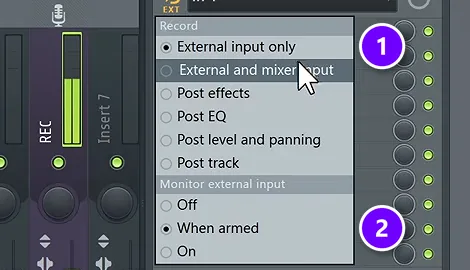
Record it dry. No effects get printed into the take. You can still hear reverb or autotune in your headphones while you sing, but the recording stays raw, so you can change every effect later in the mix.
In Mix Elite’s recording video, the rule is simple: you want a dry vocal 99% of the time. A little reverb in the singer’s headphones still helps, as long as it isn’t recorded, because it helps the singer judge their own sound.
In FL Studio, that’s the record mode External input only (1), and Monitor external input set to When armed (2) lets you hear yourself while the take stays dry.
Recording in FL Studio? Our step-by-step guide on how to record vocals in FL Studio shows every click, from the ASIO driver to the count-in and comping.
How do you fix the delay (latency) when recording vocals?
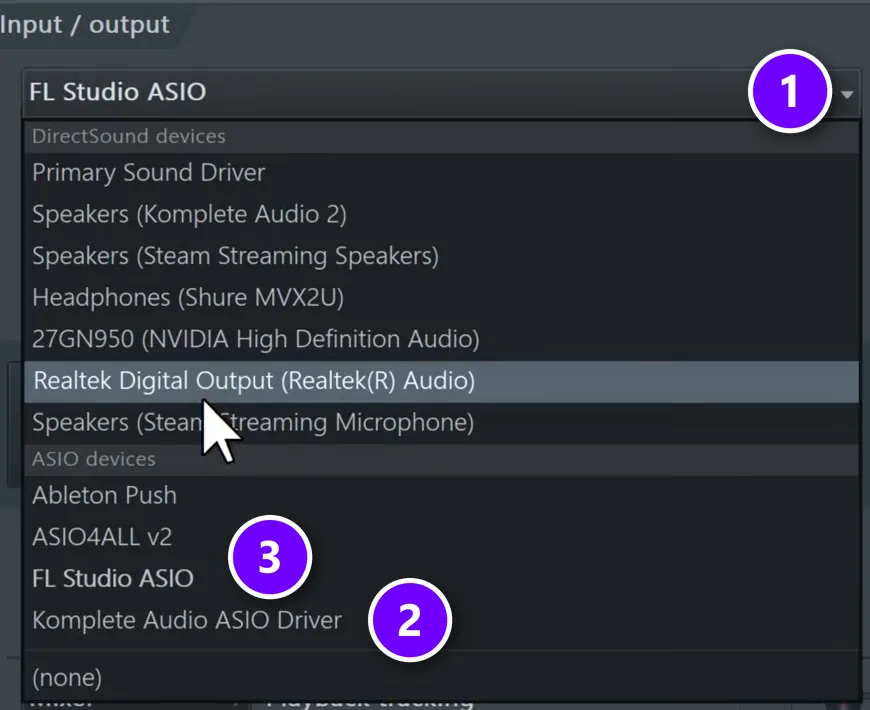
Latency is the delay between singing and hearing yourself, and it makes singing in time almost impossible. Fix it with your interface’s own driver (ASIO on Windows) and a lower buffer size, as low as it goes without crackles. If that’s not enough, record in a new, empty project.
In FL Studio, the Device menu (1) in Audio settings lists the ASIO driver with your interface’s name in it (2). If there isn’t one, FL Studio ASIO or ASIO4ALL (3) work as a backup.
A heavy project can keep the delay high at any buffer size. Mix Elite’s free course gives two fixes: record the vocal in a new, empty project, or switch off the mixer effects while you record.
How do you get a better vocal performance?
Warm up, know the lyrics and get the headphone mix right before you press record. Gear and settings only capture the performance, so a relaxed singer who can hear themselves clearly makes a bigger difference than a new mic.
- Warm up first. Hum, do a few lip trills and sing up and down a scale for a few minutes.
- Keep water close, at room temperature, and take short breaks between sections.
- Know the lyrics. Print them out or learn them, so nobody reads from a rustling sheet on the take.
- Get the headphone mix right. If the singer can’t hear themselves, turn the beat down in the headphones instead of pushing up the mic gain. A beat that’s too loud makes singers push too hard, and one that’s too quiet makes them hold back.
- Record the warm-up. Singers often relax when they think it doesn’t count.
How many takes should you record?
More than one, every time. Record a few passes of each section, even when a take feels perfect, so you have spare lines to choose from when you comp.
Max’s rule: “make sure to always record a couple of takes, even if you think that this one was perfect.” Nerves usually settle after the first pass, and the best line is often in the take you almost didn’t record.
Record in sections: a few passes of the verse, then a few of the chorus, with a short break and a sip of water in between. Turn on the metronome and a count-in, so every take starts in time. Keep the mic, the gain and the singer’s distance the same for every pass, or the takes won’t match when you cut them together.
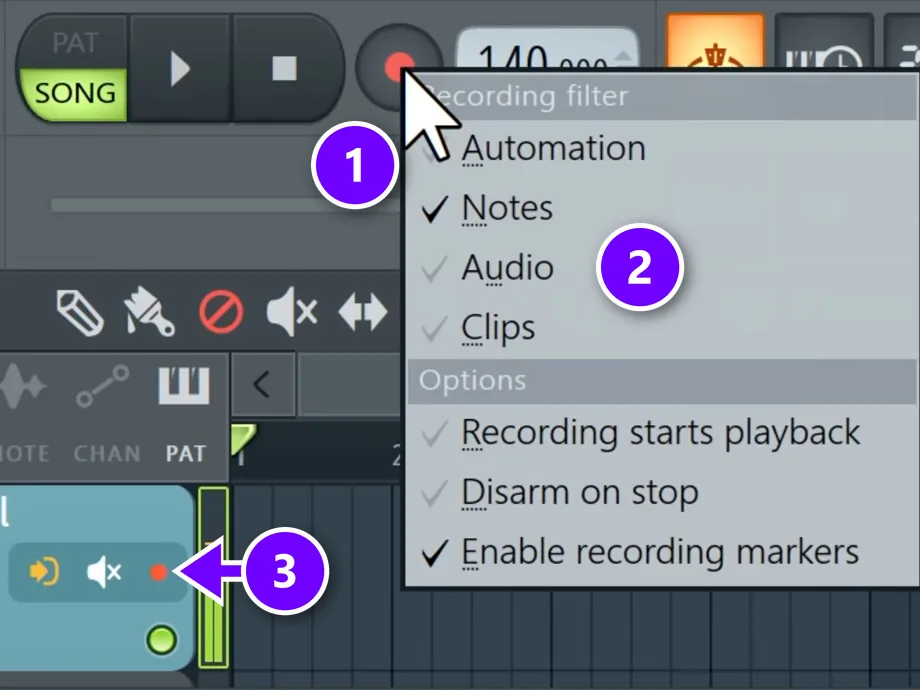
In FL Studio, right-click the record button (1), tick Audio (2) and arm the track (3). Every new pass then lands on a new lane below the last one, so nothing gets deleted.
How do you comp vocal takes?
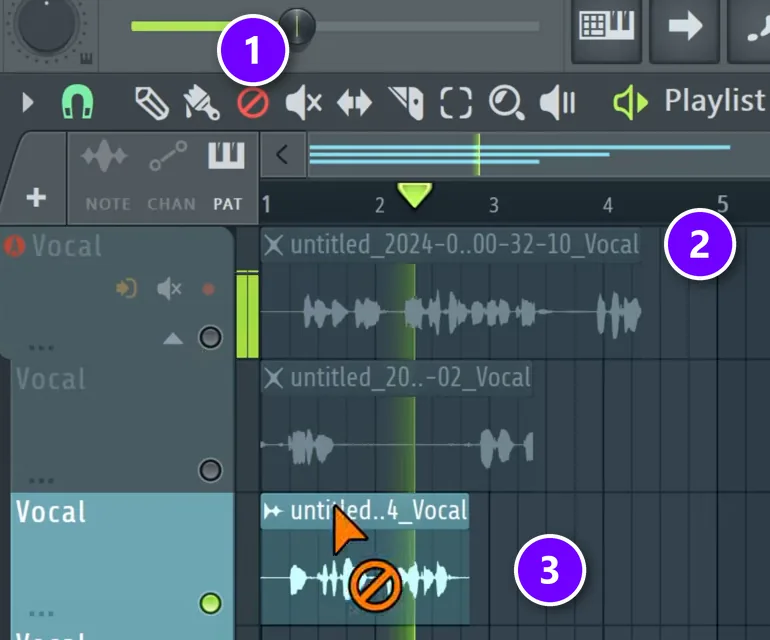
Comping means building one vocal out of the best lines from several takes. Listen to every take of a section, pick the best version of each line, cut the takes at the breaths, keep only the winners and fade every cut so it doesn’t click.
It’s a standard studio technique, and every DAW can do it with a cut tool and a mute tool:
- Listen to every take of one section and note the best version of each line.
- Cut the takes where the lines change, ideally in a breath or a short gap.
- Mute or delete everything except the best line each time.
- Cut out the long silent gaps too. Condenser mics pick up background noise, and an empty gap is just noise.
- Add a short fade to the edges of every clip, so the cuts don’t click.
In FL Studio, pick the Mute tool (1) and click the parts you don’t want. Muted parts show an X (2), and the take you keep stays bright (3).
Should you record doubles and harmonies?
Yes, for a bigger vocal. Record them in the same session. A double is the same part sung again on its own track, and the small differences between the two takes make the voice sound thicker and wider. Keep the mic and the distance the same, so the layers blend.
Sing doubles and harmonies as real takes instead of copying the lead. In his harmony video, Max says a copy of the lead works fine as a harmony, but recording the harmonies separately keeps phasing problems to a minimum.
Do it the same day, while the voice sounds the same, and keep the mic position steady. Sonarworks notes that small timing and distance differences between layered takes can cause phase problems. Our guides to double tracking and mixing background vocals show what to do with them next.
What should you do to a vocal right after recording?
Comp first. Then even out the volume between takes, and mix. A basic vocal chain goes tuning if you want it, EQ with a low cut, compression, a de-esser for harsh S sounds, and reverb on a separate send track.
Mix Elite’s free 4.5-hour FL Studio course follows that order on Day 5. It raises the quiet passages by about 3 dB at most to even out the takes, starts compression at a 4:1 ratio, and tames S sounds around 4 to 6 kHz. Then the reverb goes on its own track, so the vocal itself stays clear.
For the full chain with settings, follow our step-by-step guide to mixing vocals.
Vocal recording tips: 7 mistakes that make home vocals sound amateur
Most home vocals that sound amateur come down to one of these:
- Singing into the wrong side of a side-address mic.
- Gain too high, so the chorus clips.
- An echoey room, which makes the vocal sound far away and cheap.
- No pop filter, so every P and B thumps.
- Moving around while singing, which makes the level and tone jump.
- Recording with effects printed, so you’re stuck with them in the mix.
- Keeping the first take because it felt good, without a backup.
Fix those, and a modest mic in a closet will beat an expensive one in an empty bedroom.
DAY 5 OF THE 7-DAY MUSIC PRODUCER COURSE
Recorded a clean take? Day 5 shows you how to mix it.
Day 5 of the 7-Day course is about recording and mixing vocals: setting up your room, the best recording equipment for every budget, the V.O.C.A.L. mixing formula and 10 copy-and-paste vocal processing chains, plus practice acapellas if you don’t have a singer yet. It’s taught in FL Studio (the free trial works), about 45 minutes a day, and on day 7 a pro gives you personal feedback on your finished track. It’s $27, and you get 60 days to decide if it was worth it.
Frequently asked questions
How can I treat my bedroom to record vocals without expensive gear?
Use what you already have. Hang a thick duvet or moving blankets on the wall behind you, put a rug on a hard floor, close the curtains and stay out of the corners. A closet full of clothes also works. Clap once where you’ll sing: if it rings, add more soft stuff.
What is the best distance from the mic when recording vocals?
About one or two fists, roughly 4 to 8 inches (10 to 20 cm), with a pop filter in between. Closer sounds warmer but pops more, and further away picks up more of the room. Trained singers lean in on soft lines and back off on loud ones, but at home it’s easier to hold one distance for the whole take.
How do I stop popping sounds and background noise in my vocals?
Use a pop filter and sing slightly past the side of the mic, so the air on P and B sounds misses it. For noise, switch off fans and air conditioning, point the back of the mic at the computer, and cut out the silent gaps or use a noise gate after recording.
What level should I record vocals at so they don’t clip?
Set the gain while singing the loudest part of the song, and lower it until the interface light never turns red. Peaks around -12 to -6 dB in your DAW leave room for a louder take. A quiet take can be turned up later, but a clipped one can’t be repaired.
Why do my home recorded vocals sound muddy even with a good condenser mic?
Usually it’s the room or the distance. A condenser hears every echo off bare walls, singing too close boosts the bass through the proximity effect, and singing too far away makes the voice thin. Treat the wall behind you, stay one or two fists from the mic, and then EQ and compress the vocal in the mix.





