



“That thing that happens when a song speeds up slightly, or a vocal goes a little sharp. That thing that makes people sound like people.”
To mix rock vocals, even out the volume, cut the low end firmly and compress hard so every word stays above the guitars. Then add a little saturation for grit, tame the S sounds, keep the reverb short and ducked, and let the guitars dip slightly whenever the singer comes in.
Rock vocals have a tough job. They have to ride on top of distorted guitars, crashing cymbals and a bass that fills every gap, and still sound like one person singing their heart out. Push the vocal up and it sounds pasted on. Leave it down and the words disappear.
This guide takes the vocal chain from Mix Elite’s free FL Studio course, taught by Max, the founder of Mix Elite, and adapts it for a band mix, with a real screenshot of every setting.
Table of Contents
What makes rock vocals different?

A rock vocal fights for space with more instruments in the same range. Distorted guitars fill the mids, the same area that carries the voice and the words, while cymbals crowd the top. So the usual vocal chain needs a few changes: more compression, a bit of grit, and some room carved out of the guitars.
The goal is a vocal that sounds loud, raw and clear at the same time. Raw doesn’t mean messy, though. The rule from Mix Elite’s free FL Studio course applies here more than anywhere: great vocals start with great singing. Get a committed take, record it raw with no effects on it, and record more than one.
Rock singers shout, so set your level for the loudest moment. The check is simple: shout into the mic and lower the interface gain until its light never turns red. Many rock singers also prefer a dynamic mic, which picks up mostly what’s in front of it and forgives an untreated room.
How do you make rock vocals cut through heavy guitars?
Make room in the guitars instead of only pushing the vocal up. Find the range where the voice is strongest, then dip that range a little on the guitar bus, ideally only while the singer sings, so the guitars keep their full punch in the gaps. A firm compressor and a touch of grit on the vocal do the rest.
Two sounds fighting for the same space is called frequency masking. In Mix Elite’s frequency masking tutorial, the first step is deciding which sound wins the fight. In rock that’s the vocal, so the guitars give way, in one of four ways:
- Static EQ: sweep a narrow boost across the vocal to find where it’s strongest, often in the mids, then cut a little of that same range on the guitar bus.
- Dynamic EQ with a sidechain: the same dip, but only while the vocal plays. The free TDR Nova does it: put a band on the vocal’s range, switch the band to the external sidechain fed by the vocal, and lower its threshold. The tutorial sets it up step by step, first for a flute and then for a lead vocal.
- Sidechain compression on the guitar bus: Fruity Limiter, keyed from the vocal, dips the whole bus slightly whenever the singer comes in. Step 8 below shows every click.
- Mid/side EQ: Max points out in Mix Elite’s mid/side EQ tutorial that vocals live mostly in the mid channel, the center of the mix. Hard-panned guitars sit mostly on the sides, so a small cut in the mid channel of the guitar bus clears the center for the voice and leaves the guitars wide.
Whichever you pick, keep the dip small and judge it with the whole band playing.
How to mix rock vocals in FL Studio, step by step
This follows the V.O.C.A.L. order from Day 5 of Mix Elite’s free FL Studio course: volume first, then EQ, compression, taming harshness and finally effects. Rock adds two moves to it, grit and doubles, and one at the very end: making room for the voice inside the guitars.
Step 1: Even out the volume first
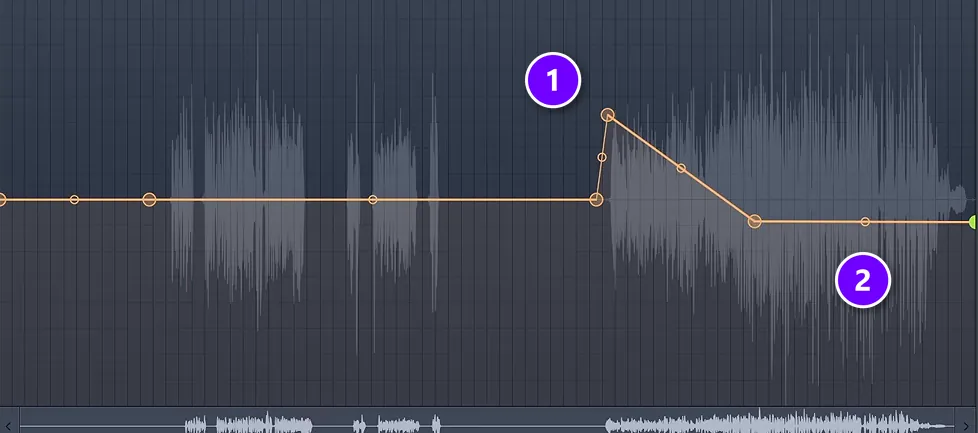
Rock singers swing from a quiet verse to a full-voice chorus, and a compressor can’t fix a gap that big on its own. Click the waveform, choose Edit sample to open it in Edison, switch to the volume envelope and right-click to add points. Raise the quiet passages (1) and pull the loud ones down (2), about 3 dB at most. Then drag the result back into the Playlist with Edison’s drag button.
Edison opens on the Master track when you do this, so remove it from the Master afterwards.
Step 2: Rock vocal EQ: cut the low end harder than in pop
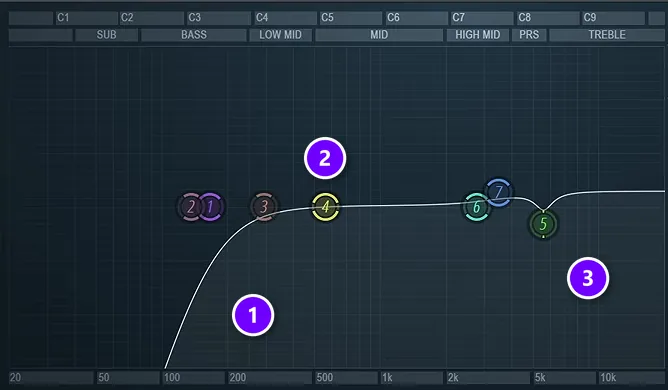
Rock vocals don’t need much low end, because their power lives in the mids. In Fruity Parametric EQ 2, use a steep low cut (1) so nothing is left below about 100 Hz. With a whole band behind the singer you can often push it higher, toward 150 Hz. Cut less if the singer has a deep voice.
Shape the body in the mids (2) rather than boosting the top. If one spot rings or stings, sweep a narrow band to find it and cut just 2 to 3 dB (3), then let the de-esser handle the rest. And always EQ with the band playing, because a vocal that sounds full on its own can vanish under two distorted guitars.
Here’s a quick map of where things live in a rock vocal:
- Below 100 to 150 Hz: rumble and stand noise. Cut it.
- 200 to 500 Hz: the body. Keep enough of it, and only cut if it sounds muddy.
- 1 to 4 kHz: bite and presence, where the vocal cuts through the guitars. A small boost helps, too much turns harsh.
- 5 to 8 kHz: the S sounds. Leave these to the de-esser.
- Above 10 kHz: air. Add a touch at most.
Step 3: Compress hard to keep every word above the band
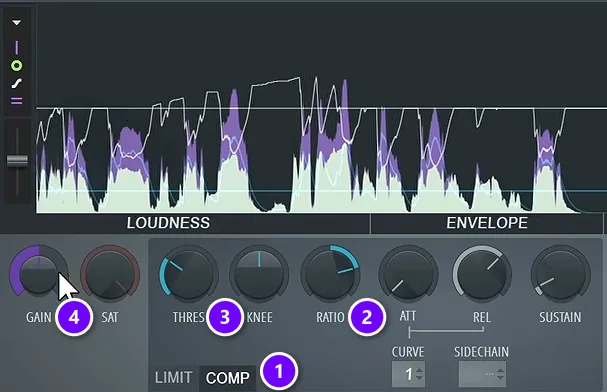
Rock vocals usually take more compression than other styles. The band never lets up. Load Fruity Limiter and switch it to COMP (1). Start with a ratio around 4:1 (2), the setting from Mix Elite’s free course, and lower the threshold (3) until every word is equally easy to hear. Then raise Gain (4) 1 dB at a time until the vocal sits a little above the band.
Don’t be afraid to push it further. In Mix Elite’s video on vocal mixing mistakes, Max says, “I honestly don’t mind going with really really harsh compression or even limiting as long as my threshold is properly set up.” If the vocal still hides behind the guitars, slow the attack down. When a vocal needs to cut through, start the attack around 25 ms and go up to 40 ms, which lets the first bite of each word through before the compressor grabs it.
Many rock mixers also stack two compressors, a fast one that catches peaks and a slower one that adds weight, or blend in a heavily squashed copy of the vocal (parallel compression). The free OTT adds similar density in one plugin; keep it around 15 to 20% on vocals. Our guide on how to compress vocals explains every knob.
Step 4: Add grit with saturation
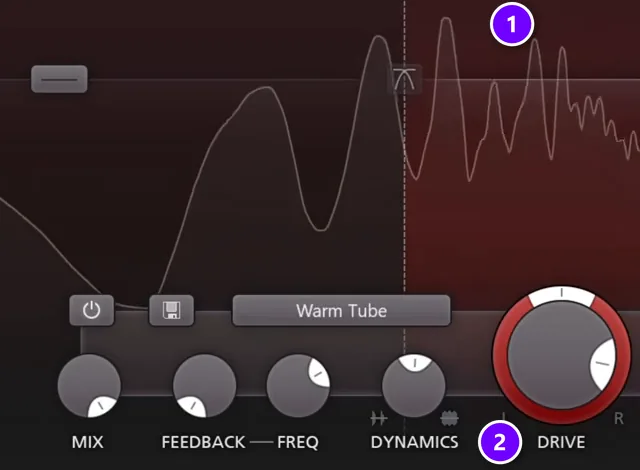
This is where rock leaves pop behind. A spotless vocal over distorted guitars can sound pasted on, so give it some grit. The reasoning from Mix Elite’s trap vocal tutorial fits rock even better: when the instrumental is distorted and dirty, make the vocal a little more saturated too.
In FabFilter Saturn 2, distort only the high band (1) and set the drive (2) by ear, so the low end of the voice stays clean while the top gets some bite. Soundtoys Decapitator works well too, and the free option is the SAT knob in Fruity Limiter.
Go easy on the lead, though. Max’s advice: “I would not make the main vocal audibly distorted. I would prefer to add a little bit of the background dirtiness.” If you want an openly distorted vocal, put the distortion on a copy of the vocal and blend it in underneath the clean one.
It also helps to use the same distortion on the vocal that’s already on the instrumental. In a rock mix, that’s often the amp simulator on your guitars, and our guide to the best amp simulator plugins covers the free and paid ones, plus how to stop an amp sim sounding fizzy.
Step 5: Tame the harsh S sounds
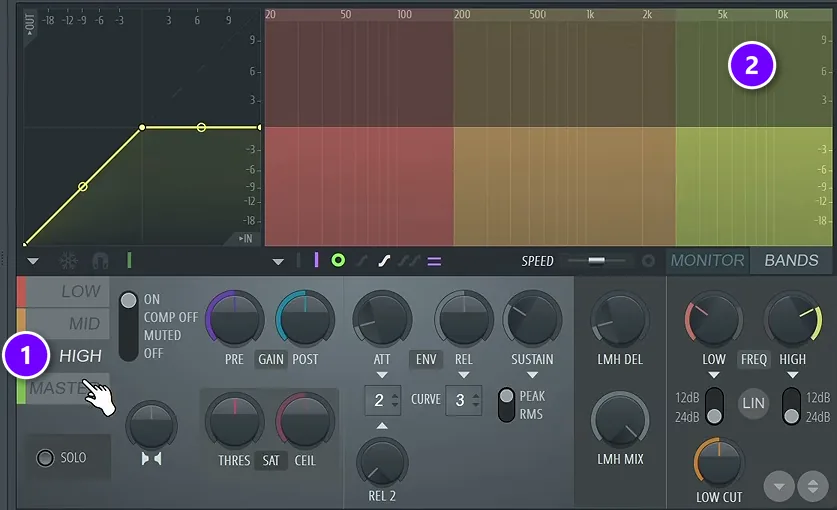
Loud singing sharpens S and T sounds. Compression and grit make them worse. FL Studio’s Maximus works as a de-esser: pick the HIGH band (1), which covers the top of the range where the S sounds live (2). Then lower that band’s threshold to about -9 dB at a ratio near 4:1, so only the S sounds get pushed down.
The faster way is a Maximus de-essing preset, such as narrow band or split band. Use Monitor to solo the band, so you hear exactly what it’s catching. Our stock-plugin guide shows how to de-ess with Maximus step by step.
Step 6: Add doubles for a bigger chorus
Double tracking means the singer records the same part twice. Panned left and right, the two takes make a chorus sound huge, while one centered lead keeps the verses focused. That’s why many rock mixes save the doubles for the chorus, so the song grows when it hits.
- Pan the doubles hard left and right and keep them well under the lead. Set them around 10 dB lower.
- Compress them harder than the lead, so they never poke out.
- De-ess them hard. Stacked S sounds turn into a hiss.
- No real double? Widen a single take with the free iZotope Ozone Imager in Stereoize mode, at about 11 ms and 100% width.
The full routine for doubles, ad-libs and backing vocals is in our guide on mixing hip hop and R&B vocals, and it works the same way in a rock song.
Step 7: Keep the reverb short and ducked
Rock vocals sound best fairly dry and in your face. As Max puts it, “Reverb is something that beginner producers overuse because it just blurs imperfections, and for something like a vocal, we want it to be clear.”
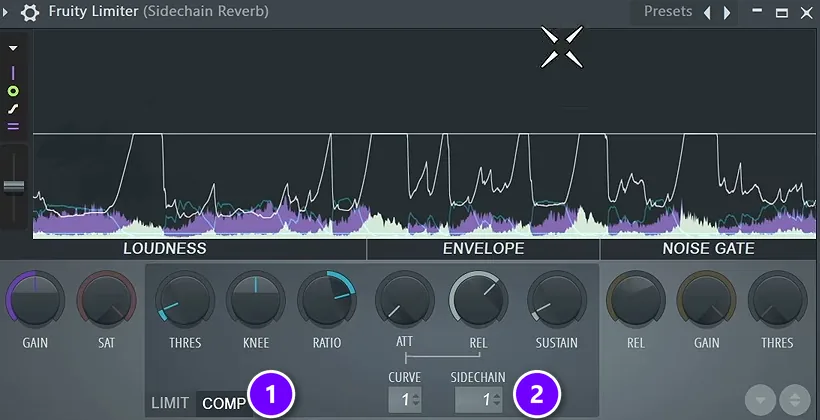
Put the reverb on its own mixer track and low-cut it, around 700 Hz in Mix Elite’s free course. Then duck it: add Fruity Limiter after the reverb, switch it to COMP (1), set its Sidechain input to the vocal (2) and lower the threshold until the reverb drops whenever the singer sings. It blooms in the gaps and stays out of the words. Our vocal mixing guide shows the whole setup.
For rock, keep the space small. A short room or plate works, or a slapback delay, which is a single echo about 80 to 120 ms after the voice. Save long, washy halls for the odd ballad.
Step 8: Make room in the guitars
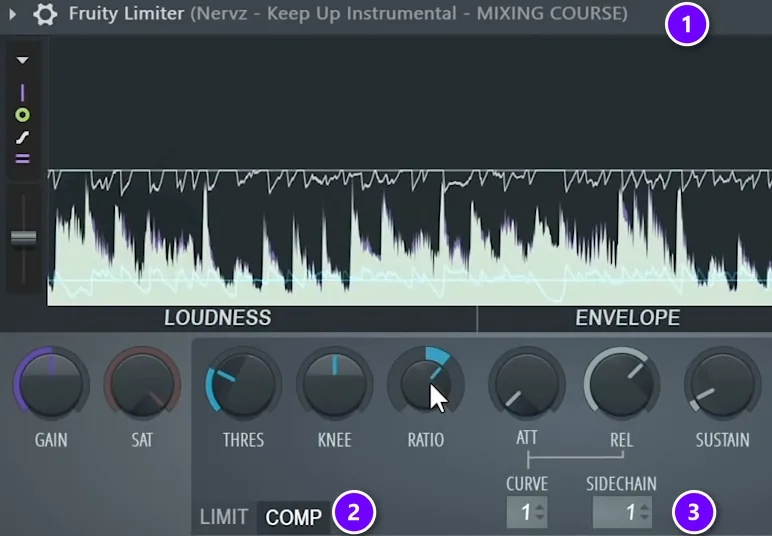
This last step makes a rock vocal sit inside the band instead of on top of it. The trick is simple. The guitars dip a little whenever the vocal plays. The video below shows the trick on a full mix.
- Route the guitars, or the whole band, to one bus.
- Select the lead vocal’s mixer track, right-click the arrow under the guitar bus and choose Sidechain to this track.
- On the guitar bus, load Fruity Limiter (1) and switch it to COMP (2).
- Set Sidechain to the vocal’s input (3), then lower the threshold until the guitars dip slightly while the vocal plays.
- Keep it subtle. If you can hear the guitars pumping, back it off.
For a cleaner dip that only touches the vocal’s range, Trackspacer by Wavesfactory does the same job, and 8 to 20% is usually plenty. For more routing options, see our guide on how to sidechain in FL Studio.
What’s the best compression chain for rock vocals?
Clean up first, then control, then color. Ride the volume, EQ, compress, add saturation and de-ess, and put reverb and delay on their own tracks. Start the compressor around 4:1, set the threshold as low as the quietest word, and use a 25 to 40 ms attack so the front of each word still punches through.
- Volume rides: even out the loud and quiet passages first, about 3 dB at most.
- EQ: a steep low cut around 100 Hz (up to 150 Hz with a full band), the body kept, a gentle presence lift.
- Compressor: about 4:1 with the threshold at the quietest word, so every word is equally easy to hear. Keep the release short enough to let go before the next word, around 150 to 200 ms.
- Extra density (optional): OTT at 15 to 20%, or a fast compressor for peaks followed by a slower one for weight.
- Saturation: on the high band only, so the words stay clear.
- De-esser: Maximus on the HIGH band, catching only the S sounds.
- Reverb and delay: on their own tracks, low-cut and ducked with the vocal.
- Guitar bus: sidechained to the vocal, so it dips slightly while the singer sings.
That threshold rule comes from Mix Elite’s vocal mixing mistakes video: set it low enough and the loud accents stop piercing while the quiet words come up, which is exactly what keeps an aggressive vocal loud and steady over a band.
Why do my rock vocals sound thin or harsh?
Usually because the boost went to the wrong place. Boosting the treble makes a vocal brighter, not clearer, and it brings up harsh S sounds, while a low cut set too high strips out the body. Keep the body around 200 to 500 Hz, lift presence gently in the 1 to 4 kHz range, and let a de-esser handle the S sounds.
Max makes the first point in Mix Elite’s trap vocal tutorial: people boost the treble when what they really want is presence. In the vocal mixing mistakes video he warns about the second: cut the lows too high and you get a much thinner vocal, which is fine for backing vocals and ad-libs but not for the lead. De-essing has a twist, too. Heavy de-essing makes a vocal darker and dirtier, so for a bright, clear lead, go light on it.
How do you get punch without harshness?
Punch and harshness live close together in a rock vocal, so it’s easy to trade one for the other. These habits help:
- Get the punch from compression and level, not from treble. A slower attack lets the front of each word hit.
- Lift presence gently, then de-ess. Harshness usually comes from too much boost around 2 to 5 kHz or from stacked S sounds.
- Saturate only the top, and only a little. Heavy distortion adds fizz, not power.
- Check the vocal against the cymbals, which share the same top end.
Common rock vocal mixing mistakes
- Burying the vocal to make the band feel bigger. Rock vocals can sit a little further back than in pop, but every word still has to be clear.
- Too much reverb. A long hall makes a shouted vocal sound distant and small.
- Tuning every note to the grid. If you tune at all, use a slow, soft setting so the voice still sounds like a person.
- EQing in solo. Always judge the vocal with the guitars playing.
- Distorting the whole vocal. Grit on the top end or on a parallel copy keeps the words clear.
If the vocal only sounds loud enough when it’s clearly louder than the guitars, the problem is space, not volume. Go back to step 8 before you push the fader.
Start with one chorus. Get the lead sitting above the guitars with EQ and compression, add the grit and the short reverb, then bring in the doubles. Once the chorus works, the verses usually take care of themselves.
DAY 5 OF THE 7-DAY MUSIC PRODUCER COURSE
Day 5: record and mix a vocal that cuts through the band
Day 5 of the 7-Day course is about recording and mixing vocals: setting up your room, the best recording equipment for every budget, the V.O.C.A.L. mixing formula and the worst mistakes even advanced producers make, plus 10 copy-and-paste vocal processing chains and practice acapellas. It’s taught in FL Studio (the free trial works), and the techniques apply in any DAW and genre. Plan on about 45 minutes a day, and on day 7 a pro gives you personal feedback on your finished track. It’s $27, and you get 60 days to decide if it was worth it.
Frequently asked questions
How do I stop rock vocals getting buried under the guitars?
Make room in the guitars instead of only turning the vocal up. Dip the guitar bus slightly where the voice is strongest, ideally only while the singer sings, with a sidechained compressor, a dynamic EQ like the free TDR Nova, or Trackspacer. Then compress the vocal firmly and add a little grit so it holds its place.
Why do my rock vocals sound harsh when I boost the highs?
Treble makes a vocal brighter, not clearer, and it brings up harsh S sounds, especially after heavy compression. Lift presence gently in the 1 to 4 kHz range instead, keep the body around 200 to 500 Hz and let a de-esser control the S sounds. A low cut set too high also makes the vocal thin.
What order should a rock vocal chain go in?
Volume rides first, then EQ, then compression, then saturation and a de-esser on the vocal itself. Put reverb and delay on their own tracks and duck them with the vocal. Last, sidechain the guitar bus to the vocal so the guitars dip slightly whenever the singer sings.
How much compression do rock vocals need?
More than most styles, because the band is loud the whole time. Start around 4:1, lower the threshold until every word is equally easy to hear, then add makeup gain. Heavier settings are fine as long as the threshold is set well. A slower attack of 25 to 40 ms helps the vocal punch through the guitars.
What is the best EQ for rock vocals?
Start with a steep low cut so nothing is left below about 100 Hz, and push it toward 150 Hz if the band already covers the low end. Keep the body around 200 to 500 Hz, add a small presence lift between 1 and 4 kHz so the vocal cuts through the guitars, and let a de-esser handle the S sounds instead of cutting the highs.





