



“I said, ‘Oh, I had to do some piano for house. But it’s got to be banging, right?’”
To mix piano in EDM, start with a bright piano sound, cut its low end (often somewhere between 150 and 300 Hz) so the kick and bass own the bottom, and tame its loudest notes with gentle compression. Then sidechain it to the kick, add a short reverb with its own low cut, and keep it a little under the vocal or lead.
The chords sound huge on their own. Then the kick, the bass and the lead come in, and the piano either turns into a cloudy wash or pokes out on every loud note and fights the vocal. Nothing is wrong with the piano. It just hasn’t been mixed for a busy dance track yet.
This guide walks through the whole job in order, from picking the sound to the last reverb tweak, with the exact FL Studio clicks and screenshots from Mix Elite’s videos. Every number here is a starting point. Your ears make the final call.
Table of Contents
Why does piano get lost in an EDM mix?
A piano that sounds huge on its own fills almost the whole frequency range. When the drop starts, the kick, bass, synths and vocal fill that same range and cover it up, so it seems to vanish. Cut its low end, tame its loudest notes and shorten its reverb in the drop, and it comes back.
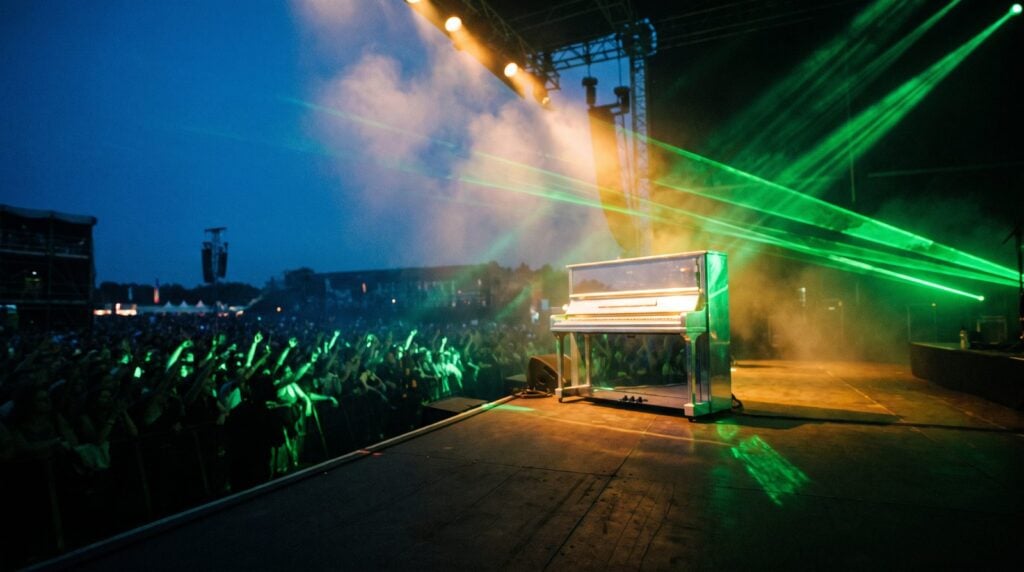
A piano covers a huge range. Its 88 keys run from about 27.5 Hz at the bottom to about 4,186 Hz at the top, and every note adds overtones above that. So an EDM piano overlaps with nearly everything else in the song: the kick and bass down low, the vocal and lead in the middle, the hats up top.
It also plays different jobs in different parts of a track. It might be a chord stab in a house groove, big chords under a drop, a solo piano in the intro or breakdown, or the first sketch of a melody. Max, the founder of Mix Elite, often writes that way: “I like to use a piano to come up with some ideas and then we can always replace it with any synthesizer you like.” Each job needs a slightly different mix. A breakdown piano can be big and wide. A piano under a full drop has to get smaller.
How do you choose a good EDM piano sound?
For dance music, choose a piano that’s bright, with a clear attack on each note and not much low end or room sound baked in. Upright and classic house pianos cut through a busy drop, electric pianos (the soft Rhodes-style sound) suit deep house, and big grand pianos shine in intros and breakdowns, where they have space.
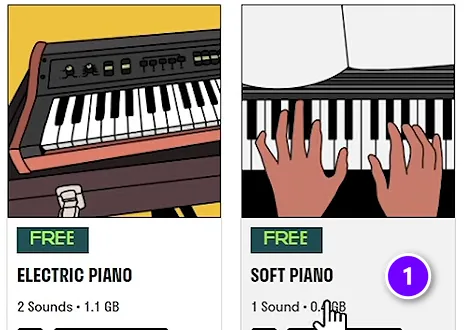
Mixing starts with the sound you pick. Max puts it simply in Mix Elite’s free 1-hour mixing course: “If we chose a really raw recording of a piano, we would need to apply some effects to make it sound better.” A good sound needs fewer fixes, and fewer fixes means less to go wrong.
You don’t need to buy anything to start. FL Studio’s own FL Keys comes with every edition. In Mix Elite’s free 4.5-hour FL Studio course, Max opens the Spitfire LABS plugin, searches for piano and downloads Soft Piano (1), a simple piano to write chords with. LABS has since moved into Splice INSTRUMENT, which is free to download and labels several pianos free, such as Intimate Grand Piano, Glass Piano and Tape Piano (checked October 12, 2026). Mix Elite also has a short on the best piano sounds in FL Studio.
Where should the piano sit in an EDM mix?
Set the volume before you touch a single plugin. In a drop, the kick and the vocal or lead are usually the loudest parts, and the piano sits just under them. In a breakdown with no drums, the piano can take the lead and get louder. That’s its moment.
Give the piano its own mixer track first, so you can EQ and compress it on its own. In FL Studio, select the piano in the Channel Rack and press Ctrl + L, the shortcut that routes a sound to a free mixer track. Then open the Mixer with F9.
Once your piano chain sounds right, save it. Right-click the piano’s mixer track, go to File and pick Save mixer track state. Save your favorite piano processing this way, so every new project can start from it instead of from zero. Image-Line’s Mixer menu guide lists the option.
How to EQ piano in EDM
To EQ piano in EDM, cut the low end (often between 150 and 300 Hz in a busy drop), cut 2 to 4 dB where it sounds boomy between 200 and 500 Hz, and cut 2 to 3 dB around 1 to 3 kHz if it fights the vocal. Add a 1 to 2 dB lift above 8 to 10 kHz only if it needs air.
Load Fruity Parametric EQ 2 in an empty effect slot on the piano’s mixer track. Then work through these four moves with the whole mix playing, not the piano on its own. Our guide to how to use EQ explains each control if you’re new to it.
1. Cut the low end
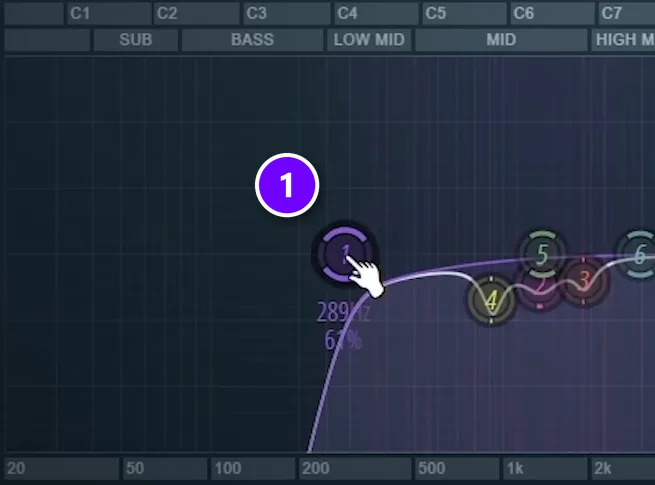
Switch band 1 to a low cut, a filter that removes everything below the point you set. Drag it up until the piano starts to sound thin, then back off a little. In Mix Elite’s mixing tricks video, the low cut on the chords (1) sits at about 290 Hz. In a busy drop, somewhere between 150 and 300 Hz is a common range. A solo piano in a breakdown can keep more of its low end.
The reason is simple math. One sound with a little extra low end won’t hurt your mix. Ten of them, each carrying a little, will muddy the whole bottom of the song.
2. Clear out the mud
Pianos often get boomy or boxy somewhere between 200 and 500 Hz. Boost a narrow band a lot, slide it slowly through that range while the piano plays, and stop where it sounds worst. Then turn that band into a cut of 2 to 4 dB. Small cuts are enough. It’s the same boost-and-sweep method Mix Elite’s EQ masterclass teaches for finding harsh spots.
3. Make room for the vocal or lead
The vocal and most leads live between about 1 and 3 kHz. If the piano keeps fighting them, cut 2 to 3 dB there with a wide band. You’ll hardly miss it on the piano, and the voice suddenly has space.
4. Add a little air, if it needs it
A gentle lift of 1 to 2 dB above about 8 to 10 kHz can add sparkle to a dull piano. Skip it if the hats and cymbals already fill that area. Bright on its own isn’t always bright in the mix.
How to compress piano so it doesn’t jump out
Use gentle compression: a 2:1 to 4:1 ratio, a 10 to 30 ms attack so the front of each note comes through, and 3 to 5 dB of gain reduction on the loudest chords. A quicker fix is Fruity Limiter on the piano track, with its ceiling lowered until the loudest notes stop poking out.
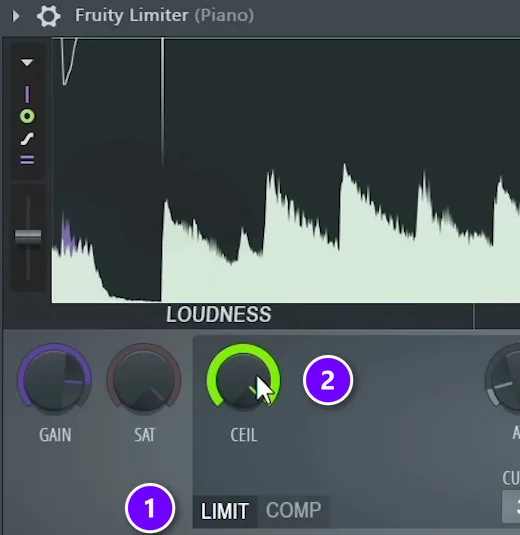
Piano notes jump in volume. One hard chord leaps out, and in a dance track that makes the piano sound like it’s on top of everything. Mix Elite’s mixing tricks video fixes this with Fruity Limiter on the piano track. It stays in LIMIT mode (1), and the CEIL knob (2), the ceiling, comes down until the loudest notes stop poking out. Without it, as Max says about his own example, “it would be really hard to get our vocal over the piano if we don’t use the trick.”
If you prefer a regular compressor, these settings are a good place to start:
- Ratio: 2:1 to 4:1. Higher squashes the piano and kills its bounce.
- Attack: 10 to 30 ms, so the front of each note still comes through.
- Release: 50 to 150 ms, set by ear so the compressor lets go before the next chord.
- Amount: 3 to 5 dB of gain reduction on the loudest chords. More than that and the piano loses its life.
In FL Studio you can click COMP on the same Fruity Limiter to turn it into a compressor, or use Fruity Compressor. Either works.
How do you make piano cut through heavy synths without sounding thin or harsh?
Make room instead of turning the piano up. Decide which part matters most, then carve: cut a little in the synths where the piano should be heard, or the other way round. Keep the low cut just below the point where the piano turns thin, and dip harsh spots with a narrow cut instead of boosting the high mids.
Mix Elite’s 2026 video on a clean low end shows this with chords and a pluck that fight each other. The chords get a low cut and a high cut. The pluck, the part people should remember, gets a boost around 4 kHz, and the chords get a cut in the same spot. If your piano is the part that matters, flip it: give the piano that spot and make the cut in the synths.
- Thin? The low cut is usually too high. Pull it down until the body comes back, then stop.
- Harsh? The high mids are where our hearing is most sensitive, so too much there sounds harsh and ear-piercing. Find the one harsh spot with the boost-and-sweep method and cut it, but not so much that the piano loses its presence.
- Harsh before any EQ? Turn down the piano plugin’s hardness control, if it has one. Mix Elite’s chord progressions video does this in FL Keys for a softer sound.
- Still fighting the vocal? Do it automatically. In the same low-end video, all the instruments run into one bus, and a Patcher preset called multiband sidechain ducks them only while the vocal, the top priority, is singing.
How to sidechain piano to the kick in FL Studio
Sidechain compression lets the kick turn the piano down for a moment every time it hits. It clears space for the kick, and it gives house and EDM pianos that pumping, breathing feel. Mix Elite’s sidechain video explains why it matters: the piano ducks when the kick lands, which makes the kick feel bigger. Here’s the stock FL Studio way.
Step 1: Send the kick to the piano’s track
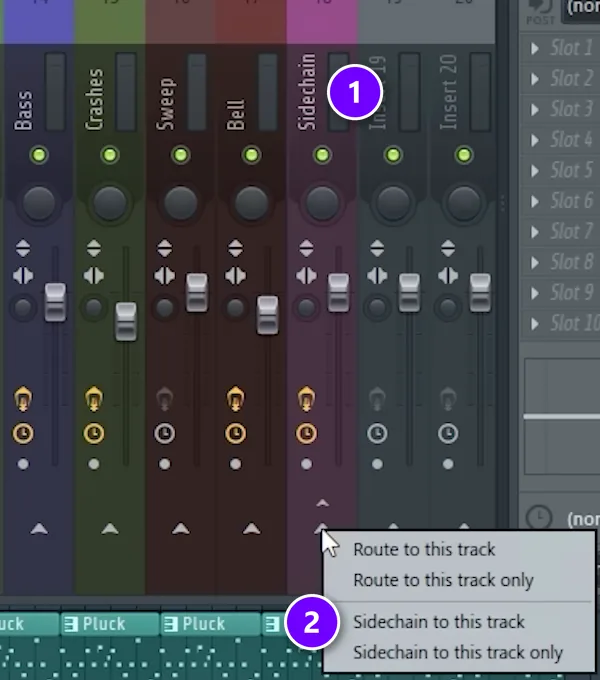
Click the kick’s mixer track to select it. Then right-click the small arrow at the bottom of the piano’s track and choose Sidechain to this track (2). The kick now feeds the piano’s plugins without being heard there. In the video, the piano, pad and other melodic parts all run through one bus called Sidechain (1), so a single compressor ducks them together.
Step 2: Set Fruity Limiter to duck on each kick
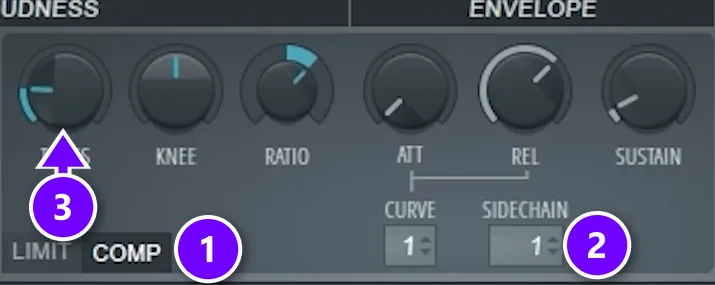
- Open Fruity Limiter on the piano track and click COMP (1).
- Set SIDECHAIN (2) to the kick’s track. In the video, that’s track 1.
- Lower THRES (3) and raise RATIO until the piano dips about 3 to 6 dB on each kick.
- Shorten REL, the release, until the piano swells back before the next kick lands.
Let the tempo guide the release. At 128 BPM one beat lasts about 0.47 seconds, so the piano has less than half a second to come back up. For other ways to do it, including a sidechain on only the low end, see our guide to sidechaining in FL Studio.
How much reverb should a piano get in EDM?
Less than you think in a drop: a short decay of about 1 to 1.5 seconds, the wet fader low, and a low cut on the reverb at 200 to 500 Hz. Save the long, big reverb for the breakdown, where the piano has room.
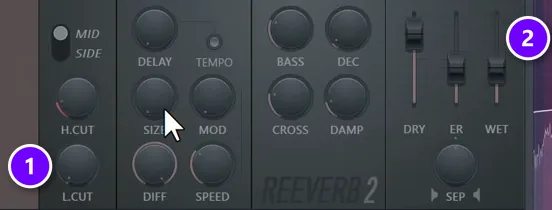
Reverb makes a piano sound like it’s in a room, but too much of it blurs every chord in a drop. Mix Elite’s 1-hour mixing course sets reverb with three knobs and two faders: low cut, size and decay, plus the dry and wet faders. Dry is the plain sound, and wet is the reverb. The course always raises the low cut, because it doesn’t want reverb on the low frequencies.
In Fruity Reeverb 2, that’s the L.CUT knob (1), and the WET fader (2) sets how much reverb you hear. For a piano in a busy drop, try these:
- Low cut on the reverb at 200 to 500 Hz, so the tail never muddies the bass.
- A short decay, about 1 to 1.5 seconds. The course keeps reverb on percussion at 1.5 seconds or shorter, and short piano stabs work the same way.
- The wet fader low. You should feel the space more than hear it.
- Longer, bigger reverb only in the breakdown, where the piano has room.
A short delay can fill the gaps between chord stabs without the wash of a long reverb. Keep it quiet and cut its lows the same way.
Should a piano be mono or stereo in EDM?
Keep the low notes in the middle and let the high notes spread. Low frequencies that sit in the center stay solid on club systems and phone speakers. Most piano samples are already recorded in stereo, so they rarely need extra widening.
Every FL Studio mixer track has a stereo separation knob. Turning it left makes the sound wider, and turning it right merges it toward mono. In the mixing course, Max says he mostly uses it to merge sounds a little, not to widen them. Check it in mono now and then. If the piano drops away or sounds hollow, it’s too wide. Our guide to mono vs stereo mixing shows how to fix width problems with mid/side EQ.
How to layer piano with synths, pads and vocals
A lot of EDM chords are two or three sounds at once. A piano gives the attack, and a pad or supersaw gives the long sustain. Each layer has one job. In Mix Elite’s free FL Studio course, Max writes the chords on piano and then blends a synth melody from the free Vital synth on top.
- Give each layer its own range. Piano in the middle, pad a little lower, pluck or lead a little higher.
- EQ each layer so they don’t all boost the same spot.
- Sidechain the whole group from the kick, the way the video does with its piano and pad bus.
- Turn the piano down when a vocal comes in, or cut it around 1 to 3 kHz while the vocal sings.
EDM piano by style: house, deep house, progressive and future bass
House has used piano since its early days. Marshall Jefferson’s “Move Your Body” from 1986 is one of the first house records to feature piano. Here’s how the piano usually behaves in a few styles:
- House: short chord stabs, often off the beat, with a clear attack and a sidechain from the kick. Mix Elite’s shorts on house chord stabs and fast house chords show quick ways to write them.
- Deep house: a warmer electric piano with less top end, more room and slower chords.
- Progressive house and trance: a big solo piano in the breakdown, then a synth takes over the same chords in the drop.
- Future bass: piano chords layered under heavily sidechained synth chords, so the piano keeps the notes clear.
Building a whole track around your piano? Our guides on how to make house music, making a tech house track and EDM song structure cover the drums, bass and arrangement it sits on.
Can you use piano loops in EDM and pop?
Yes, as long as the loop is royalty-free or you have permission to use it. Loops from sample packs come with a license that says what you can do with them, so read it before you release. Then mix the loop like any piano part: match its tempo and key, cut its low end and sidechain it to the kick.
A loop taken from someone else’s record is different. That’s a sample, and the US Copyright Office recommends getting permission whenever you’re in doubt.
To make a loop your own, chop it. A Mix Elite short shows the fast way in FL Studio: load the loop in a Sampler channel, right-click its waveform and open it in Fruity Slicer, pick a slicing mode with the cut icon, and raise the attack and decay a little so the slices don’t click. Each slice then sits on its own key in the Piano Roll, ready to play in a new order.
DAY 4 OF THE 7-DAY MUSIC PRODUCER COURSE
Mix the whole drop, not just the piano
Day 4 of the 7-Day course is all about mixing: the simple Holy-Quad mixing formula, the “Mix Murdering” mistakes most beginners make, a one-click setting that makes your song wider with no new plugins, and the volume mistake people make in the first 5 minutes of every mix. You also get a mixing checklist and a mixing and production template. It’s taught in FL Studio, and on day 7 a pro gives you feedback on your finished track. It’s $27, and you get 60 days to decide if it was worth it.
Frequently asked questions
How do you make a piano sound good in an EDM mix?
Pick a bright, clear piano, give it its own mixer track and cut the low end so the kick and bass own the bottom. Tame the loudest notes with a limiter or compressor, sidechain it to the kick, and add a short reverb with its own low cut. Then set its level a little under the lead or vocal.
What EQ settings are best for piano in EDM?
Start with a low cut between about 150 and 300 Hz, a 2 to 4 dB cut where it sounds boomy between 200 and 500 Hz, and a small cut around 1 to 3 kHz if it fights the vocal. Add a gentle lift above 8 to 10 kHz only if it needs more air. Always set these with the full mix playing.
Can you use piano loops in EDM and pop?
Yes, if the loop is royalty-free or you have permission. Read the sample pack’s license before you release the song. Then treat the loop like any piano part: match its tempo and key, cut its low end and sidechain it to the kick. A loop taken from someone else’s record is a sample, and that needs permission.
What is the best free piano for EDM in FL Studio?
FL Studio’s own FL Keys comes with every edition and is a solid start. Splice INSTRUMENT, the new home of Spitfire’s LABS, is free to download and labels several pianos free, such as Intimate Grand Piano and Tape Piano (checked October 12, 2026). In Mix Elite’s free FL Studio course, Max writes his chords with LABS Soft Piano.
Should I sidechain the piano to the kick?
In most EDM drops, yes. A sidechain from the kick dips the piano a few decibels on every beat, which clears room for the kick and gives house pianos their pumping groove. In a breakdown with no kick, the sidechain has nothing to react to, so the piano plays at full level.





