



“Ambient Music must be able to accommodate many levels of listening attention without enforcing one in particular; it must be as ignorable as it is interesting.”
To make ambient music, pick one calm scale, hold long chords with an added 7th over a low drone note, and play them with soft sounds like pads, piano or field recordings. Then add long reverb and delay, and automate slow changes so the track keeps moving without a drum beat.
Ambient looks like the easy genre. There’s no drop to build, no drum pattern to program and no vocal to tune. Then you hold one pretty chord for three minutes, and it sounds like a phone line on hold.
The difference between hold music and a track people put on to fall asleep is a handful of small choices about notes, sounds and time. Below is how to make ambient music that breathes, with the exact FL Studio steps and real screenshots from Mix Elite’s videos.
Table of Contents
What is ambient music?
Ambient music is slow, spacious music made for atmosphere instead of a beat or a hook. It’s built from long, soft sounds like pads, drones, piano and field recordings with lots of reverb, and it changes so slowly that the mood matters more than any melody.

The name comes from Brian Eno, who used it in the liner notes of his 1978 album Ambient 1: Music for Airports. He wanted music you could listen to closely or simply let fill the room. The idea is older, though. More than a hundred years ago, the composer Erik Satie wrote what he called “furniture music”: pieces meant to sit in a space the way a chair or a lamp does.
Most ambient tracks share a few traits:
- Texture over tune. The sound itself is the hook, not a catchy melody.
- Slow change. Layers fade in and out over many bars, usually one at a time.
- Space. Long reverb and echoes make the music feel like a place you’re standing in.
- Little or no beat. If there are drums at all, they’re soft and far in the background.
Some ambient is almost still, built from a few notes that repeat and shift very slowly. That’s what people mean by ambient minimalism. Other ambient floats over a soft beat or swells like a film score. They all chase the same thing: a mood you can sit inside for a few minutes.
What do you need to make ambient music?
Less than you think. You need a DAW (the program you make music in), one soft instrument, a reverb, a delay and a pair of headphones. This guide uses FL Studio, and its free trial has every tool you’ll see here, including the stock Fruity Reeverb 2 and Fruity Delay 3 plugins.
For sounds, the free synth Vital comes with plenty of pad presets, and the free LABS Soft Piano is the plain piano installed in Mix Elite’s free 4.5-hour FL Studio course. You don’t need a MIDI keyboard, because your computer keyboard can play notes. Your phone makes a fine field recorder, too.
How to make ambient music, step by step
Here’s the whole process in seven steps. You don’t need to know any theory to start, and each step is explained below with the exact FL Studio clicks:
- Set a slow tempo, around 60 to 90 BPM, or switch off the metronome and play freely.
- Pick one calm scale. No theory? Use C major or A minor, which use only the white keys, so every white key you play fits.
- Hold a drone: one long, low note on the root that plays through the whole section.
- Write two to four slow chords, add a 7th to each, and let every chord ring for 2 to 8 bars.
- Play them with soft sounds, like a slow pad, a soft piano or a field recording.
- Add long reverb and delay, with the reverb’s low cut up so the bottom stays clean.
- Automate slow changes, and arrange in 8- or 16-bar sections where one thing changes at a time.
Ambient music theory: how to make notes float
Ambient music theory is ordinary music theory used to avoid tension. Pick one calm scale or mode, use soft chords with added 7ths, 9ths or suspended notes, hold a drone underneath, and change chords slowly, without the strong pull back home that makes a song sound finished.
Most pop and dance songs use chords that pull toward “home” and then land there, which creates tension and release. Ambient keeps the harmony floating instead, so the listener never waits for the next big moment. You only need the basics from the 17-minute theory crash course below, taught by Max, the founder of Mix Elite, plus a few ambient tweaks. If theory is new to you, start with our music theory guide for producers.
Pick a scale that floats
A scale is the set of seven notes your song uses. Choosing one is like picking the colors for a painting, because it sets the mood before you play a single chord. Major scales sound happy and bright, and minor scales sound more serious or sad. For ambient, a few scales do most of the work:
- Major or Lydian for bright and weightless. Lydian is the major scale with its fourth note raised a half step, which gives it a dreamy, floating sound. Our guide to musical modes explains how it works.
- Natural minor or Dorian for darker, more thoughtful moods.
- Major or minor pentatonic when you want no clashes at all. These five-note scales have no half steps, so almost any notes you hold together blend.
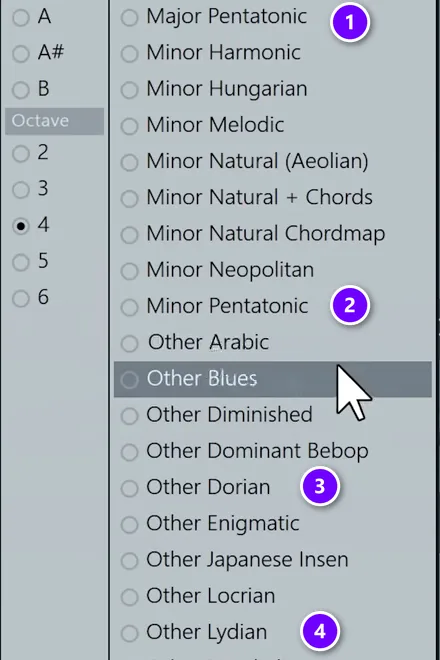
In FL Studio, the Piano Roll can highlight any scale for you. Right-click the note icon in the Piano Roll toolbar, then choose a root note (the note the scale starts on) and a scale. Left-click the same icon to switch on snap to scale, so notes can only land on the highlighted rows. In the video, snap usually stays off, because it gets in the way of happy accidents.
A similar list appears when you right-click the typing keyboard button in FL Studio’s toolbar. Major Pentatonic (1) and Minor Pentatonic (2) sit near the top, and the modes are listed under “Other”, like Dorian (3) and Lydian (4).
Set the typing keyboard to the same root and scale as your chords, then press record and play slowly on your computer keyboard. Every key now plays a note from your scale, so a wandering ambient melody is almost impossible to get wrong.
Stretch your chords into 7ths
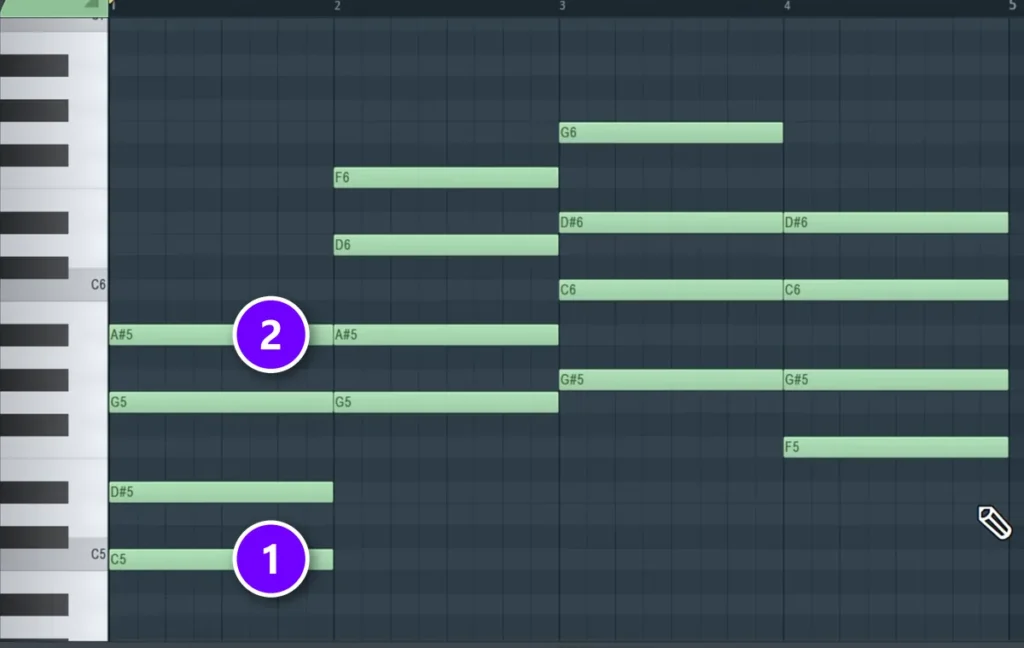
A chord is three or more notes played at the same time. The theory video builds them with a simple rule: place the root note, then stack every other note of the scale on top of it. Skip one, place one, and do it twice. That gives you a basic three-note chord.
For ambient, take it one step further. Skip one more note and add it on top, and every chord becomes a 7th chord, which sounds softer, wider and less final. When Max does this in the theory video, his reaction is: “Now you’re getting jazzy, right?” In the example, each chord keeps its root (1) and gains a 7th on top (2). The four chords become C minor 7, G minor 7, A-flat major 7 and F minor 7, all in C minor.
The video stops at the 7th, because past that, more notes don’t really start to sound any better. Ambient is the exception worth testing. Because each chord rings for so long, an extra 9th (skip one more) can add a soft shimmer. Add it, listen, and delete it if the chord turns to mush.
Suspended chords work too. A sus2 or sus4 chord swaps the middle note, the 3rd, for the 2nd or the 4th note of the scale, so it sounds neither happy nor sad. That open sound fits ambient well.
Spread the notes out
Chords with all their notes packed together sound small. Ambient chords usually spread out across the keyboard, with air between the notes. Two quick moves fix this in the Piano Roll:
- Double the root an octave lower. Hold Ctrl + Shift and click each chord’s root, then hold Shift and drag the copies down an octave. It makes the chord sound a bit fuller.
- Drop the top notes. If the top note jumps far from one chord to the next, select those top notes with Ctrl + drag and press Ctrl + ↓ to move them down an octave. This is called a different voicing: the same notes in different octaves.
For an even wider sound, move the middle note of a chord up an octave, so the chord stretches across more than one octave. Pads love this, because every note gets its own space.
Slow the chords down
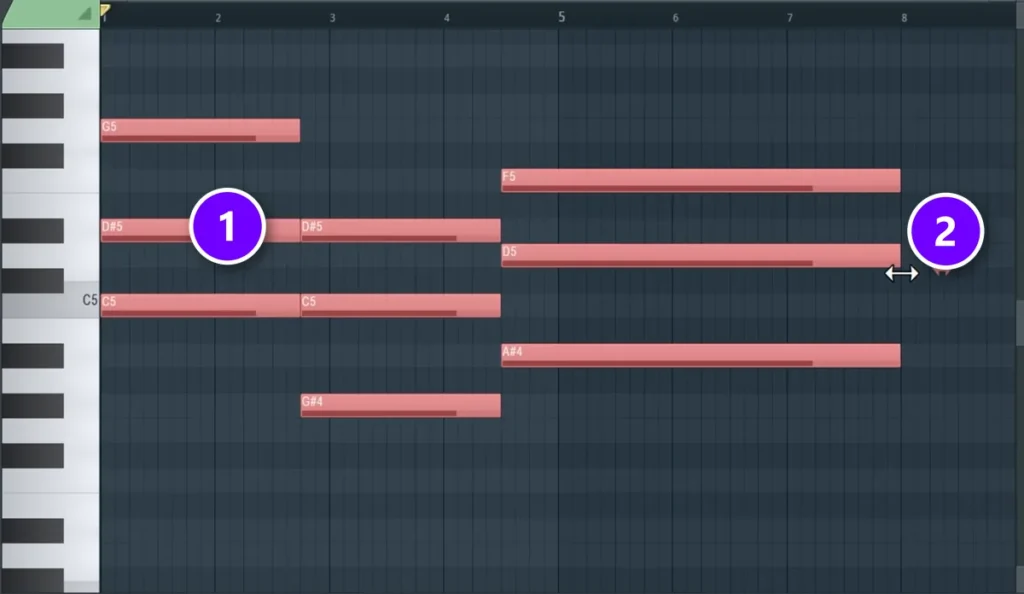
In pop, a chord usually lasts one bar. In ambient, let each chord ring for two, four or even eight bars. At 70 BPM, four bars last about 14 seconds, which gives the sound time to bloom and fade before the next chord arrives. Slow is the point.
To stretch a whole progression in FL Studio, select all the chords (1), then grab the end of the notes and drag right while holding Alt (2). Let go when the chords reach double their length. Do it twice and they’re four times as long.
Hold a drone underneath
A drone is one low note that keeps playing while the chords change above it. Classical musicians call it a pedal tone. Draw one long note on your root, an octave or two below the chords, and let it run through the whole section. When a chord moves away from the root, the drone rubs against it a little, and that soft tension is a big part of the ambient sound. Try it under any pad.
Avoid chords that pull toward home
The strongest pull in music is the move from the fifth chord of a scale back to the first. It tells the ear that the story is ending. Ambient tracks skip it or hide it. Try one of these instead:
- Rock back and forth between two chords, like the first and fourth chord of your scale.
- In Lydian, move between the first and second chord. It’s bright, and it never lands.
- Loop four chords that don’t end on the root, so the last chord leads back to the first without a full stop.
Don’t overthink it, though. Max points out where the real work is: “The hard part is getting the right progression because it will define the vibe of your track.” But there are no rules for which progression to write, he says, so play around until one sets the mood.
How to make ambient sounds and textures
In ambient, the sound is the melody. A plain synth pad and a pad that breathes and shimmers can play the same chords and feel like two different songs. Build from three layers: a low drone, a pad or piano in the middle, and something small and bright on top, like bells or high piano notes. Six good sources:
- Slow pads. Pick a pad preset, then raise the attack (how slowly a note fades in) and the release (how slowly it fades out). A long attack makes every chord swell in instead of starting with a hit.
- Soft piano. A plain piano with long reverb is one of the most common ambient sounds. Play softly and let the notes overlap.
- Stretched samples. Slow a short sound, like one sung note or a guitar chord, to many times its length. FL Studio’s sampler does this in the channel settings, under time stretching.
- Granular clouds. FL Studio’s stock Fruity Granulizer chops a sound into tiny grains and smears them into a cloud, which turns a voice or a piano note into a pad.
- Field recordings. Rain, wind, birds or a busy café, recorded on your phone and tucked quietly under the music, add a life no synth can fake.
- Reversed sounds. Reverse a piano note or a cymbal so it swells in instead of fading out. In FL Studio, open the sample’s channel settings and tick Reverse.
Want to shape your own pads from scratch? Our guide to sound design basics shows how a synth builds a sound step by step.
How to add space with reverb and delay
Reverb (the sound of a room) and delay (echoes) turn a dry pad into a place. In ambient they’re not a finishing touch. They’re half the sound. If you’re not sure which one does what, here’s reverb vs delay in plain words.
Reverb: long decay, low cut
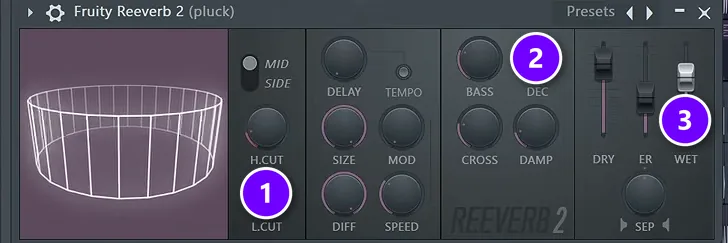
The reverb method from Mix Elite’s free FL Studio course works for ambient as it is. First, switch off any reverb built into the synth preset. Then put Fruity Reeverb 2 on the sound’s mixer track instead, so you control it:
- Raise the low cut (1). As Max puts it: “always increase the low cut so we don’t mess up the lowest frequencies.” A low cut removes the deep rumble that reverb adds.
- Turn the decay (2) way up. On a synth pluck in the course’s dance track, the decay goes a lot longer to build a soundscape. On ambient pads you can push it to several seconds, until one chord melts into the next.
- Raise the wet fader (3), which sets how much reverb you hear. Ambient can take far more than a pop mix, as long as the low cut keeps the bottom clean.
Delay: echoes that bounce
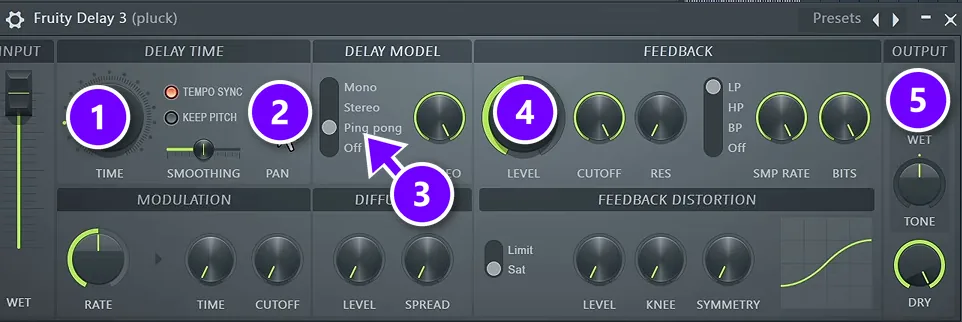
Next, add Fruity Delay 3, which the course calls the most popular stock delay. Check four things: the time, the delay model, the feedback and the wet amount. In the course’s example:
- Set the TIME (1). The course uses 3.0, which sets the gap between the echoes.
- Turn PAN (2) to the left or right. Ping pong only bounces once the sound is panned.
- Choose Ping pong (3) in the DELAY MODEL section, so the echoes bounce from one ear to the other.
- Raise the feedback LEVEL (4) for more repeats, and set the WET knob (5) to taste.
For ambient, long feedback is your friend: the echoes pile up into a soft wash behind the pad. Put the reverb after the delay, and the echoes blur into the room as well.
Long reverb on everything turns a mix to mud. Keep the low cut up on every reverb, and leave one sound a little drier, like a piano or a bell, so the ear has something to hold on to.
Which effects turn a synth chord into a huge pad?
Chain a chorus, a delay and a long reverb, in that order. The chorus widens and thickens the chord, the delay’s high feedback piles up echoes, and the reverb, with its decay way up and its low cut on, blurs it all into one wash. Give the synth a slow attack and release too, so each chord swells in and fades out.
In FL Studio, the stock plugins cover the whole chain:
- Fruity Chorus for width and thickness.
- Fruity Delay 3 with the feedback turned up, set up as above.
- Fruity Reeverb 2 with a long decay. The free Valhalla Supermassive is a reverb made for huge, lush spaces.
- Fruity Granulizer, from the list above, when you want the chord smeared into a cloud.
Some reverbs also have a shimmer mode, which adds a copy of the tail an octave higher for a glassy, bright wash.
How do you add movement to ambient music without drums?
Keep changing something, slowly. Automate a filter opening on the pad over 16 to 32 bars, swell the reverb’s wet level, fade layers in and out, and let the panning drift. Without that, the same pad sits at the same volume, brightness and width for minutes, and the ear stops listening.
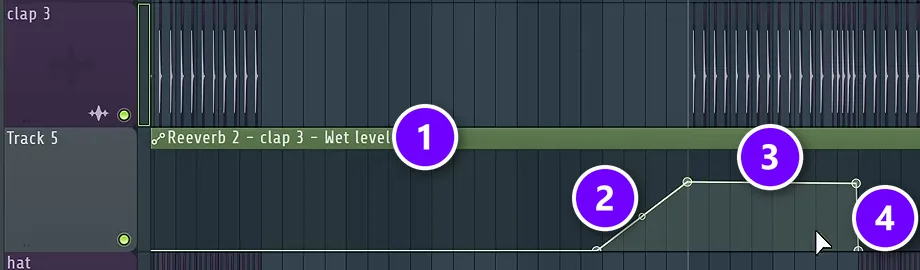
In FL Studio, slow change comes from automation: a line that moves a knob for you over time. Every knob in FL Studio can be automated, so anything you can turn, you can make drift.
- Move the knob you want to change, like the reverb’s WET fader or a filter on the pad.
- Right-click it and choose Create automation clip. You can also move the knob and use Tools > Last tweaked > Create automation clip.
- Find the new clip in the Playlist (1). Right-click to add points, and draw a slow rise (2) up to the level you want (3).
- Stretch the shape out. In the course’s dance track, the reverb swells over four bars and cuts off when the drop hits (4). In ambient, slower is better: try 16 or 32 bars.
- If you hear the effect before the clip starts, extend the clip back to the start of the song. It’s a quick, common workaround for an FL Studio setting.
Good things to automate in an ambient track:
- A low-pass filter (it cuts the highs) slowly opening on a pad, so the sound brightens without anyone noticing.
- The reverb’s wet level, swelling up at the end of a section and falling back.
- The volume of each layer, so sounds fade in and out instead of starting and stopping.
- Panning that drifts slowly from one side to the other.
Three more ways to add movement without a beat:
- Loops of different lengths. Put a 7-bar texture over an 8-bar pad, and the two line up differently on every pass, so the music doesn’t repeat exactly for a long time.
- Field recordings. A long recording of rain, wind or birds never repeats exactly, so it keeps small details moving under the music.
- A soft arpeggio drowned in delay. An arpeggio plays a chord’s notes one after another. Turn its dry sound down and let the echoes carry it, and you get a gentle pulse with no drums.
How do you arrange an ambient track?
Ambient has no verse or chorus to lean on, so think in sections of 8 or 16 bars where one thing changes. Add a layer, take one away, open a filter, or move to the next chord. Here’s a simple map you can copy:
- Intro: the drone and a field recording on their own.
- Chords enter: the pad fades in over a long volume automation.
- Detail: a few soft piano or bell notes on top.
- Fullest point: every layer plays, with the reverb and delay at their biggest.
- Strip back: the layers leave one by one.
- Ending: the drone and the reverb tail fade into silence.
There’s no fixed length. Plenty of ambient pieces run longer than a pop song, because slow changes need time to land. A slow tempo, somewhere around 60 to 90 BPM, keeps the grid out of your way, or you can switch off the metronome and play freely. If you add a beat under your pads later, the 8-bar thinking in our EDM song structure guide carries straight over.
How to mix and master ambient music
Mixing ambient is mostly about staying clear while everything sits in reverb. Use a low cut (also called a high-pass filter) on every layer except the drone, so only one sound owns the bottom end. Watch the low mids too, the area where pads and reverb tails pile up and turn muddy.
Keep the dynamics. Ambient is quiet music, and a heavy limiter flattens the swells you automated. Streaming apps turn loud tracks down anyway: Spotify normalizes playback to -14 LUFS by default, so there’s no prize for mastering ambient loud.
One last check before you export: play it at a very low volume. Ambient should still feel good when it’s barely there, because that’s how many people will hear it.
Tips for your first ambient track
- Start with the drone, and build everything else on top of it.
- Change one thing at a time. When two things change at once, neither one feels special.
- Leave space. Fewer notes ring longer and sound bigger.
- Record long takes with the metronome off, then keep the best minute.
- Copy one idea from an ambient track you love, like a sound or a section length, not the whole track.
- Finish it. A simple three-minute piece that you export teaches you more than a perfect loop you never close.
Nothing here goes to waste if you switch genres later, either. Ambient pads and swells make great intros and breakdowns in dance music, so they carry over the day you start making house music.
DAY 2 OF THE 7-DAY MUSIC PRODUCER COURSE
Write chords and melodies that set the mood
Day 2 of the 7-Day course covers the music theory you need for fresh-sounding harmonies, a 3-step formula for writing chord progressions, 4 easy ways to write melodies, and where to find pro-quality instruments (paid and free) and how to install them. You also download 30+ of the best chord progressions and 20+ free plugins and tools. It’s taught in FL Studio (the free trial works), about 45 minutes a day, and the page says the techniques work in any genre. On day 7 a pro gives you feedback on your finished track. It’s $27, and you get 60 days to decide if it was worth it.
Frequently asked questions
What is ambient music theory?
Ambient music theory is ordinary music theory used to avoid tension. Producers pick calm scales or modes like Lydian, build soft 7th and 9th chords, hold a drone note underneath and change chords slowly. They skip the strong move from the fifth chord back to the first, which makes music sound like it’s ending, so the harmony keeps floating.
How do you add movement to ambient music without drums?
Automate slow changes: open a filter on the pad over 16 to 32 bars, swell the reverb’s wet level, fade layers in and out and let the panning drift. Loops of different lengths, field recordings and a soft arpeggio drowned in delay add movement too, without a single drum hit.
Which effects make a synth chord sound like a huge pad?
A chorus to widen the chord, a delay with high feedback and a long reverb with a low cut, in that order, plus a slow attack and release on the synth. In FL Studio that’s Fruity Chorus, Fruity Delay 3 and Fruity Reeverb 2. Valhalla Supermassive is a free reverb made for huge, lush spaces.
How do you make ambient music if you don’t know music theory?
Use C major or A minor, which use only the white keys, so every white key you play fits. Hold one low note as a drone, build chords by stacking every other white key (like A, C, E and G), let each chord ring for several bars, and let long reverb and delay blur everything together.
What BPM is ambient music?
Ambient has no set tempo. Many producers work somewhere around 60 to 90 BPM so the grid stays slow, and some switch the metronome off and play freely. Because most ambient has little or no beat, the tempo matters much less than how slowly the sounds and chords change.





