



“…making sure every transient is in lockstep with every bass transient.”
To make tech house, set your tempo between 124 and 128 BPM and build a four-on-the-floor groove: a short, punchy kick, claps on 2 and 4, swung hi-hats and plenty of percussion. Add a short, bouncy bassline that ducks under the kick, arrange it in 8-bar blocks with a long DJ intro and outro, and finish it with vocal chops and FX.
Tech house is the sound that keeps a club moving at 3 a.m. without one giant drop. There’s a groove that keeps rolling, a bassline you can’t stop nodding to and a vocal chop that’s still in your head on the drive home. It sounds simple, and that’s the catch. With so few parts, each one has to be right.
Below is the full recipe in FL Studio, built from Mix Elite’s videos. You’ll get the tempo and key, the bar-by-bar song structure DJs expect, the drum groove, a plucky bass patch from FL Studio’s free 3x Osc synth, a fix for flat basslines and two ways to chop a vocal. Every step has a real screenshot.
Table of Contents
What is tech house?
Tech house is a blend of techno and house. It takes the four-on-the-floor beat and the swing of house and mixes in the tougher drums and stripped-back sound of techno. Most tracks have very few chords. The bassline, the percussion and one catchy vocal or synth hook do the work.
It’s made for DJs first. That’s why tech house tracks have long, simple intros and outros, change in small steps every 8 bars and keep the same groove for five or six minutes. If you’re new to house in general, start with our guide on how to make house music, then come back here for the tech house twist.
What are the essential elements of a tech house track?
Fewer than you’d think: a short, punchy kick with grit in the mids, layered claps on 2 and 4, open and closed hi-hats, a few percussion hits like shakers, rims and congas, a short plucky bassline, and one hook, usually a vocal chop or a chord stab. Risers, sweeps and crashes mark the changes.
Each section below covers one of these parts, in the order you’d build them. Choose short, dry one-shots for the drums, since with so few parts every hit needs its own space. Ready-made loops work too. Just check whether a bass or music loop already has sidechain pumping printed in.
What BPM is tech house?
Most tech house sits between 124 and 128 BPM, and 125 or 126 BPM is a common place to start. Go slower and it drifts toward deep house. Go faster and it starts to feel like techno.
Knowing what the tempo means in real time makes the structure below easy to plan. At 126 BPM:
- 1 bar lasts about 1.9 seconds.
- 8 bars last about 15 seconds.
- 32 bars last about one minute.
What key is best for tech house?
There’s no single best key, but a lot of tech house is written in minor keys, and F minor, F sharp minor and G minor are popular choices. The reason is the bass. In those keys the lowest root note lands around 44 to 49 Hz (F1 is about 43.7 Hz and G1 about 49 Hz), right where club subwoofers push the most air.
Pick the key that suits your bass sound and your vocal sample. If the low end feels weak or muddy, move the whole track up or down a semitone or two and listen again.
Tech house song structure, bar by bar
This is where most producers get stuck. Tech house works in 8-bar blocks: every 8 bars, something comes in, drops out or changes. Here’s a common layout that works.
- Intro, 32 bars. Drums and a hint of bass. Keep bars 1 to 16 minimal for the DJ, then add percussion and the groove in bars 17 to 32.
- Breakdown and build, 16 bars. The kick drops out, the vocal or a chord stab comes in, and a filter or riser builds tension.
- Drop 1, 32 bars. Full kick and bass. Split it into four 8-bar blocks: the full groove, then add the hook, then filter or mute something, then a variation.
- Breakdown, 16 bars. No kick. The vocal, pads and FX keep the energy floating.
- Build, 8 bars. Risers, clap rolls and a filter sweep. Many producers mute the kick for the last bar, so the drop hits harder.
- Drop 2, 32 bars. The groove returns with a twist, like a new bass variation, an extra percussion layer or a different vocal chop.
- Outro, 32 bars. Strip it back to drums, so the next DJ has a clean runway.
That’s 168 bars, or about 5 minutes and 20 seconds at 126 BPM. A radio edit trims the intro and the outro to 8 or 16 bars each.
Build the intro slowly. The arrangement advice in Mix Elite’s free FL Studio course fits tech house perfectly. As Max, the founder of Mix Elite, puts it: “We’d like to introduce the mood first and then go slowly”. Bring the hats and percussion in a few at a time, and save the full kick and bass for the drop.
To copy the exact layout of a tech house track you love, map it with markers using the reference-track method in our EDM song structure guide, which shows every click with screenshots.
How to make a tech house drum groove
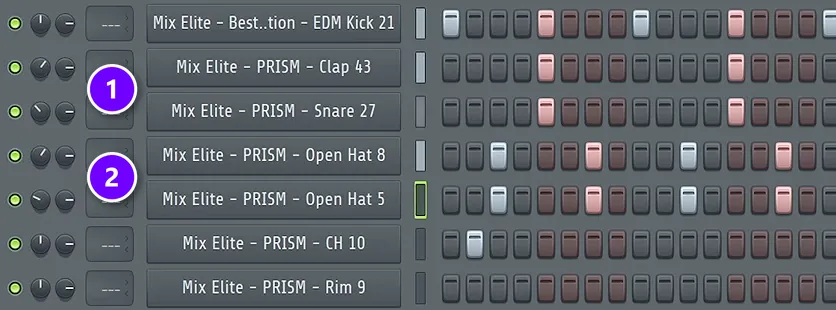
Start with the house pattern from Mix Elite’s free FL Studio course: kick on every beat, clap on beats 2 and 4, an open hat on every off-beat and a closed hat in between. Our house drum walkthrough shows it step by step in the Channel Rack. Then make it tighter and busier, which is what turns house drums into tech house.
- Pick a short, punchy kick (more on that below) and keep it on every beat.
- Layer two claps, or a clap and a snare, on beats 2 and 4 (1 in the screenshot), and two open hats on the off-beats (2). Pan each layer a little to the left or right.
- Fill the gaps with percussion: shakers, rims, congas or a ride. Place these hits just before the next beat, which gives the groove that classic disco push.
- Turn up the swing knob in the Channel Rack to about 40%, the setting the course uses, so the in-between notes shuffle (see it at 1:21:46).
- Change the velocity of your hats so they don’t sound like a machine.
That last step matters more than it looks. “You don’t want to sound too robotic. I would put down the velocity of every other one,” Max says about his hi-hats. It doesn’t have to be perfect, just human.
Add a ping-pong echo to your percussion
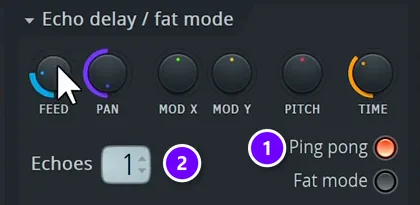
This trick from a Mix Elite short adds a second rhythm without writing a single new note. It works best on percussion and hats.
- Click the percussion channel to open its settings, and go to the wrench tab, Miscellaneous functions.
- Under Echo delay, switch on Ping pong (1).
- Set Echoes to 1 (2).
Each hit now plays one echo that bounces to the other side. It’s a quick way to add another layer of rhythm to your drum loop.
How to choose and shape a tech house kick
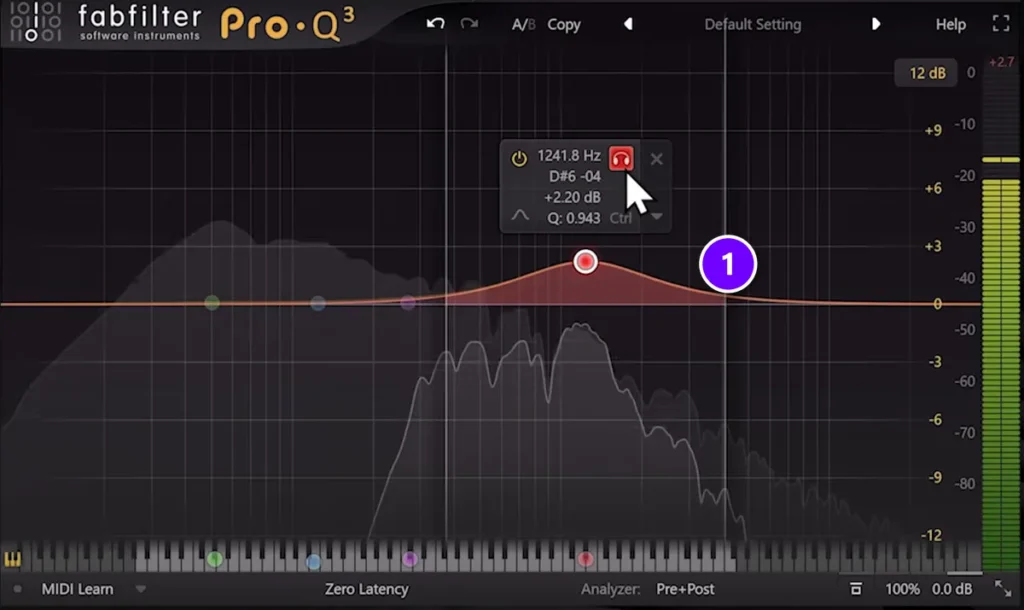
The kick is the heartbeat of tech house, so choose it with care. Mix Elite’s kick masterclass explains that every kick has three parts: the transient (the click at the very start), the body and the tail, which carries the low end.
For tech house you want a tight kick with plenty of mids, because that’s where its grit lives. On a tech house track, the masterclass says, the mids are “where your kick should shine”.
- Match the length to the bass. With a long, sustained bass, use a shorter kick. With a short, plucky bass, a longer kick is fine. Either way, the kick’s tail shouldn’t overlap the bass.
- Lift the mids gently if the kick gets lost. In the screenshot, a wide bell adds about 2 dB around 1.2 kHz (1). The video uses FabFilter Pro-Q, and FL Studio’s own Fruity Parametric EQ 2 does the same job.
- Judge it in the full mix. A kick that sounds great on its own can poke out once everything plays.
- Layer only the click. If you want more attack, add another kick’s transient, never a second full kick. The rule is simple: never layer the sub frequencies.
- For a darker rumble, send the kick to a long reverb and sidechain that reverb to the dry kick, so it only blooms between the hits. The masterclass calls this how you make “those techno rumbles”.
If the kick and bass still fight, our guide on how to mix a kick and 808 has fixes that work just as well for a tech house bass.
How to write a tech house bassline
Tech house basslines are short, bouncy and repetitive. They often stay on one or two notes and do their talking with rhythm. As Max says in Mix Elite’s free course, “basses love off-beat as well, especially in house drums”.
- Put most notes on the off-beats, or on the 16th notes around them, so the bass answers the kick instead of fighting it.
- Keep the notes short. The silence between them is what makes the line bounce.
- Move to a new note only every bar or two, usually the root of your chord or the note a fifth above it.
- Write one bar, copy it with Ctrl + B, and change a single note in the copy for variation.
Then give it the right sound. One of Mix Elite’s house shorts builds a plucky house bass in FL Studio’s free 3x Osc synth in a few clicks.
Set up the oscillators
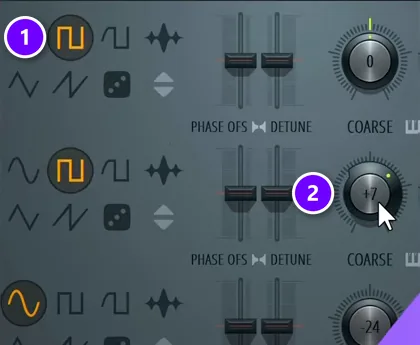
- Use at least two oscillators. The first one here is a square wave (1).
- Turn the second oscillator’s Coarse knob to +7 semitones (2). That’s a perfect fifth above the first one, and it makes the bass sound fuller.
Shape the pluck with the filter envelope
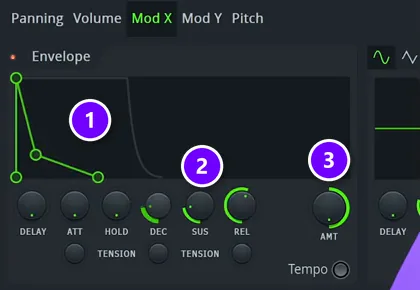
- Open the channel’s envelope tab. On the Volume envelope, set Attack to 0, Decay and Sustain to 100% and Release to about 20%.
- Turn the filter cutoff all the way down, so you hear nothing yet.
- Switch to Mod X, which controls the filter cutoff, and give its envelope a fast decay (1).
- Set Decay and Sustain to about 20% and Release to about 50% (2).
- Turn the envelope amount (AMT) up to 100% (3). Now every note opens the filter and closes it again, and that’s the pluck.
- Set the channel to Mono so the notes don’t overlap, and add a little reverb with the low end cut, some pre-delay and a short decay.
Want to know why this works? The fundamentals of sound design explain oscillators, envelopes and filters in plain English.
How to sidechain the bass in tech house
Even a short bass needs to duck under the kick. Sidechain compression turns the bass down for a split second each time the kick hits, so the two never pile up. Aim for about 7 to 10 dB of ducking, with a ratio around 4:1 on Fruity Limiter in COMP mode.
The sidechain step in our house guide shows the exact setup with a screenshot. For other ways to do it, see the top 3 ways to sidechain in FL Studio.
Ready-made tech house loops sometimes have the pumping already printed in. Look at the waveform: if it dips on every beat, it’s already sidechained, so don’t stack more ducking on top.
Why does my tech house bassline sound flat?
Usually the notes are too long, sit on the beat with the kick, or never change. Shorten the notes, move them to the off-beats, duck the bass 7 to 10 dB under the kick, and give the sound a fast filter envelope so each note plucks open and shut.
Run through these five checks, in this order:
- Notes too long. Long notes blur into one drone. Cut them short, because the gaps are what make the line bounce.
- Notes on the kick. A bass that hits with the kick fights it. Move most notes to the off-beats or the 16th notes around them.
- No ducking. Without sidechain, the bass and the kick pile up into one dull thud. Duck the bass each time the kick hits.
- A static sound. If every note sounds the same from start to end, nothing moves. Use the filter envelope from the 3x Osc patch above, so each note opens and closes.
- The same bar forever. Copy the bar with Ctrl + B, change one note in the copy, and move to a new note every bar or two.
How to make tech house vocal chops
Vocal chops are short pieces of a vocal, moved around and played like an instrument. They’re all over tech house. The video below shows two ways to make them in FL Studio.
Method 1: Slice the vocal with Slicex
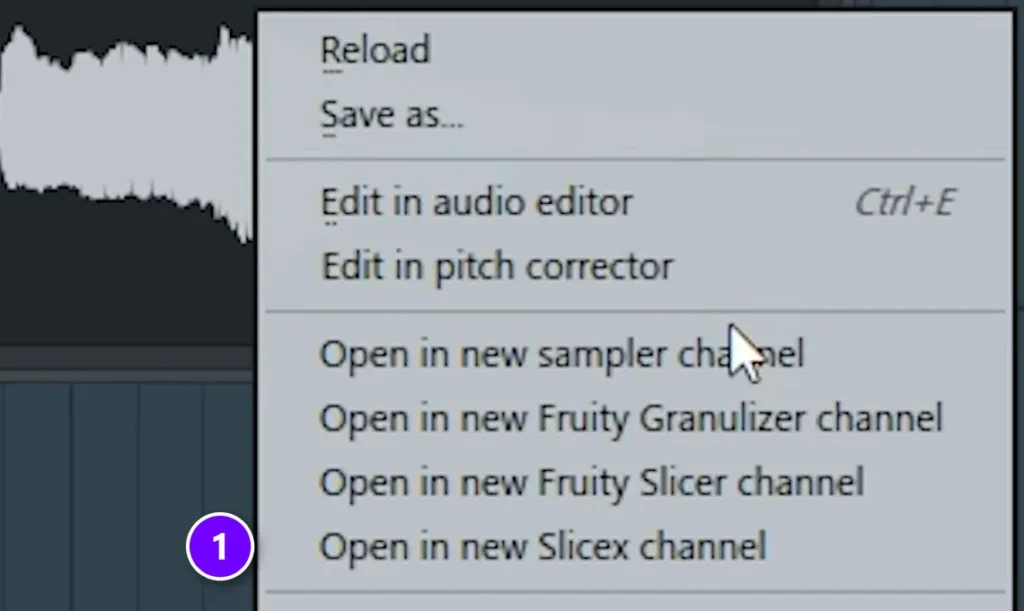
- Double-click your vocal sample, right-click its waveform and choose Open in new Slicex channel (1 in the first screenshot). Slicex is FL Studio’s slicer.
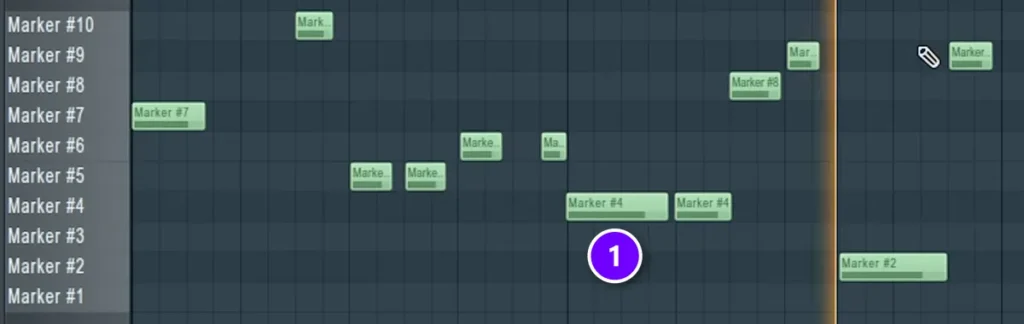
- Open the Piano roll. Every row is now one slice of the vocal, named Marker #1, Marker #2 and so on, so each note you draw plays one piece (1 in the second screenshot).
- Draw a simple rhythm with the slices you like.
- In the Piano roll’s Control lane, switch to Note fine pitch and drag each note until the chops form a little melody.
- Send the Slicex channel to its own mixer track. The video adds the free OTT compressor at about 30% depth, some reverb, a low cut, a small cut in the mids and a limiter at the end.
Method 2: Auto-slice the vocal in the Playlist
The second way is faster. Open the menu of the vocal clip in the Playlist and choose Chop, then Sharp auto-slicing. FL Studio cuts the clip at every peak. Keep the pieces you like and move them into a new rhythm. Make sure to leave some longer original parts in, too.
The outside-the-club effect
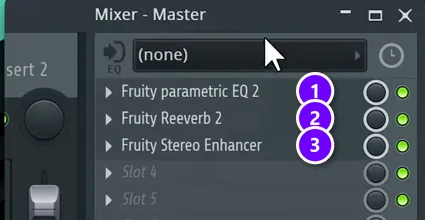
This trick from another Mix Elite short makes the track sound like it’s playing in the next room, then slams it back in for the drop. On the Master mixer track, load three plugins.
- Fruity Parametric EQ 2 (1), set to cut away the highs.
- Fruity Reeverb 2 (2) with the low cut up, a medium room size, almost no decay, 50% dry and 100% wet.
- Fruity Stereo Enhancer (3) with stereo separation at 0, which squeezes the sound toward mono.
Right-click the EQ’s mix level, create an automation clip and draw it down to 0% exactly where the drop starts. Then right-click the mix level of the other two plugins, choose Link to controller and pick the same clip. All three switch off together, and the full track hits at once.
FX samples do the rest. Drag sweeps and crashes straight into the Playlist where a new section starts. They usually come in too loud, so turn them down, and drag the clip’s corner to fade them in. Mix Elite’s free FL Studio course shows this at 1:38:24.
How to mix a tech house track
Tech house mixes are simple on purpose. Get these five things right and the track will hit on a club system.
- Kick and bass first. They should be the loudest parts. Set everything else around them.
- One sound in the sub. Only the kick and the bass get deep low end. Cut the lows from percussion, vocals and FX.
- A mono low end. Keep the kick and bass centered, so they hit just as hard on a club system as in your headphones.
- Light drum compression. The course’s drum group setting is 2:1 with 3 to 4 dB of reduction. Go easy on purpose, so the drums keep the groove going. Our guide to mixing drums covers the rest.
- A reference track. Compare your mix with a tech house track you love, at the same volume.
For the whole mixing process, follow the mixing step in our house music guide.
Start with one 16-bar loop tonight: kick, claps, hats, one percussion layer and a two-note bassline. When it makes you nod your head on its own, lay out the 168-bar structure and fill it in.
THE 7-DAY MUSIC PRODUCER COURSE
Day 3: build the drums, then the whole track
Day 3 of Mix Elite’s 7-Day Music Producer Course covers writing drums and arranging your track: how to build drum patterns in seconds, how to pick sounds that hit, and one simple tactic for turning ideas into full songs. It’s made for EDM, house, trap, hip-hop and pop and taught in FL Studio (the free trial works). Plan on about 45 minutes a day, and on day 7 a pro gives you personal feedback on your finished track. It’s $27, and you get 60 days to decide if it was worth it.
Frequently asked questions
What BPM is tech house?
Most tech house runs between 124 and 128 BPM, and 125 or 126 BPM is the most common starting point. At 126 BPM one bar lasts about 1.9 seconds, so a 32-bar intro is roughly one minute. Slower tracks drift toward deep house, and faster ones start to feel like techno.
What is the song structure of a tech house track?
Tech house works in 8-bar blocks. A common layout is a 32-bar intro, a 16-bar breakdown and build, a 32-bar first drop, a 16-bar breakdown, an 8-bar build, a 32-bar second drop and a 32-bar outro. That’s 168 bars, or about 5 minutes and 20 seconds at 126 BPM.
Why does my tech house bassline sound flat?
Most flat basslines have notes that are too long, land on the beat with the kick, or never change. Keep the notes short, put most of them on the off-beats, sidechain the bass to the kick for about 7 to 10 dB of ducking, and use a fast filter envelope so every note plucks.
What sounds do you need for tech house?
A short, punchy kick, layered claps on beats 2 and 4, open and closed hi-hats, percussion like shakers, rims and congas, a short plucky bass, and one hook such as a vocal chop or chord stab. Add risers, sweeps and crashes to mark each new section.
What’s the difference between house and tech house?
Tech house is a mix of house and techno. It keeps the four-on-the-floor beat and swing of house, but uses tighter, punchier drums, more percussion and fewer chords. The groove and the bassline carry the track, usually with a short vocal hook, and the tracks are built for DJs with long intros and outros.





