No, you don’t need a music theory degree to make music, but you do need a few basics. Music theory for producers comes down to a handful of things: notes and octaves, major and minor scales, keys, chords, chord progressions, and how a melody and a bass line sit on top. FL Studio’s piano roll can even show you the right notes while you learn them.
This guide teaches them in the order you’ll use them when you make a song, the way Max explains it in his 17-minute crash course, with real screenshots from FL Studio. Max’s promise: build it in the right order, and “there’s just no way you’ll write a bad sounding chord progression.”
Table of Contents
Do you need music theory to make music?

Not to get started. Lots of producers make beats by ear, and nobody checks your theory before they press play. What theory gives you is speed. Instead of clicking random notes until something sounds right, you know which 7 of the 12 notes fit your song and which chords you can build from them.
You can also skip a lot of what music classes teach. Reading sheet music is the big one. The staff, the clefs and the note symbols are for players who read music off paper. In a DAW (a digital audio workstation, the program you make songs in, like FL Studio), every note is a bar on a grid that you can see, hear and drag. Counterpoint and rare scales can wait too.
And theory won’t make your music sound like a formula. It explains why things sound good, and it doesn’t stop you from breaking the rules. Max even turns off the tool that keeps his notes inside the scale most of the time, because he likes the “happy accidents” he gets from notes outside it.
Music theory for producers: what to learn first
Think of it as music theory for beginners, trimmed down to what a producer really uses. Learn it in the order you’ll use it, because each step builds on the one before:
- Notes and octaves: the 12 notes that repeat up the keyboard.
- Half steps and whole steps: the distance between two notes.
- Major and minor scales: the 7 notes that fit your song.
- Keys: a scale plus its home note, like C minor.
- Chords: three or more scale notes played together.
- Chord progressions: chords in a row, counted with Roman numerals.
- Melody, bass and rhythm: what goes on top, what goes underneath, and when it plays.
Max covers most of this list in the video below, building every chord live in FL Studio.
Notes and octaves: the 12 keys that repeat
Everything starts on a piano keyboard. Max puts it this way: “Just like letters make words and sentences, notes come together to create melodies and harmonies.” The white and black keys are the notes.
Look closely and you’ll see a pattern that repeats every 12 keys. Those 12 notes make an octave. Once you pass the 12th key, the pattern starts over at a higher pitch, so the next C sounds like the first C, only higher.
The white keys use the letters A to G. Each black key borrows the name of a white key next to it, plus a sign. C# (C sharp) is the black key just above C, and Db (D flat) is the same key, seen from the D side. In the screenshots below you’ll see names like C5 and G#6. The letter is the note. The number is the octave.
What are half steps and whole steps?
The distance from one key to the very next one, white or black, is a half step, also called a semitone. Two half steps make a whole step. C to C# is a half step. C to D is a whole step. E to F is a half step too, because there’s no black key between them.
Why care? Tutorials use these words all the time, and they’re how scales are built. Every scale is just a recipe of whole and half steps.
Major and minor scales: which notes fit your song
You almost never use all 12 notes in one song. You pick 7 of them, and that set is a scale. Max compares it to choosing a few colors before you paint a picture: the scale sets the mood. The two you need are major, which sounds happy and bright, and minor, which sounds more serious or sad.
- Major: whole, whole, half, whole, whole, whole, half. Start on C and you get C D E F G A B, all white keys. C is the root, the note the scale is built from, so this is C major.
- Natural minor: whole, half, whole, whole, half, whole, whole. Start on A and you get A B C D E F G, the same white keys, so this is A minor.
Notice that C major and A minor share the same 7 notes. Every major scale has a minor twin like this, called its relative minor, which starts three half steps lower. Only the home note changes, and with it the mood.
Which one should you use? Max’s answer: “In today’s music, pop, hip-hop, R&B, and any electronic music, minor scale is definitely more popular.” There are a few kinds of minor. The two you’ll meet most are natural minor and harmonic minor, which raises the 7th note by a half step. They differ by only one or two notes, and harmonic minor is Max’s personal favorite.
How to show a scale in FL Studio’s piano roll
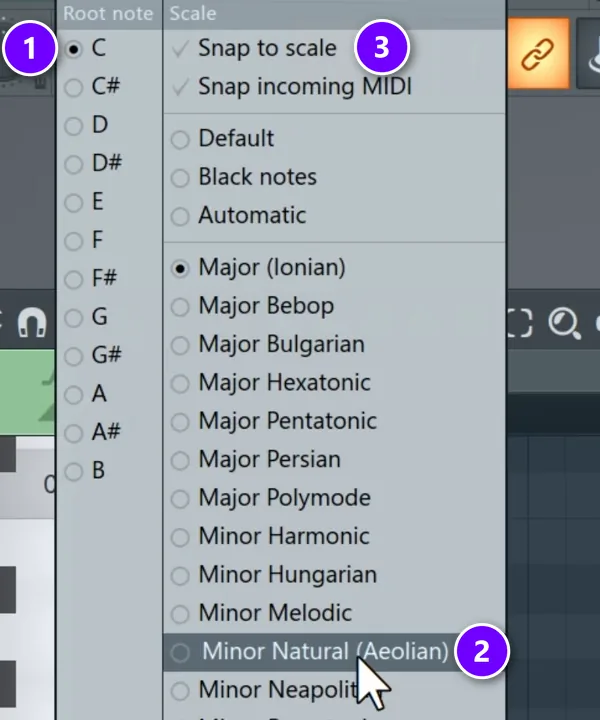
You don’t have to memorize any of these step patterns, because FL Studio’s piano roll can light up the right notes for you. Right-click the small note icon in the piano roll’s toolbar to open the scale menu. Pick the root note on the left (1), then the scale, for example Minor Natural (2). The rows of your scale get highlighted, and the root note is marked darker.
Left-click the same icon to turn on Snap to scale (3). Now FL Studio only lets you place notes on scale rows, which is handy when you want to work fast. The menu also lists names like Major (Ionian) and Minor Natural (Aeolian). Those are modes, which you can learn later.
What is a key? (and the circle of fifths)
A key is a scale plus its home note. C minor means the notes of the minor scale, starting on C, with C as the note that feels like home. When a producer says a beat is in C minor, every chord, melody and bass note comes from those 7 notes. That’s also why loops and 808 samples often have their key in the file name.
The circle of fifths is a map of all 12 keys. Picture a clock with C major at the top. Each step clockwise jumps up a fifth (7 half steps) and adds one sharp: G, D, A, E, B. Each step counterclockwise adds one flat: F, Bb, Eb, Ab, Db. At the bottom, F# and Gb meet as the same key.
| Major key | Sharps or flats | Relative minor |
|---|---|---|
| C | none | A minor |
| G | 1 sharp | E minor |
| D | 2 sharps | B minor |
| A | 3 sharps | F# minor |
| E | 4 sharps | C# minor |
| B | 5 sharps | G# minor |
| F# / Gb | 6 sharps / 6 flats | D# / Eb minor |
| Db | 5 flats | Bb minor |
| Ab | 4 flats | F minor |
| Eb | 3 flats | C minor |
| Bb | 2 flats | G minor |
| F | 1 flat | D minor |
Here’s how producers use it:
- Find chords that fit. The two keys next to yours are your 4 and 5 chords. In C major, that’s F and G.
- Find the relative minor. Each major key shares all its notes with one minor key, listed in the right column.
- Change key smoothly. Neighbors on the circle share all but one note, so a move of one step sounds natural.
- Borrow a chord. A chord from a nearby key adds color without sounding wrong.
You don’t need to memorize the circle to make beats. It earns its place later, when you want to change key or borrow a chord.
How to build chords from a scale
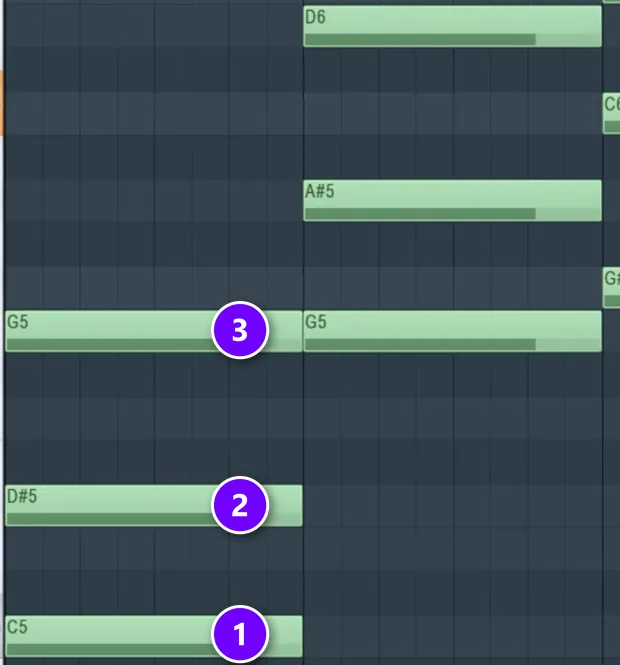
A chord is three or more notes played at the same time. The easy way to build one is to stack every other note of your scale. Max calls it “skip one, place one”: start on a root note, skip the next scale note, place one, skip one, place one.
In the screenshot, the scale is C minor. The root is C (1). Skip D and place D# (2). Skip F and place G (3). That’s a C minor chord. The next chord does the same thing from G, giving G, A# and D.
Because you only stack scale notes, the scale decides whether each chord comes out major, minor or diminished (a tense, unstable chord), so you don’t have to work it out. A 7-note scale gives you 7 basic chords. If the chords end up too high, select everything and press Ctrl + Down arrow to move them all an octave lower.
Add a 7th for a richer chord
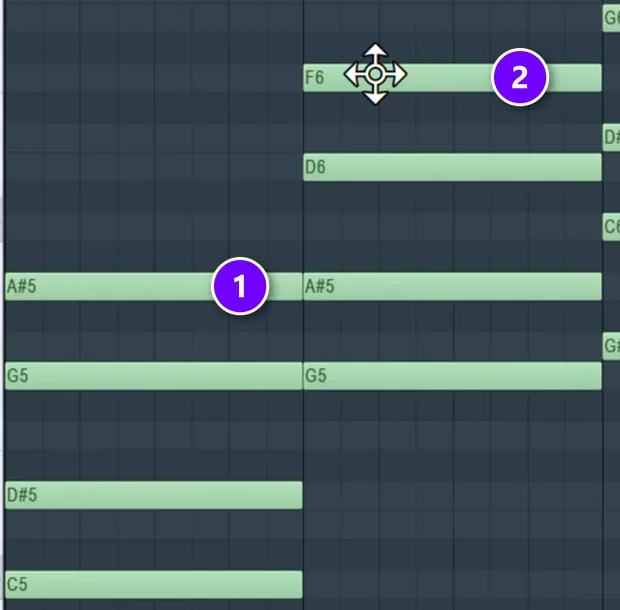
Stack one more note the same way, skip one and place one, and you get a four-note chord called a 7th, because the new note is seven scale notes up from the root. In the screenshot, A# is the 7th on the C chord (1) and F is the 7th on the G chord (2). Max’s reaction when he plays them: “Now you’re getting jazzy, right?” He adds that piling on even more notes doesn’t really make the chord sound any better.
Double the root and fix the voicing
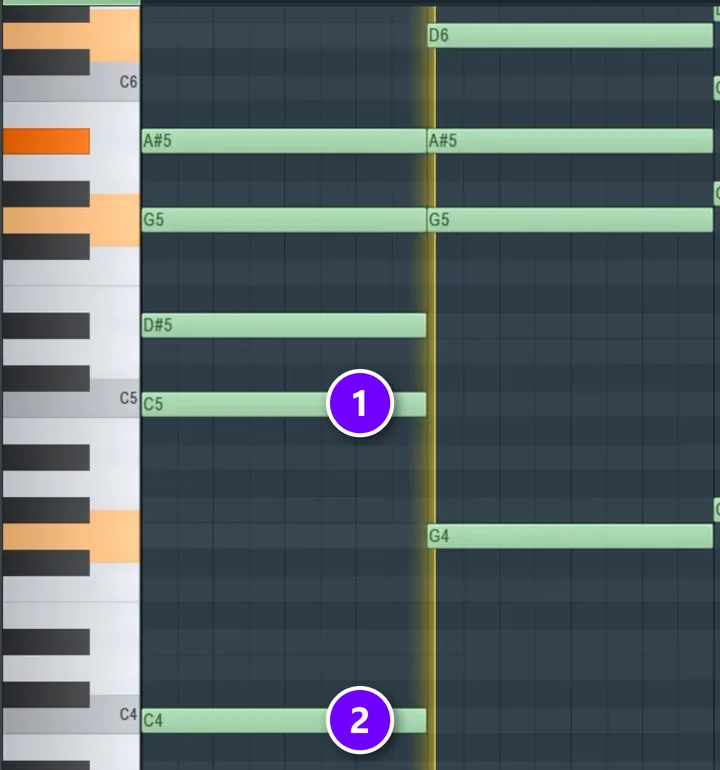
Two small moves make plain chords sound finished. First, copy each root note an octave lower to make the chord fuller. Here C5 is the root (1) and C4 is its copy (2). Hold Ctrl + Shift and click each root to select it, then hold Shift and drag to copy the notes, and drop the copies one octave down.
Second, fix the voicing, which is the octave each note sits in. If the top note jumps far from one chord to the next, the chords sound jumpy. Hold Ctrl, drag a box around the high notes and press Ctrl + Down arrow to drop them an octave. Same notes, smoother flow.
How chord progressions work (Roman numerals)
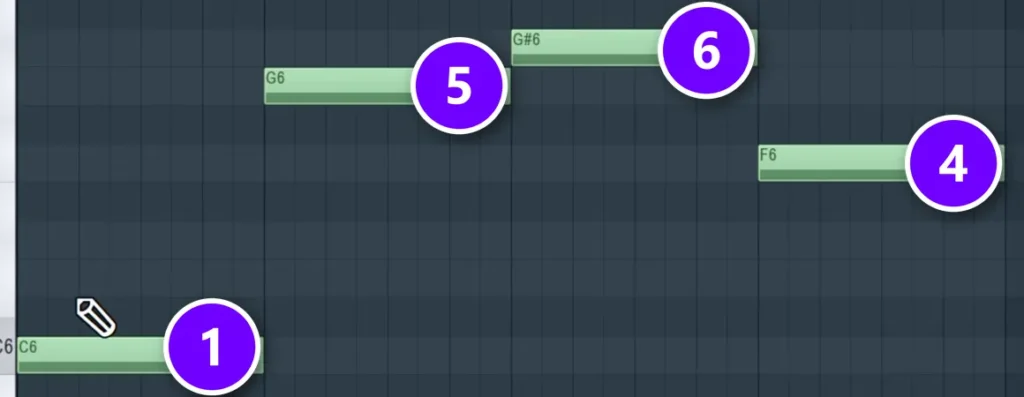
A chord progression is a few chords played one after another, usually on repeat. Max calls it “the backbone of your song.” Most songs use just four chords on a loop, and some use only two.
Musicians count chords with Roman numerals. Count up the scale notes from your root, and the root is 1. Max’s first example is 1, 5, 6 and 4. In C minor, that’s C (1), G (5), G# (6) and F (4). Place those four root notes first, then build a chord on each one with skip one, place one.
Which root notes should you pick? Max is honest that there are no fixed rules for it. He tried 1, 2, 3, 4 and then a totally random set, and both sounded good once the chords were built and voiced. In his words, “The hard part is getting the right progression because it will define the vibe of your track.” Three progressions from his lesson to start with:
- 1, 5, 6, 4 in C minor, his first example.
- 1, 6, 2, 5 in C# major, which he says works for a ballad or a happier track.
- 1, 6, 2, 5 again in C# minor, with harmonic minor on the last chord.
That last one is worth a closer look. In natural minor, the final chord sounded a little off to him, so he switched to harmonic minor, which raised one note and fixed it. He says the result works for melodic trap or any emotional kind of song. For the full click-by-click method, see our guide on how to make chords in FL Studio.
How to write a melody that fits your chords
A melody is the part people hum. The simplest way to write one that fits is to build it from notes that are already in your chords. In his free beginner course on YouTube, Max shows four ways to write melodies, and this is the first and easiest one.
Show your chords as ghost notes
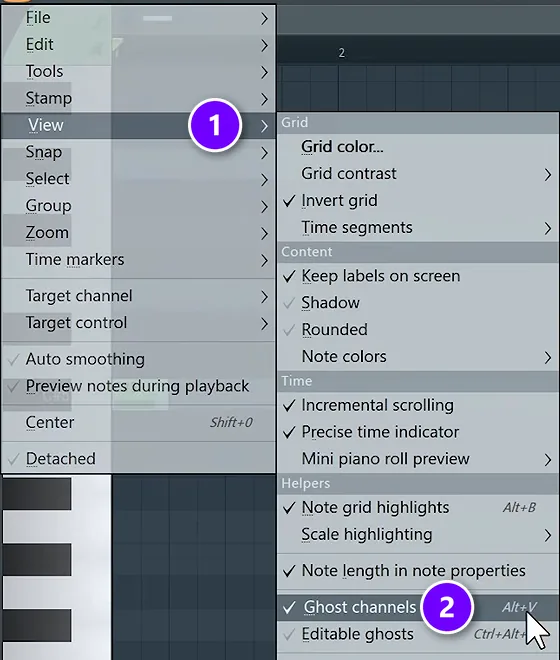
Open the piano roll for your melody instrument. Click the menu at the top left, go to View (1) and turn on Ghost channels (2), or press Alt + V. The chord notes from your other patterns now show up as faint gray notes behind your melody.
Use chord notes, and change the rhythm every bar
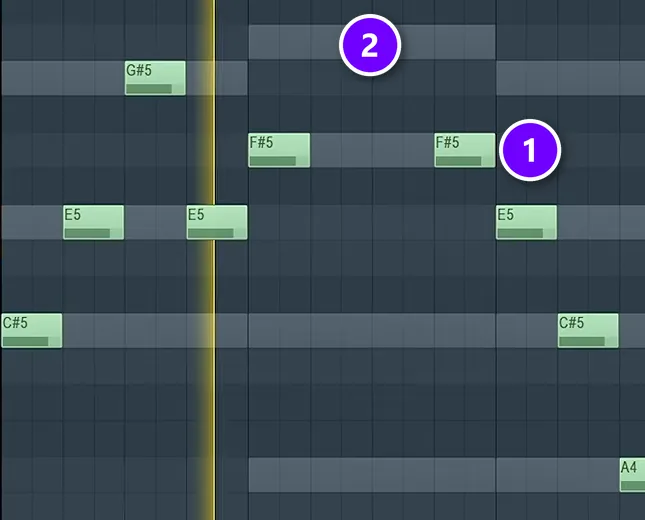
Now place melody notes on top of the gray ghost notes (2), like the F#5 note here (1). A small step off a chord note is fine too, as long as you stay in the scale. The bigger rule is rhythm. In Max’s words, “the idea here is to never keep the rhythm all the time the same.” Give every bar a slightly different rhythm.
Two more tricks from the same lesson. Write a short idea, copy it two or three times, and change it in the last bar, like a question and an answer. And when a bar doesn’t sound right, change one note at a time instead of starting over. For a darker style, see how to make UK drill melodies.
How to write a bass line from the chord roots
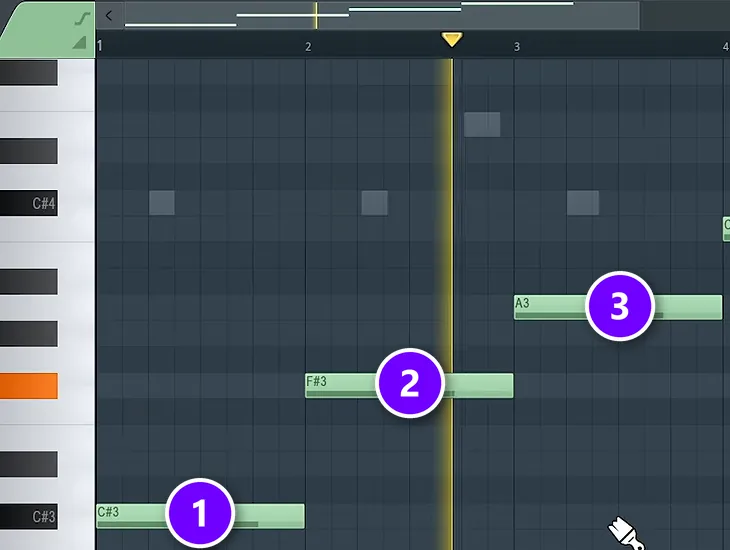
The bass line is the easiest part, because theory has already done the work. Play the root note of each chord, an octave or two below the chords. Here the bass follows the roots C# (1), F# (2) and A (3), and the faint gray notes above it are ghost notes.
Lost track of the root? Max’s trick is to listen for the note that “sounds like home” over the chord. Don’t go too deep, either. Max keeps the bass one or two octaves under the chords and no lower, because lower than that it starts to sound weak. For a darker mood, hold the first root note while the chords above it change.
For more ideas, read how to write bass lines and these tips for better basslines in FL Studio. In a trap beat, the bass is usually an 808, which follows the kick drum as well as the chords.
THE 7-DAY MUSIC PRODUCER COURSE
Learn chords and melodies on Day 2
On Day 2, the 7-Day course teaches music theory, chords and melodies: the theory you need for fresh harmonies, a 3-step formula for writing chord progressions, 4 easy ways to write melodies even if you’ve never touched a keyboard, and where to find good instruments, paid and free. You also get 30+ chord progressions and 20+ free plugins and tools. It’s $27 for all seven days, and you have 60 days to decide if it was worth it.
Rhythm basics: bars, beats and BPM
Rhythm is the timing of all those notes. Most pop, hip-hop and electronic music counts four beats to a bar, which is what 4/4 time means. In a drum grid, each beat splits into four steps, so one bar has 16 steps.
Tempo is how fast those beats go, measured in BPM (beats per minute). Max’s rule of thumb is that every style sits somewhere between 90 and 160 BPM. Trap is usually around 140, and he’s precise about it: 140, not 130.
Drums are where rhythm matters most. Our guide on how to make beats shows exactly where every kick, snare and hi-hat goes in a trap pattern.
Song structure: sections and bars
Form is the order of the sections in a song. Pop songs use verses, a chorus and sometimes a bridge, while beats usually talk about the hook and the verse. Sections are counted in bars, often 8 or 16 at a time.
Max’s simple layout for a trap beat is an intro, a hook, a verse and a hook again, each 16 bars long, then a short outro. For a longer song, add a second verse before the outro. To turn a loop into those sections, see how to arrange loops into a full song.
Scales and modes to learn next
Once major and minor feel easy, there’s more to explore. Modes are the 7 scales you get when you start the major scale on a different note. Dorian, for example, is a minor scale with one brighter note. The pentatonic scale uses only 5 notes, which makes it very hard to play a wrong one. You don’t need any of these for your first songs.
When you’re ready, start with our beginner guide to music scales, then read musical modes explained.
How to practice music theory as a producer
Theory sticks when you use it the same day. Max ends his chord and melody lesson with homework: write a few progressions, each in its own pattern, and a simple melody for each. Stretched into a short routine, it looks like this:
- Pick one key, like C minor, and stay in it for the week.
- Write three or four chord progressions, each in its own pattern.
- Build the chords with skip one, place one, then fix the voicing.
- Write a short melody over each one, using notes from the chords.
- Add a bass line on the roots.
- Put drums under your favorite one and turn it into a beat.
Two habits speed it up. Learn the theory behind songs you already like: find their key and count their chords. And try every new idea in FL Studio right away, so you hear it instead of just reading about it. If you’re new to the program, start with our FL Studio beginner guide.
Frequently asked questions
Do you need music theory to make beats?
No. You can make beats by ear, and many producers do. But a little theory makes it much faster: pick a scale, build chords by stacking every other note, and follow the chord roots with your bass or 808. FL Studio’s piano roll can highlight your scale for you, so you can learn the basics while you make your first beat.
What music theory should a producer learn first?
Learn it in the order you use it: notes and octaves, half and whole steps, major and minor scales, keys, chords and chord progressions, then melody, bass and rhythm. That covers most of what you need for pop, hip-hop, trap and electronic music. Sheet music, counterpoint and rare scales can wait until much later.
Should I use a major or a minor scale?
Major sounds happy and bright, and minor sounds more serious or sad. For today’s pop, hip-hop, R&B and electronic music, Max says minor is the more popular choice. Harmonic minor, which raises one note, is his personal favorite, and his harmonic minor loop suits melodic trap. Major works well for ballads and happier songs.
Is the circle of fifths useful for producers?
Yes, but you don’t need to memorize it. It’s a map of the 12 keys where each neighbor is a fifth away. Producers use it to find the 4 and 5 chords of a key, to find the relative minor, and to change key smoothly. For a first beat, highlighting your scale in the piano roll does most of the work.
Can I learn music theory in FL Studio?
Yes. FL Studio’s piano roll can highlight any scale and root note, snap your notes to that scale, and show your other patterns as ghost notes, so you can see and hear which notes fit while you write. Building chords there, one note at a time, is a fast way to learn how they work.