



“It is not the man who has too little, but the man who craves more, that is poor.”
The best free mixing plugins are TDR Nova (dynamic EQ), TDR Kotelnikov (compressor), Softube Saturation Knob (warmth), Valhalla Supermassive (reverb) and iZotope Ozone Imager 2 (stereo width). Add Voxengo SPAN and Youlean Loudness Meter 2 to check your mix. All seven are free on Windows and Mac.
Plugin sales make it look like a good mix costs hundreds of dollars, one shiny bundle at a time. It doesn’t. Most of this list comes from Mix Elite’s free plugins video, and we checked every one again on its maker’s site in October 2026. Mix Elite’s own freebies are at mixelite.com/free, where a free account gets you samples, presets, e-books and cheat sheets.
Table of Contents
What are the best free mixing plugins in 2026?
For a clearer mix on a $0 budget, the free plugins that matter most are a dynamic EQ (TDR Nova), a clean compressor (TDR Kotelnikov), a stereo widener that stays safe in mono (iZotope Ozone Imager 2) and two meters to check your work (Voxengo SPAN and Youlean Loudness Meter 2). The other picks add punch, warmth, space and effects.
Twelve of the 19 come from Mix Elite’s free plugins video. In it, Max, the founder of Mix Elite, shows each one on his own music in FL Studio, including what several of them do that FL Studio’s stock plugins can’t. Seven more picks cover the jobs the video skips. Here they are, sorted by job, with what changed since the video.
1. TDR Nova (Tokyo Dawn Labs): free dynamic EQ
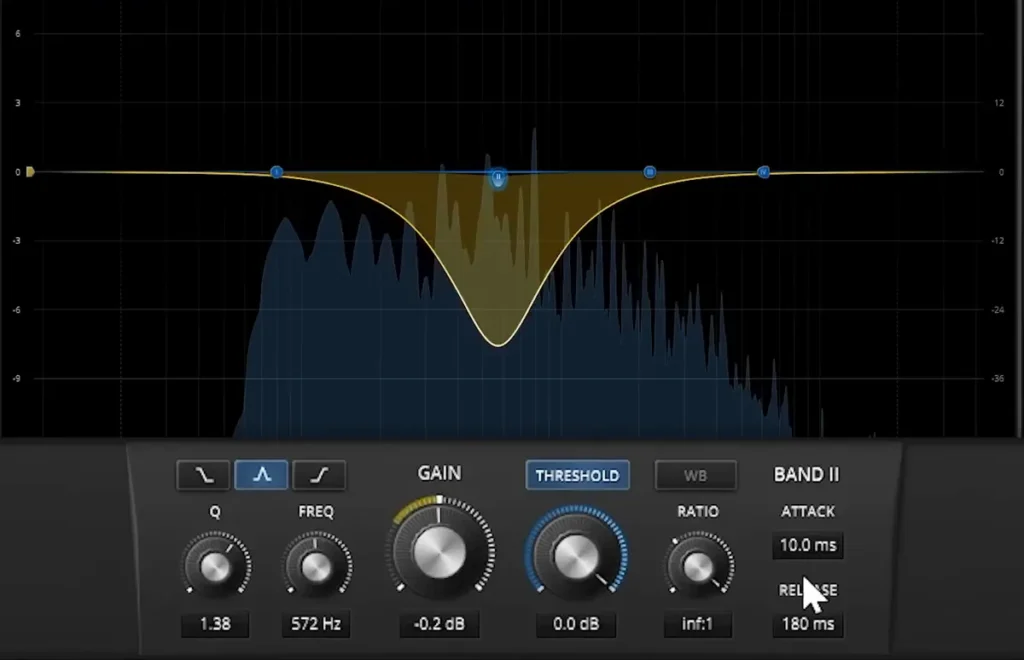
A normal EQ cuts a frequency all the time. A dynamic EQ only cuts it when that frequency gets too loud. Max’s reason for keeping Nova: “I’m a fan of using the stock equalizer of FL Studio, but the reason why you should have the Nova in your library is because it’s a dynamic equalizer.”
In the video, one note in a sample sounds harsh. Cutting it with a normal EQ dulls the whole sample, because the problem only appears when that note plays. Here’s the fix:
- Put a narrow band on the harsh note.
- Turn on that band’s THRESHOLD.
- Lower the threshold until the band only dips when the note plays. Raise the ratio for a stronger cut.
Nova has four bands plus high-pass and low-pass filters, and it can also tame sharp “s” sounds in vocals. It’s free with no account, for Windows 7 and up and Mac (Apple chips included), as VST2, VST3, AU or AAX. Get it from Tokyo Dawn Labs.
2. Patcher (FL Studio): a free mid/side EQ you already own
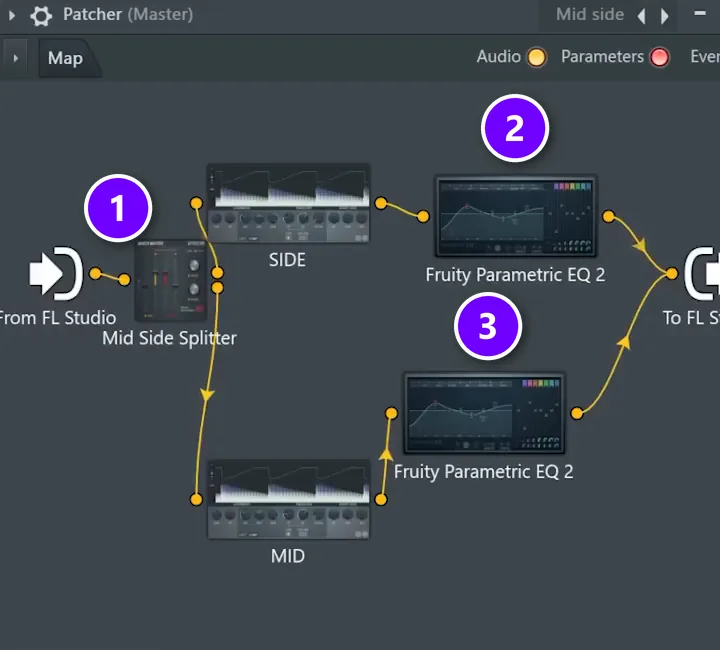
Before you download anything, look at the library of hidden plugins already inside FL Studio: Patcher. It lets you build your own effect chains, and it comes with every FL Studio edition. The video uses it to build a mid/side EQ, because Fruity Parametric EQ 2 has no mid/side mode on its own.
Mid is the part of the sound that’s the same on both speakers. Side is the part that’s different, and it’s what makes a mix sound wide. The video starts from a mid/side patch:
- The Mid Side Splitter (1) splits the sound into a side path and a mid path.
- Add a Fruity Parametric EQ 2 on the side path (2) and another on the mid path (3), and connect both to To FL Studio.
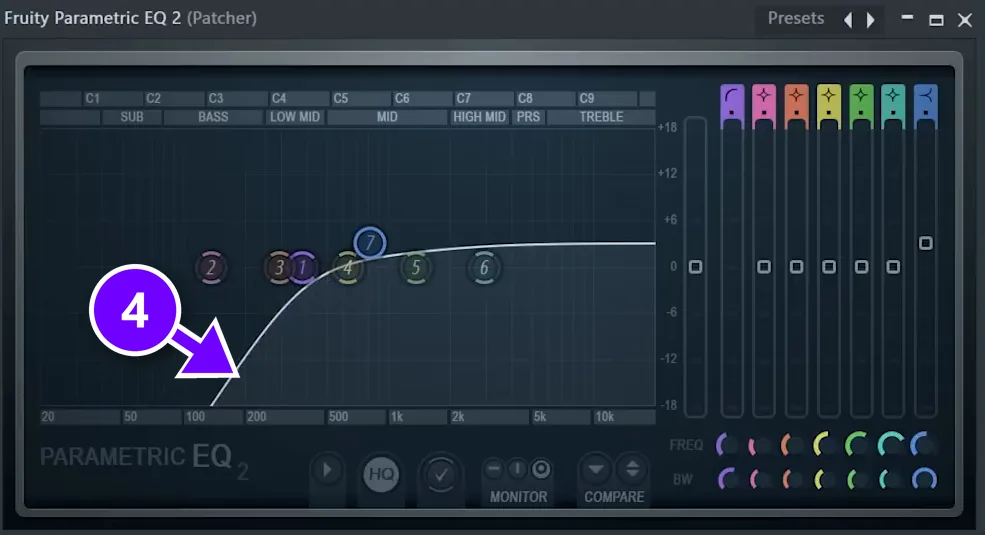
- On the side EQ, cut the low end (4).
- Save it as a preset (the video calls it “Mid side EQ”), so it’s one click next time.
Max’s tip: “cut the lows from the side channel to make your instruments way way less muddy.” Patcher also comes with ready-made one-knob compressor, delay and reverb patches. Fruity Parametric EQ 2 is in every edition, too.
3. Couture (Auburn Sounds): free transient shaper
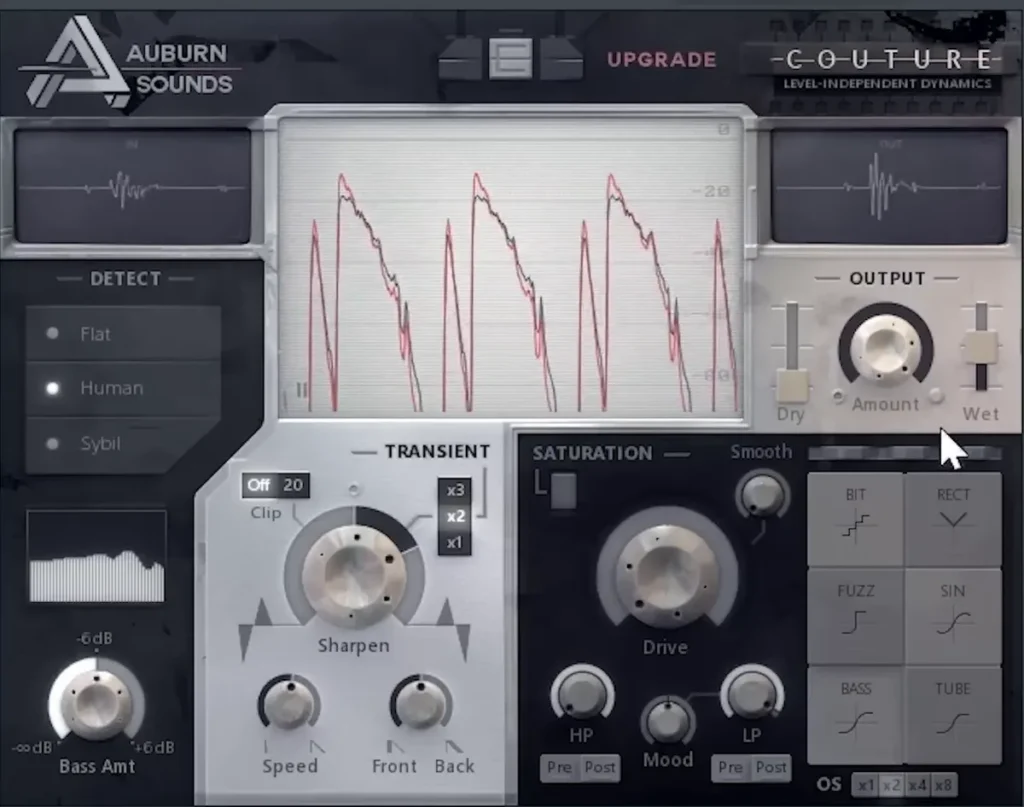
A transient is the very first hit of a sound, like the click at the start of a hi-hat. A transient shaper turns that hit up or down. In the video, the hi-hats sound buried, and turning them up doesn’t fix it. Turning up Couture’s Sharpen knob does: the hats jump out of the mix. It works on a pluck, too.
Don’t overdo it: you’re changing the dynamics of the sound, and too much sharpening makes hats and plucks sound clicky and thin.
The free edition is the transient part only, and the paid edition adds saturation. It’s a direct download with no account, for Windows, macOS and Linux, as VST, AU, AAX or LV2. FL Studio’s own Transient Processor only comes with the All Plugins Edition, so this is the free way to get one. Get it from Auburn Sounds.
4. OTT (Xfer Records): free multiband compressor
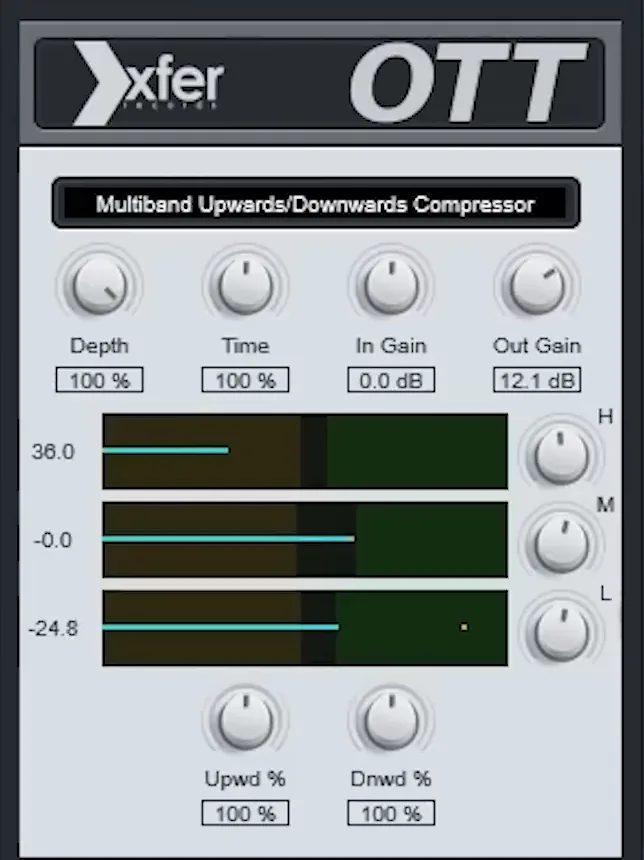
OTT stands for “over the top”, and it squashes the highs, mids and lows separately, both up and down. The video calls it the legend itself, and the summary is simple: it glues sounds together and makes them sound better. The key control is Depth, which blends the effect with the dry sound. Start low and turn it up until you like it.
Version 1.37 is free on Xfer’s freeware page, with no sign-in. It runs on Windows and Mac (Apple chips included) as VST, VST3, AU or AAX. FL Studio’s Soundgoodizer, in every edition, gives you a similar one-knob effect. Settings for vocals and the master are in our OTT compressor guide. Get it from Xfer Records.
5. TAL-Filter-2 (TAL Software): free volume shaper
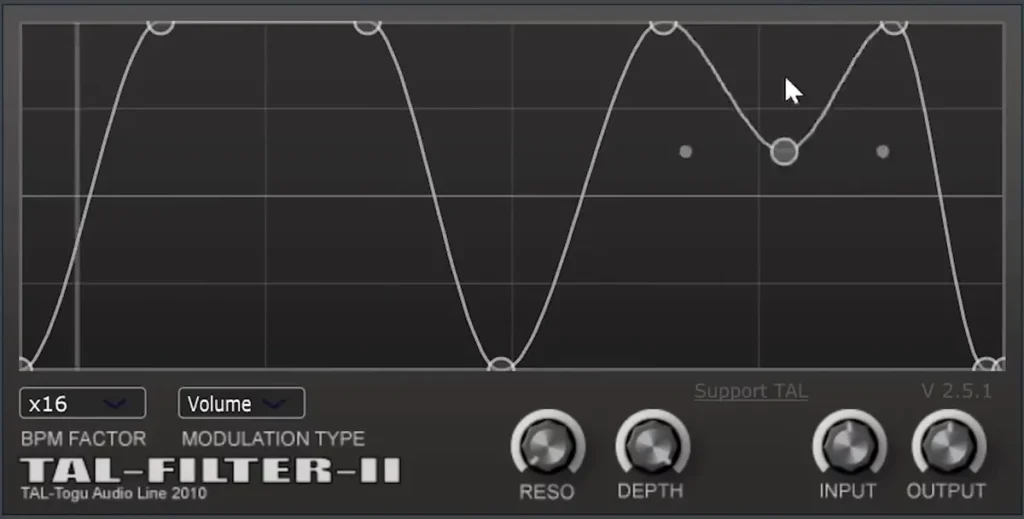
TAL-Filter-2 is a free stand-in for paid volume shapers like LFO Tool and Kickstart. In the video, all the instruments go to one mixer track with TAL-Filter-2 on it, BPM Factor set to x16 and Modulation Type set to Volume, and a drawn curve dips the volume in time with the beat. That gives you the pumping sound of sidechain compression without setting up a sidechain.
It’s free with no account, for Windows 7 and up, macOS 10.9 and up, and Linux, as VST, VST3, AU, AAX or CLAP. For real sidechain compression, see our guide to the 3 ways to sidechain in FL Studio. Get it from TAL Software.
6. Ozone Imager 2 (iZotope): free stereo widener
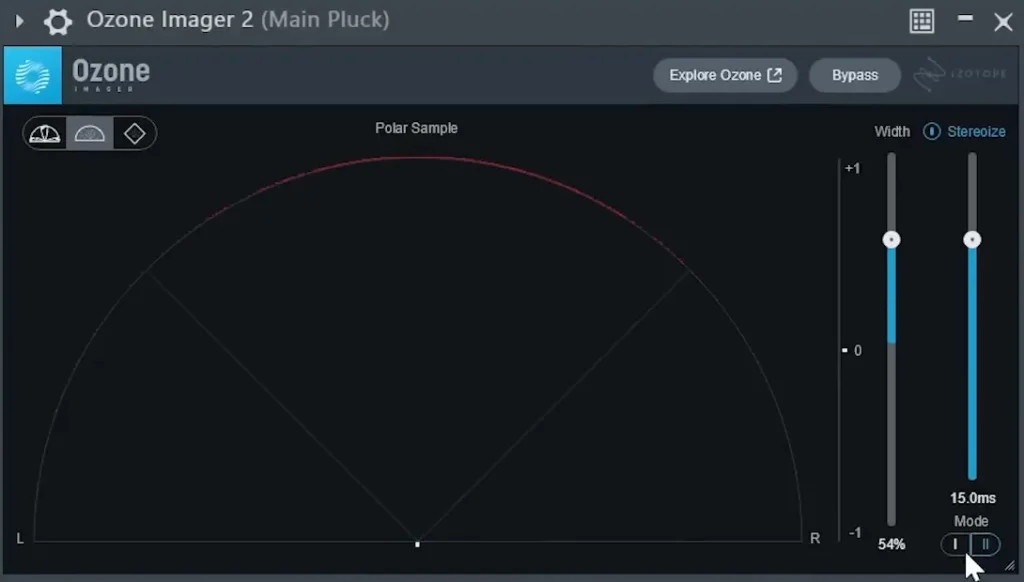
Ozone Imager makes a sound wider, and it stays safe in mono. The video puts it on a pluck that’s fully mono. Turning up Width alone does nothing on a mono sound, so turn on Stereoize first. “I like to play with the settings around 12 to 18,” Max says, meaning 12 to 18 ms, and of the two modes he prefers the first.
Then the video tries FL Studio’s Stereo Enhancer instead, at about 13 ms. Ozone Imager’s correlation meter, which shows if the left and right sides cancel each other out, drops below zero, and the pluck falls apart in mono. With Ozone Imager doing the widening, the pluck sounds as good in mono as in stereo. That matters, because lots of phones and club speakers play in mono.
It’s a free download from iZotope, for Windows 10 and 11 and macOS 14.7 and up, as VST2, VST3, AU or AAX. Get it from iZotope.
7. SPAN (Voxengo): free spectrum analyzer
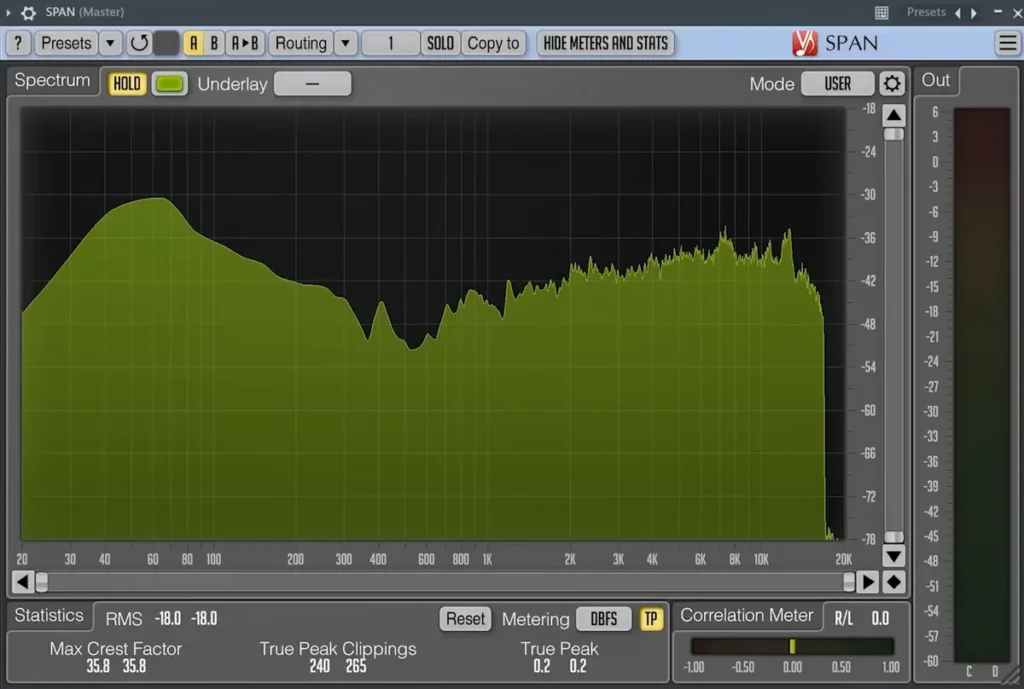
SPAN shows your mix as a picture of its frequencies, from deep bass on the left to bright highs on the right. The video uses it for what it calls the most important mixing tip: referencing. You play your song through SPAN, then a professionally mixed and mastered song in a similar style, and compare the two shapes.
A big dip where the reference is full tells you a part of your mix is empty. A big bump tells you something is too loud. SPAN also shows loudness in LUFS, true peaks and a correlation meter. It’s free with no account, for 64-bit Windows and Mac, as VST, VST3, AU or AAX. Get it from Voxengo.
8. s(M)exoscope: free oscilloscope
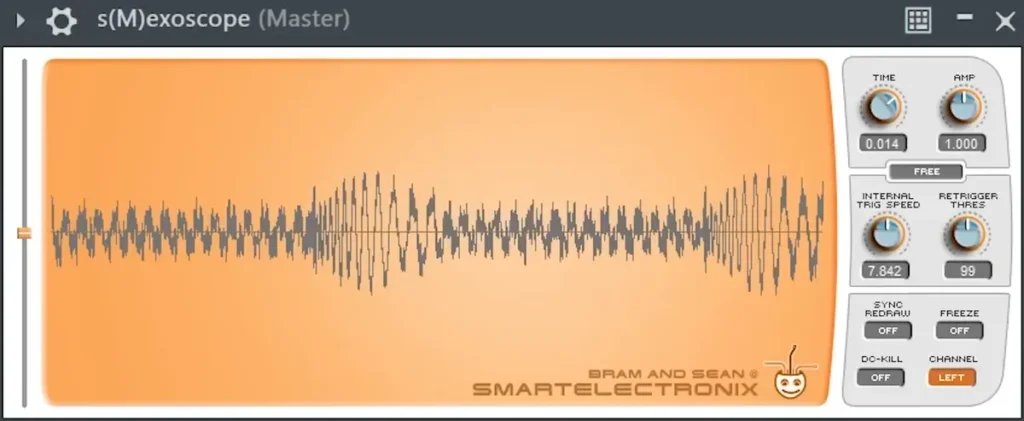
An oscilloscope draws the actual wave of your sound. The video puts an EQ with a high cut at about 200 Hz in front of it, so only the kick and the bass show. Then it checks that the bass fades in nicely after the kick. When the two clash, you see odd spikes where they fight.
The original download site is gone, and smartelectronix.com now sends you to an unrelated website, so don’t use it. The author still shares a free, open-source build on GitHub, updated in April 2026. It’s a zip with no installer, for Windows (VST3), Mac (VST3 or AU) and Linux. FL Studio’s Wave Candy, in every edition, also has an oscilloscope. Get it from the author’s GitHub page.
9. MAutoPitch (MeldaProduction): free auto-tune
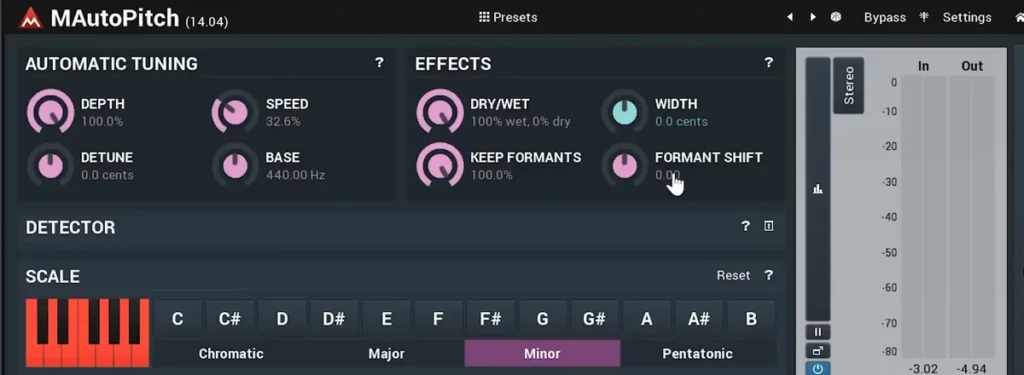
MAutoPitch is free auto-tune. Set Depth to 100%, pick the song’s scale (A minor in the video) and lower Speed when you want a softer effect. Then try its formant shift, which changes the character of a voice without changing the notes.
A doubling trick from the video: copy the vocal to a second track, shift the formant a little up or down on the copy, turn up Width, and blend the two. It sounds like two takes.
MAutoPitch is part of Melda’s MFreeFXBundle of 38 free effects. You install it with Melda’s MPluginManager app, and the steps include logging in to a Melda account. It runs on 64-bit Windows 10 and 11 and macOS 10.14 and up, as VST, VST3, AU or AAX. Get it from MeldaProduction.
10. Youlean Loudness Meter 2 and MLoudnessAnalyzer: free LUFS meters
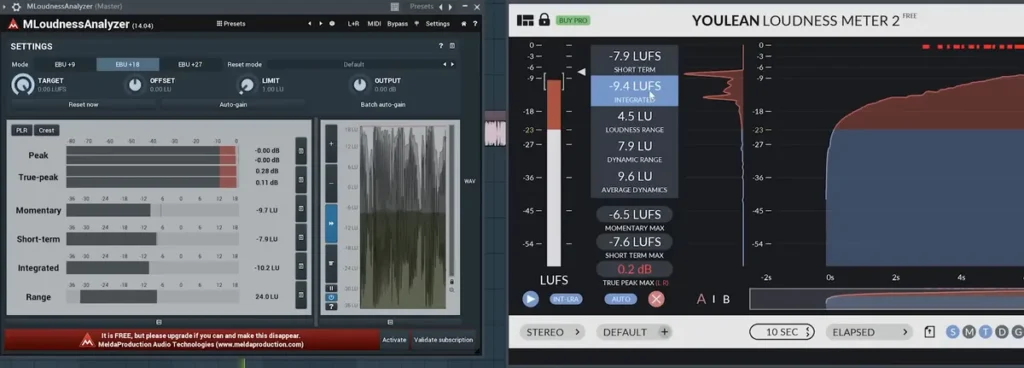
LUFS is the unit streaming sites use to measure how loud a song is, and you can’t really master without a loudness meter. Put one at the very end of the master track to see how loud the song is and how loud it should be for Spotify, YouTube and the other platforms. The video uses Youlean, and Melda’s MLoudnessAnalyzer comes free in the same bundle as MAutoPitch.
Youlean’s free version shows integrated, short-term and momentary loudness, true peak and loudness range. The ready-made streaming presets are in the paid PRO version only. It’s a direct download with no account, for Windows 7 and macOS 10.13 and up, as VST2, VST3, AU, AAX or an app. To learn what to do with the numbers, see our simple 5-step mastering guide. Get it from Youlean.
11. Vinyl (iZotope): free lo-fi effect
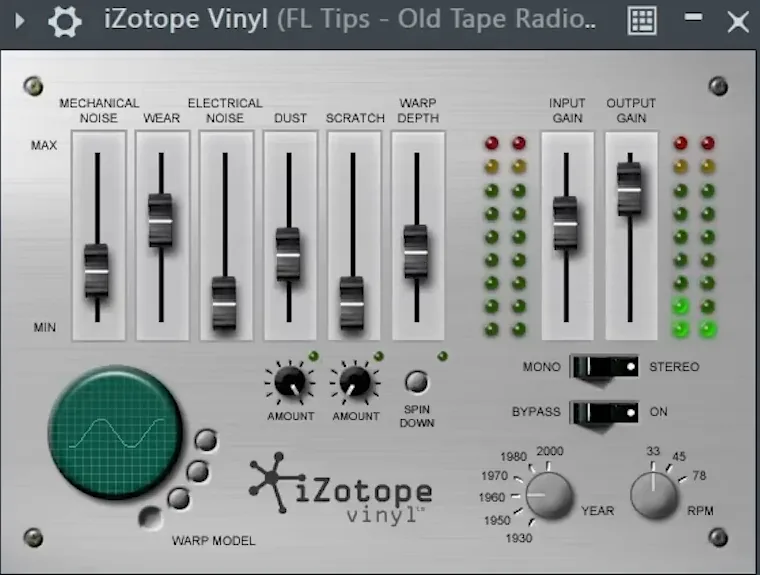
Vinyl makes a sound feel like an old record, with dust, scratches, wear, warp and a year knob that goes back to the 1930s. For lo-fi sounds, it’s a no-brainer. Try it on a melody, or across a whole beat for an intro.
It’s a free download from iZotope, for Windows 10 and 11 and macOS 14.7 and up, as VST2, VST3, AU or AAX. Get it from iZotope.
12. Glitch 2 (Illformed): free glitch effects
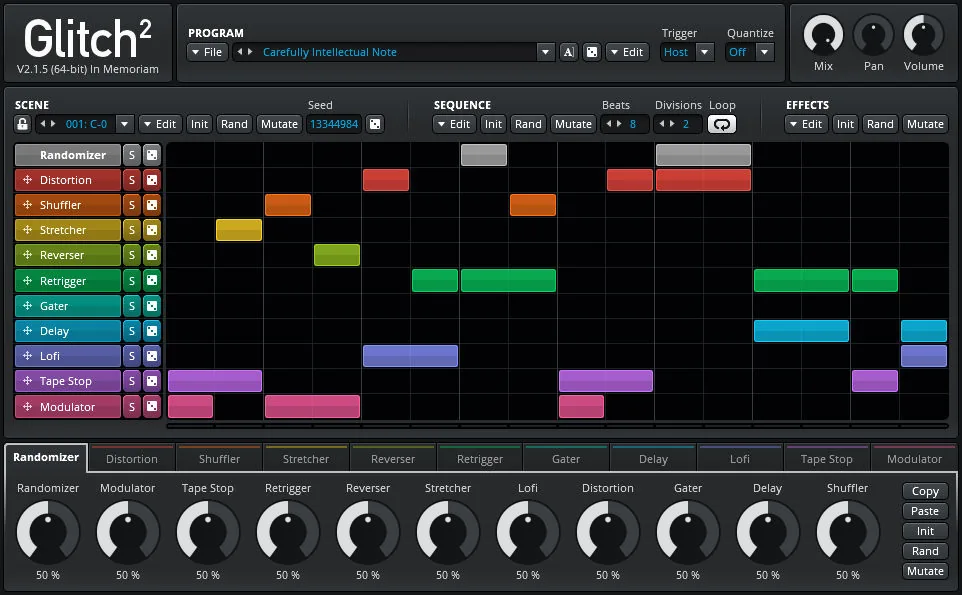
Glitch chops and mangles a sound in time with your song: stutters, tape stops, reverses and gated chops, all from one step sequencer. The video shows the old Glitch 1.3, which only works as a 32-bit plugin on Windows. The good news: Illformed made Glitch 2 free in 2026, in memory of its creator, Kieran Foster.
Glitch 2 runs on 64-bit Windows 7 and up, Mac OS X 10.11 and up (Apple chips included) and Linux, as VST2, VST3 or AU, with no account. Get it from Illformed.
7 more free mixing plugins: compression, saturation, air, space and panning
The video skips a few jobs that every mix needs: a smooth compressor, saturation, high-end air, reverb, delay and movement across the speakers. These seven free plugins fill the gaps.
13. TDR Kotelnikov (Tokyo Dawn Labs): free compressor
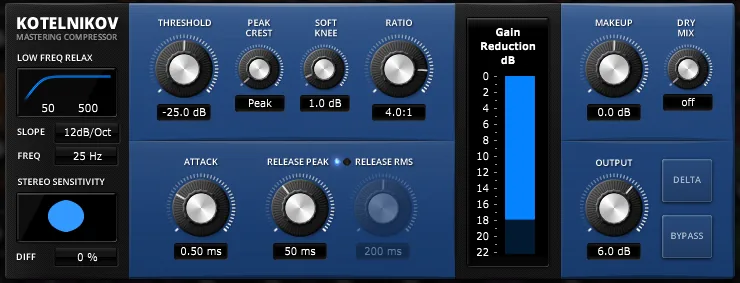
Kotelnikov is a clean compressor made for the mix bus and the master. A compressor turns down the loudest parts so the whole sound is steadier. Its Delta button lets you hear only what the compressor removes, which is a great way to train your ears. If compressors still confuse you, start with our FL Studio compressor guide.
It’s free with no account, for Windows 7 and Mac OS X 10.9 and up, Apple chips included, as VST2, VST3, AU or AAX. Get it from Tokyo Dawn Labs.
14. Saturation Knob (Softube): free saturation
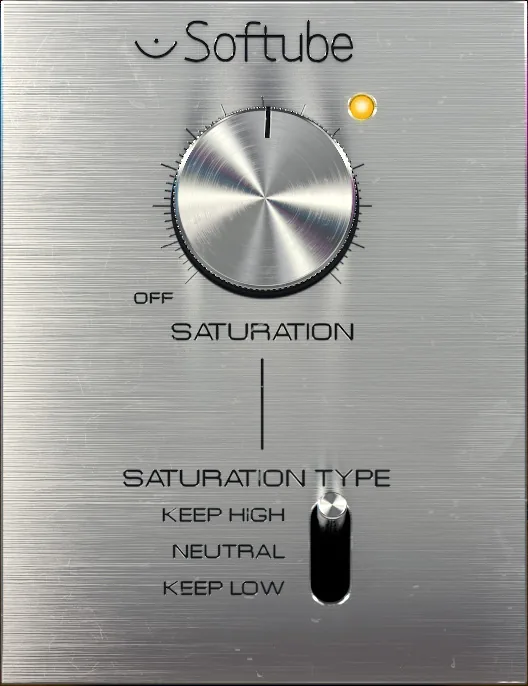
Saturation adds gentle distortion, the warmth you hear from old tape and analog gear. It also helps bass and 808s show up on small speakers. Saturation Knob has one big knob and three modes: Keep High, Neutral and Keep Low. Keep High saturates the lows and keeps the highs clean, and Keep Low does the opposite.
It’s free, but you need the Softube Central app, a Softube account and an iLok account. It runs on Windows 10 and 11 and macOS 14 and up, as VST, VST3, AU or AAX. Get it from Softube.
15. Fresh Air (Slate Digital): free high-end exciter
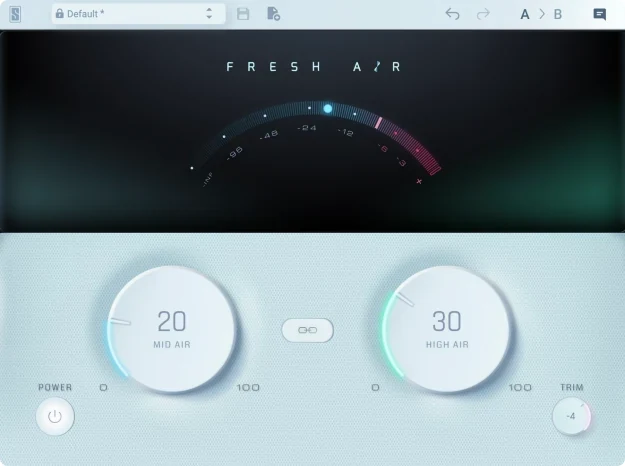
Fresh Air adds brightness, or “air”, to the top of a sound without making it harsh. Slate Digital based it on vintage exciter circuits plus dynamics processing, and all of that sits behind two big knobs, Mid Air and High Air, with a small Trim knob for the output. Try a little on a dull vocal, on hi-hats or across the whole mix bus.
It’s one of the 16 plugins in Slate Digital’s Free Collection, which Slate says is free forever. You need a free Complete Access account and Slate’s Complete Access Hub app to install it, but no iLok. It runs on Windows 10 and up and macOS 10.15 and up, Intel or Apple chips, as VST, VST3, AU or AAX. Get it from Slate Digital.
16. Supermassive (Valhalla DSP): free reverb and delay
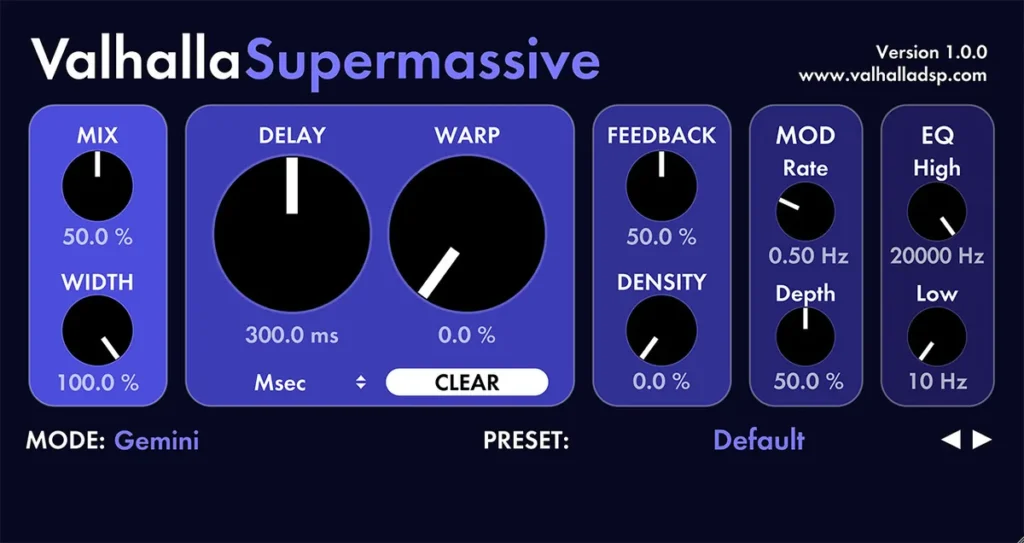
Supermassive is a free reverb and delay with 22 modes, built for big delays and huge reverbs. Reverb makes a sound feel like it’s in a room or a hall, and delay repeats it. Use it on a send so several sounds share the same space.
It’s free with no strings attached, for 64-bit Windows 7 to 11 and macOS 10.9 and up, Intel or Apple chips, as VST2, VST3, AU or AAX. Get it from Valhalla DSP.
17. Space Lite (Cymatics): free reverb
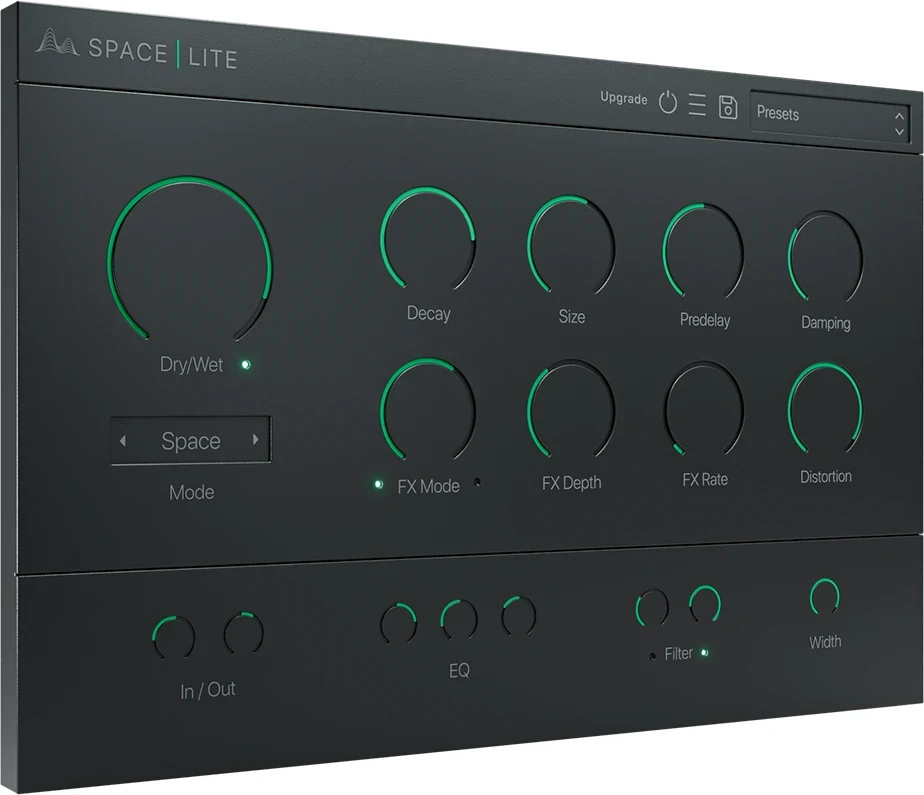
Space Lite is the free version of Cymatics’ Space reverb. You get three reverb modes, the usual Decay, Size, Predelay and Damping knobs, and a big Dry/Wet knob. The FX knobs add modulation, like chorus or a flanger, to the reverb only, so the dry sound stays clean. There’s also a Distortion knob for grit, plus an EQ, a filter and a Width knob along the bottom.
It’s free from Cymatics’ Free Download Vault, for 64-bit Windows and Mac, as a VST or AU plugin. Like Supermassive, use it on a send. Get it from Cymatics.
18. Delay (Kilohearts): free delay with ducking
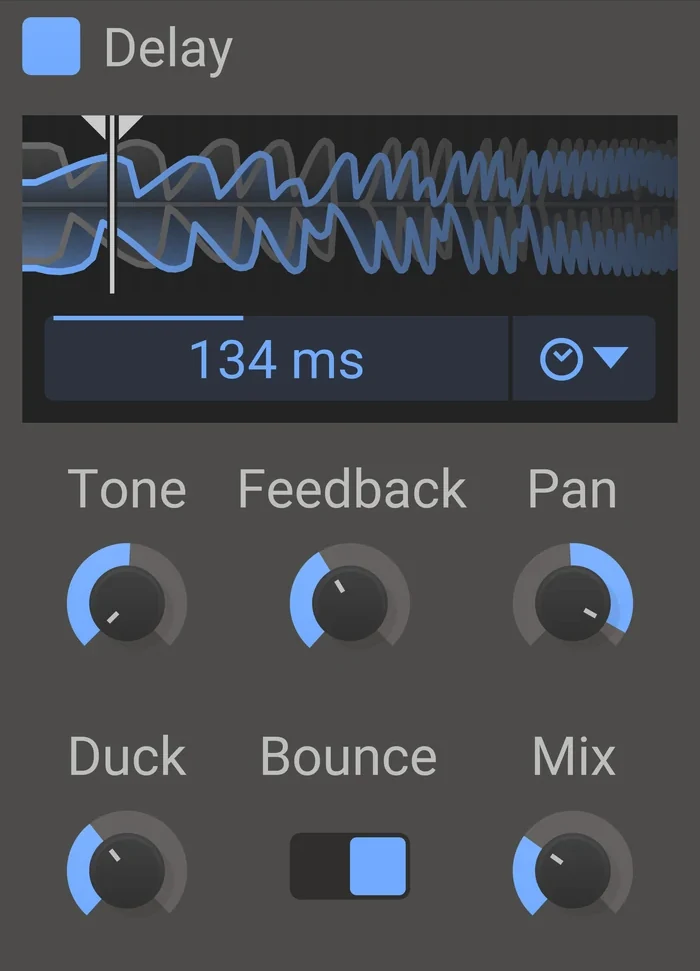
Delay repeats a sound, and Kilohearts’ version adds a handy trick: a Duck knob. Turn it up and the echoes get quieter while the sound itself is playing, then come back in the gaps. That lets you use a long delay on a vocal or a lead without burying the words or the melody. It also has Feedback, Pan and Mix knobs, a ping-pong option that bounces the echoes between the speakers, and a sync mode that locks the delay to your song’s tempo.
Delay is one of the 34 effects in the free Kilohearts Essentials bundle, which you get with a free Kilohearts account. It runs on 64-bit Windows and Mac, Apple chips included, as VST, VST3, AU or AAX. Get it from Kilohearts.
19. PanCake 2 (Cableguys): free auto-panner
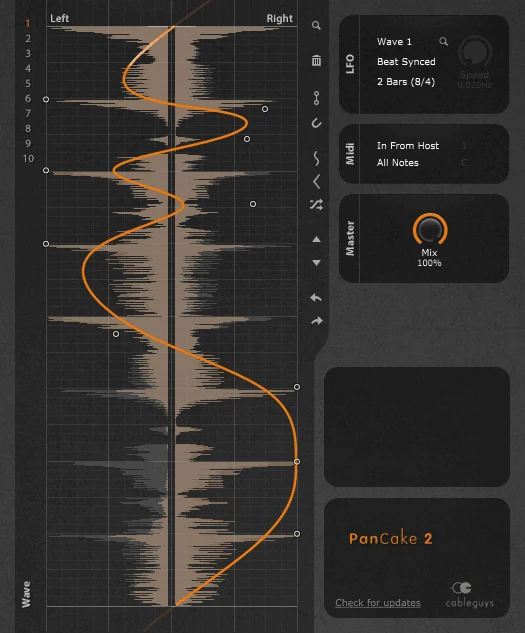
PanCake 2 moves a sound between the left and right speakers in a pattern you draw. The curve sits over a picture of your audio, so it’s easy to line the moves up with the hits. Patterns can sync to your song’s beat, run freely in Hz or start from MIDI notes, and the Mix knob sets how strong the panning is. Try it on hi-hats, percussion or a synth that needs some movement.
It’s free: enter your email address on Cableguys’ site, and it sets up an account and sends you the download. It runs on 64-bit Windows 7 to 11 and Mac OS X 10.9 and up, Intel or Apple chips, as VST2, VST3, AU or AAX. Get it from Cableguys.
Which FL Studio plugins already do the same job?

You can mix a whole song with FL Studio’s own plugins. Here’s what each edition already gives you, from Image-Line’s own comparison page:
| Job | Stock FL Studio plugin | Editions |
|---|---|---|
| EQ | Fruity Parametric EQ 2 | All |
| Compression and limiting | Fruity Limiter | All |
| One-knob loudness | Soundgoodizer | All |
| Stereo width | Fruity Stereo Enhancer, Stereo Shaper | All |
| Scope and meters | Wave Candy | All |
| Effect chains, mid/side | Patcher | All |
| Multiband compression | Maximus | Producer and up |
| Transient shaping | Transient Processor | All Plugins only |
So what do the free plugins add? A dynamic EQ (Nova), a transient shaper for every edition (Couture), a safer widener (Ozone Imager), clear LUFS readings (Youlean) and effects FL Studio doesn’t have. Before you install anything, read our guide on how to mix a song with stock plugins only. Most bad mixes come from the basics, not from missing plugins.
How do you fix a muddy mix with free plugins?
Mud is a pile-up of low mids, roughly 200 to 500 Hz, when too many sounds share the same space. Low-cut every sound except the kick and bass, use TDR Nova to dip the low mids only when they swell, and compare your mix with a reference track in SPAN to see where it’s too full.
Mix Elite’s free 1-hour mixing course describes a muddy mix as one where everything fights and nothing sounds clear. Work through it in this order:
- Put SPAN on the master and play a reference track in the same style. A bump between about 200 and 500 Hz that the reference doesn’t have is your mud.
- Low-cut everything that isn’t the kick or the bass with Fruity Parametric EQ 2, at about 200 to 250 Hz for most instruments. Only the kick and one bass sound should play in the sub.
- Use TDR Nova where the low mids only swell now and then: a band in that range with its threshold on cuts only when it gets too loud.
- Cut the lows from the side channel with the Patcher mid/side EQ from item 2.
- Make the bass duck each time the kick hits, with a sidechain or TAL-Filter-2’s volume curve, so the two don’t blur together.
- Low-cut your reverbs too. A reverb adds low end you don’t need, even on a vocal.
Which free plugins should a beginner use to EQ and compress vocals?
Start with FL Studio’s own Fruity Parametric EQ 2 and Fruity Limiter, which works as a compressor in COMP mode. Then add TDR Nova to tame harsh “s” sounds only when they jump out, TDR Kotelnikov to learn compression, and MAutoPitch for tuning. All of them cost nothing.
Kotelnikov is a good teacher because its Delta button plays only what the compressor removes, so you hear exactly what each setting does. Learn one tool at a time on a real vocal: low-cut the rumble first, then compress, then fix the harsh moments with Nova.
Is there a free plugin bundle for mixing?
Yes. Kilohearts Essentials is a free bundle of 34 small effects, including a 3-band EQ, a compressor, a limiter, a gate, a transient shaper and the Delay from item 18, and you get it with a free Kilohearts account. MeldaProduction’s MFreeFXBundle adds 38 more, including MAutoPitch and the MLoudnessAnalyzer meter.
Bundles are handy, but you won’t use most of what’s inside. Start with the picks above, and add a bundle when you need one specific tool from it.
Which free mixing plugins should you skip in 2026?
These show up on older lists, including the old version of this page, but they’re not a good free pick in 2026:
- CamelCrusher: gone. Its maker’s website now sends you to Apple’s Logic Pro page, and there’s no official download.
- Glitch 1.3: the version in the video is a 32-bit Windows plugin. Get the free Glitch 2 instead.
- s(M)exoscope from smartelectronix.com: that address now goes to an unrelated site. Only use the GitHub link above.
How do you add free mixing plugins in FL Studio?
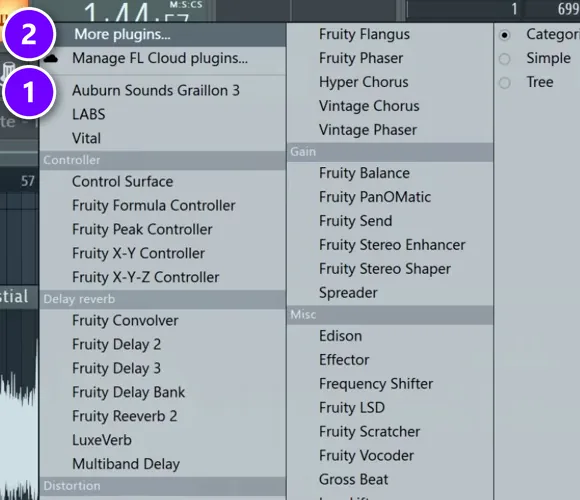
Effects go in the Mixer. Click an empty effect slot and your starred plugins show at the top of the menu (1), while More plugins (2) opens the full list of everything you’ve installed.
Every plugin here installs the same way. The full walkthrough, with screenshots for Windows and Mac, is in our guide on how to install VST plugins in FL Studio. Here is the short version:
- Run the maker’s installer, or its app if it uses one. On Windows, keep the default VST3 folder so FL Studio finds the plugin on its own.
- In FL Studio, open Options > Manage plugins and click Find installed plugins. If a plugin won’t show up or won’t load, tick Verify plugins first.
- Star the plugin so it sits at the top of your list.
- Open the Mixer with F9, select the mixer track of the sound you want to change and click an empty effect slot on the right. Pick the plugin from the list.
- Put meters such as SPAN and Youlean on the master track, in the last slot, so they read the finished mix.
If FL Studio lists a plugin twice, pick the VST3 version.
The best free mixing plugins at a glance
Here are all 19 in one place, sorted by the job they do in a mix.
| Job | Free plugin | What you need |
|---|---|---|
| Dynamic EQ | TDR Nova | Nothing |
| Mid/side EQ | Patcher (FL Studio) | Already in FL Studio |
| Punchier hits | Couture | Nothing |
| Multiband squash | OTT | Nothing |
| Volume pumping | TAL-Filter-2 | Nothing |
| Stereo width | Ozone Imager 2 | A free download from iZotope |
| Seeing your mix | SPAN | Nothing |
| Kick and bass check | s(M)exoscope | A zip from GitHub |
| Vocal tuning | MAutoPitch | A Melda account and its app |
| Loudness (LUFS) | Youlean Loudness Meter 2 | Nothing |
| Lo-fi and vinyl | Vinyl | A free download from iZotope |
| Glitch effects | Glitch 2 | Nothing |
| Compression | TDR Kotelnikov | Nothing |
| Saturation | Saturation Knob | Softube and iLok accounts |
| High-end air | Fresh Air | A free Slate Digital account |
| Reverb and delay | Supermassive | Nothing |
| Reverb | Space Lite | A free download from Cymatics |
| Delay with ducking | Delay (Kilohearts) | A free Kilohearts account |
| Auto-panning | PanCake 2 | Your email address |
All 19 run on Windows and Mac, and all of them load in any FL Studio edition. We checked each maker’s page again in October 2026.
DAY 4 OF THE 7-DAY MUSIC PRODUCER COURSE
Plugins are tools. Day 4 shows you the mix.
Free plugins only help when you know what each one is for. Day 4 of the 7-Day course is all about mixing: the simple Holy-Quad mixing formula, the “Mix Murdering” mistakes most beginners make, and the volume mistake people make in the first 5 minutes of every mix. You also get a mixing checklist and a mixing and production template. It’s taught in FL Studio (the free trial works), about 45 minutes a day, and on day 7 a pro gives you feedback on your finished track. It’s $27, and you get 60 days to decide if it was worth it.
Frequently asked questions
What are the best free mixing plugins?
TDR Nova for EQ, TDR Kotelnikov for compression, Softube Saturation Knob for warmth, Valhalla Supermassive for reverb and Ozone Imager 2 for stereo width. Add Voxengo SPAN and Youlean Loudness Meter 2 to check your mix. All of them were still free on Windows and Mac on October 12, 2026.
Which free mixing plugins should a beginner download first?
Start with TDR Nova and TDR Kotelnikov, a dynamic EQ and a clean compressor with clear controls; Kotelnikov’s Delta button lets you hear exactly what it removes. Add SPAN and Youlean Loudness Meter 2 to see what you hear. FL Studio’s Fruity Parametric EQ 2 and Fruity Limiter come with every edition, too.
Are free mixing plugins good enough for a professional mix?
Yes. Free EQs, compressors, reverbs and meters like these are good enough for a finished, released song. What makes a mix sound pro is knowing what each plugin is for, and comparing your mix with a reference track. Mix Elite’s free plugins video calls referencing the most important mixing tip.
Do you need third-party plugins to mix in FL Studio?
No. Every FL Studio edition includes Fruity Parametric EQ 2, Fruity Limiter, Soundgoodizer, Wave Candy and Patcher, which cover EQ, compression, meters and effect chains. Free plugins add what the cheaper editions lack, like a dynamic EQ, a transient shaper and a LUFS loudness meter.
Where can I find Mix Elite’s free downloads?
Go to mixelite.com/free and sign up for a free account. You get Mix Elite’s free downloads there: samples, presets, e-books and cheat sheets for music production and mixing. The free plugins on this page come from their makers’ own sites, linked in each section.





