



“Simplicity is a great virtue but it requires hard work to achieve it and education to appreciate it. And to make matters worse: complexity sells better.”
The best free mastering plugins in 2026 are TDR Nova (dynamic EQ), TDR Kotelnikov (compressor), GClip (clipper), LoudMax (true peak limiter), iZotope Ozone Imager (stereo width) and Youlean Loudness Meter 2 (LUFS meter). Used in that order, they make a complete mastering chain for $0, and FL Studio users already own Fruity Parametric EQ 2, Fruity Limiter and Maximus.
Mastering ads make it look like a loud, clean song costs a few hundred dollars in plugins. It doesn’t. Max, the founder of Mix Elite, takes a finished mix to a loud, clean master in one of Mix Elite’s FL Studio videos, using only the stock plugins and one free loudness meter. This guide shows the free plugins worth your time, which job each one does, and the settings from that video. We checked every plugin on its maker’s own site on October 12, 2026, and dropped the ones that aren’t free anymore.
Table of Contents
What does a free mastering chain need?
A free mastering chain needs six jobs done in order: EQ, a clipper, compression, stereo width, a limiter and meters. Every one of them has a good free plugin, and saturation is an optional seventh for warmth.
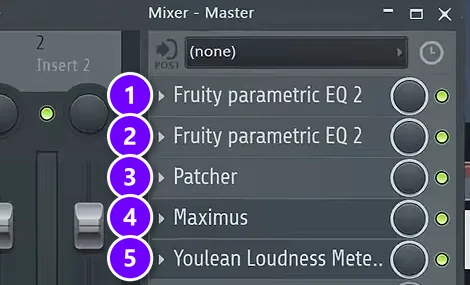
The screenshot above is the master channel in Mix Elite’s stock mastering video. Two copies of Fruity Parametric EQ 2 (1, 2) clean up the tone, Patcher (3) holds a mid/side EQ, Maximus (4) does the compression and the loudness, and Youlean Loudness Meter (5) sits last, so it measures the finished sound.
Mastering is the last polish on a finished mix. You make the whole song a little clearer, a little more even, and loud enough to sit next to other songs on Spotify, YouTube or a DJ’s playlist. Max puts it simply: “mastering is all about the subtlety. 95% of the work is already done when mixing, so mastering is just polishing it out.”
That’s why a free chain works so well. You don’t need big moves. You need six jobs done in the right order, and this is the order in Mix Elite’s 2026 mastering video:
- EQ: cut the rumble you can’t hear and nudge the tone, with moves of 2 dB or less.
- Clipper: shave off the sharpest peaks so the limiter has less work to do.
- Compression: even out the low, mid and high parts of the song so it feels glued together.
- Stereo width: keep the bass in mono and open up the mids and highs a little.
- Limiter: turn the song up without letting any peak go over your ceiling.
- Meters: check loudness, peaks, mono and tone against a pro song you like.
Saturation is an optional extra for warmth. The video only uses a touch of it, so treat it as seasoning. Here’s the full walkthrough with FL Studio’s stock plugins, and our complete guide to mastering in FL Studio goes through every step in writing.
The 11 best free mastering plugins in 2026
The 11 best free mastering plugins in 2026 are TDR Nova, TDR SlickEQ, TDR Kotelnikov, IVGI, GClip, LoudMax, Ozone Imager, Stereo Tool, Youlean Loudness Meter 2, SPAN and bx_masterdesk Classic. All 11 were free on their makers’ sites on October 12, 2026, and every one runs on Windows and Mac.
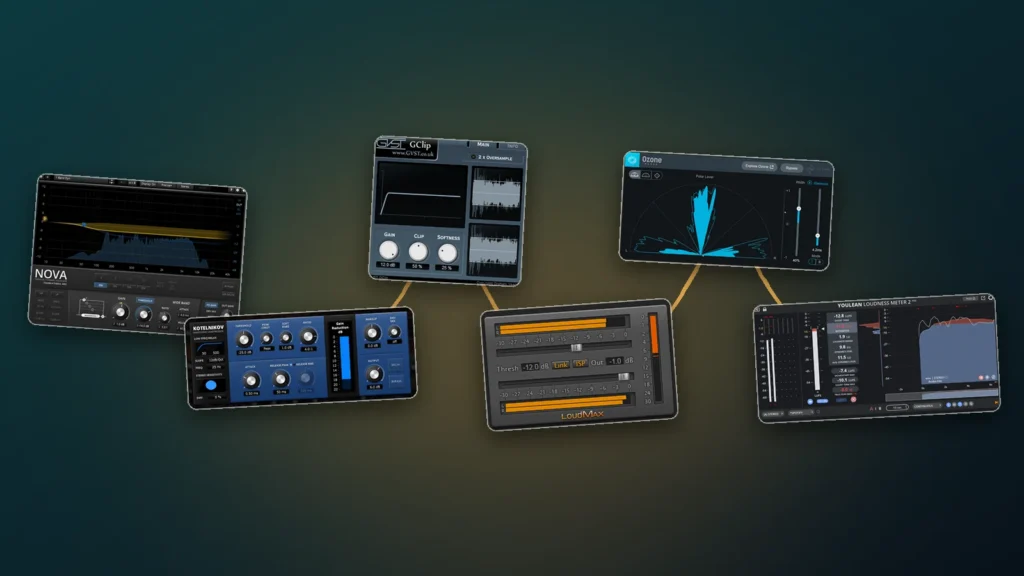
They’re grouped by job, in chain order. Under each one you’ll also see which FL Studio plugin already does the same work, so you only download what you’re missing. Looking for mixing tools instead? See our free mixing plugins.
1. TDR Nova (Tokyo Dawn Labs): free dynamic EQ
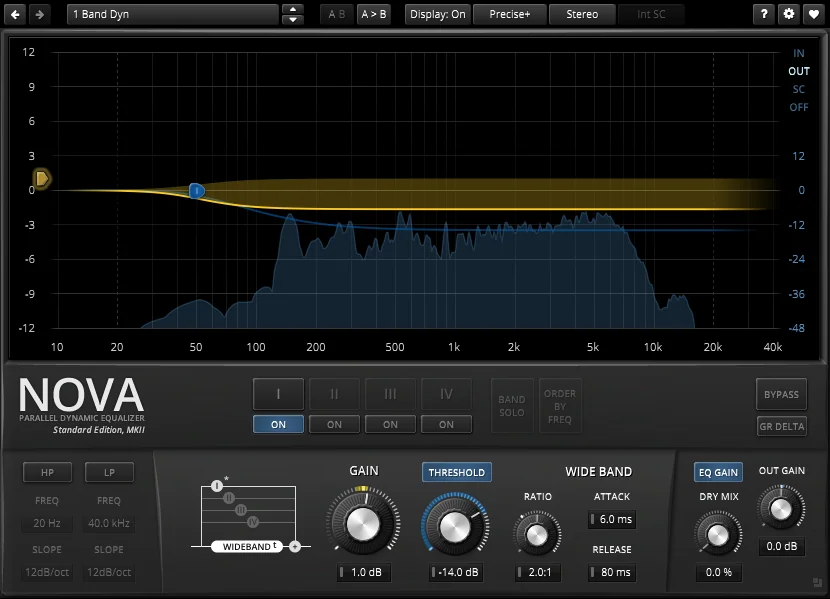
A normal EQ cuts or boosts a frequency all the time. A dynamic EQ only steps in when that frequency gets too loud, which is perfect for a master where one bass note booms or the hi-hats turn harsh in the chorus. TDR Nova gives you four of these dynamic bands, a low cut and a high cut, a spectrum display and an equal loudness switch, so a boost can’t fool you just by making things louder.
Use it gently. Put a narrow band on the problem, switch on that band’s threshold, and lower it until the band only moves on the loud moments. It’s a free direct download for Windows 7 and up and Mac (OS X 10.9 and up), as VST2, VST3, AU or AAX. Already in FL Studio: Fruity Parametric EQ 2 handles normal EQ moves, but it has no dynamic mode.
2. TDR SlickEQ (Tokyo Dawn Labs): free mastering EQ
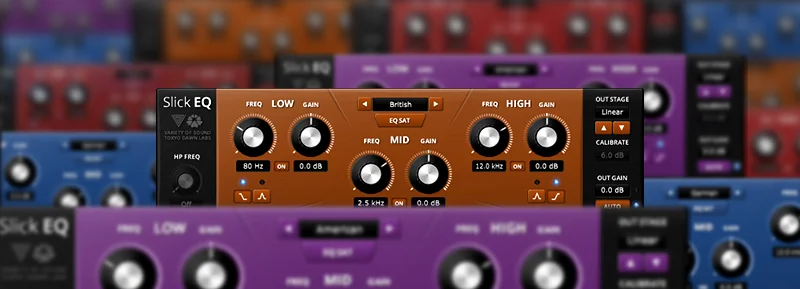
SlickEQ is a mastering EQ built for speed. It has three main bands (low, mid and high), four EQ modes with different curves, and auto gain that keeps the volume steady while you EQ, so you judge the tone and not the loudness. It can also work on only the center of the song or only the sides. That’s the mid/side trick the video builds in Patcher, without the setup.
It can add warmth, too. Its output stage has four gentle saturation flavors. It’s free for Windows 7 and up and Mac, as VST2, VST3, AU or AAX. Already in FL Studio: Fruity Parametric EQ 2, plus a mid/side setup in Patcher (shown further down).
3. TDR Kotelnikov (Tokyo Dawn Labs): free mastering compressor
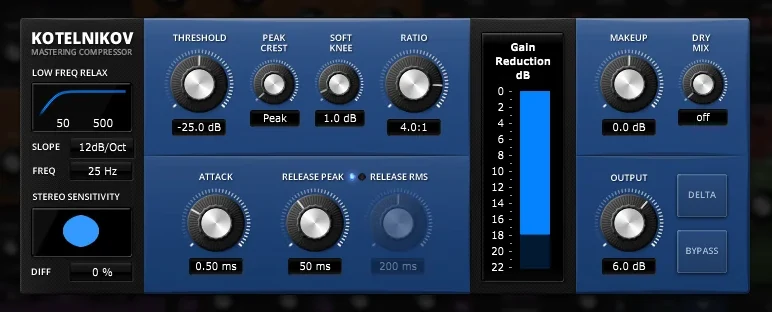
A mastering compressor gently squeezes the loudest moments of the whole song, so it feels even and glued together. TDR Kotelnikov is built for exactly this, and it adds almost no color of its own. It has separate release controls for sharp peaks and for the average level, a sidechain low cut so the kick doesn’t pump the whole song, and a Delta button that plays only what the compressor removes.
That Delta button is the honest test. If you can clearly hear music in it, you’re squeezing too hard. Start near a 2:1 ratio with about 2 dB of gain reduction, which is where Mix Elite’s mastering video starts on a master. It’s a free download for Windows 7 and up and Mac. The frequency-dependent ratio some reviews mention is only in the paid Gentleman’s Edition. Already in FL Studio: Fruity Limiter in COMP mode (screenshot below).
4. IVGI (Klanghelm): free saturation
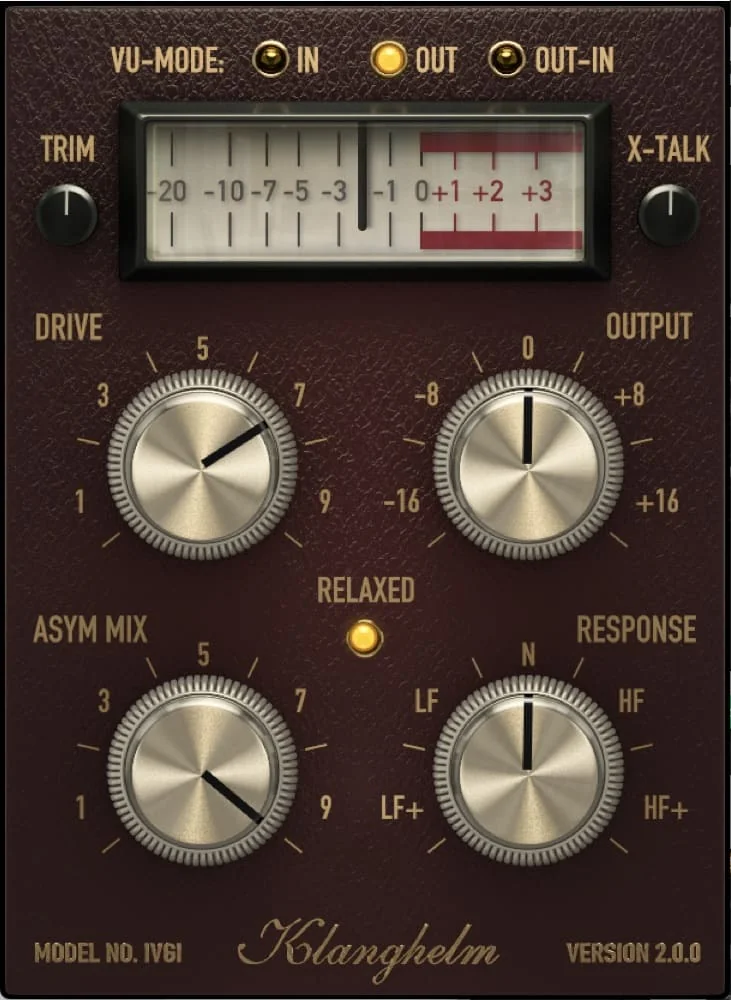
Saturation adds a little harmonic distortion, the warm sound of a signal pushed through analog gear. On a master, use just a touch. IVGI goes from barely there to dirty with its Drive knob, and its Response knob changes which frequencies saturate most. It also reacts to the level of the music as it plays, the way analog gear does.
IVGI is freeware for Windows and Mac. For a second flavor, Wave Arts’ Tube Saturator Vintage is free too, but you register with your name and email to get a serial. Already in FL Studio: the SAT knob in Fruity Limiter and Maximus. Mix Elite’s Maximus video points out that this SAT knob is really a soft clipper.
5. GClip (GVST): free clipper
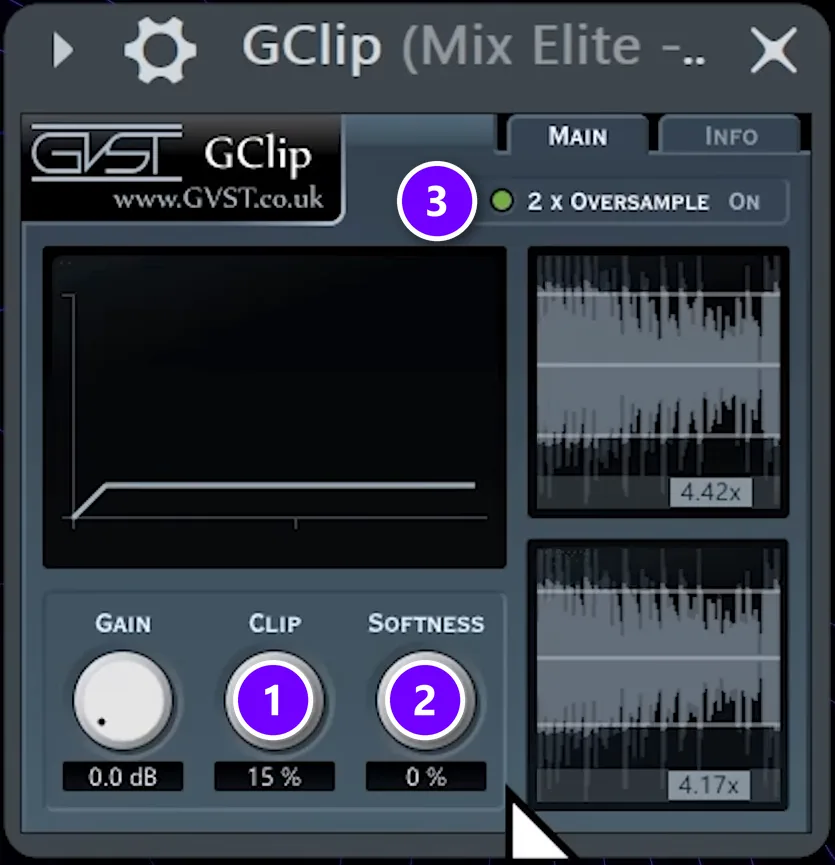
A clipper chops the tips off the loudest peaks, like a big snare hit, before they reach the limiter. A limiter tries to be smart and smooth those hits, and that can soften your drums. Mix Elite’s 2026 mastering video uses the free GClip for this. Max’s method: “You push it until you just barely hear it change the knock of your drums, then back it off 10%.” Here’s how to set it.
- Lower the CLIP level (1) slowly while the loudest part of the song plays, until you just hear the knock of the drums change.
- Back it off by about 10%, so you can’t hear it working anymore.
- Keep SOFTNESS (2) at 0%, as the video does.
- Turn on 2 x OVERSAMPLE (3). It cuts the harsh side effects that clipping can add.
GClip is free for Windows (64-bit and 32-bit), Mac (Apple chips included) and Linux, as a VST plugin. Want to know how it differs from a limiter? Read compression vs clipping vs limiting. Already in FL Studio: Fruity Soft Clipper, in every edition.
6. LoudMax (Thomas Mundt): free true peak limiter
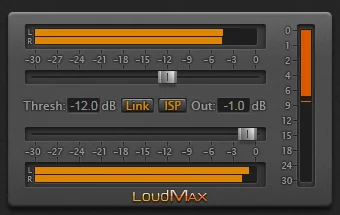
A limiter is the last plugin on most masters. It turns the whole song up and stops any peak from going over the ceiling you set. LoudMax is about as simple as limiters get: one slider for the threshold, one for the output ceiling, and an ISP switch for true peak limiting. That catches the peaks that pop up between digital samples once your song turns into an MP3 or a stream.
Turn on ISP first. Then set the output to −1 dB, the ceiling Mix Elite’s stock mastering video uses for MP3s and streams, and pull the threshold down until the song is loud enough. For a loud master headed to Spotify, −2 dB is safer (more on that below). The rule for how far to go: push until you hear distortion, then back off 1 to 2 dB. Our true peak meter guide explains why the ceiling matters. LoudMax is freeware for Windows, Mac and Linux. Already in FL Studio: Fruity Limiter (every edition) and Maximus (Producer Edition and up).
7. Ozone Imager (iZotope): free stereo widener
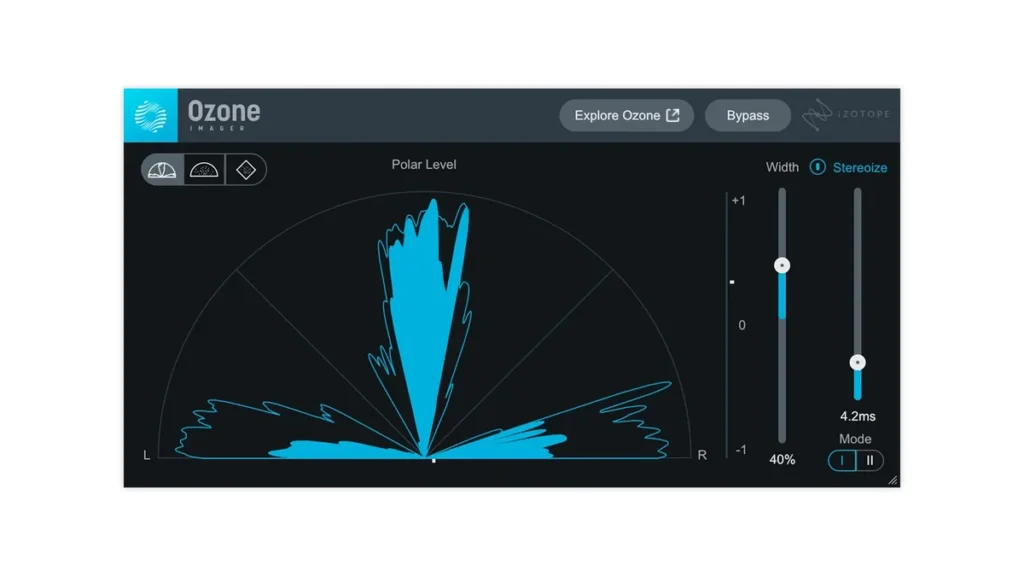
Stereo width is how wide the song feels from left to right. Ozone Imager gives you a width control, a Stereoize mode that makes narrow sounds feel wider, and a display that shows where your sound sits. iZotope calls this free version a sampling of its paid Ozone suite.
Width is easy to overdo. The rule in Mix Elite’s 2026 video: keep the lows fully in mono and make the mids and highs only a little more stereo. Too much width in the bass can make it disappear on mono speakers and in clubs. Ozone Imager is free for Windows 10 and 11 and Mac (Apple chips included), as VST2, VST3, AU or AAX, and iZotope lists FL Studio as a supported host. Already in FL Studio: Fruity Stereo Enhancer, and the per-band separation knobs in Maximus.
8. Stereo Tool (FLUX::): free phase and width check
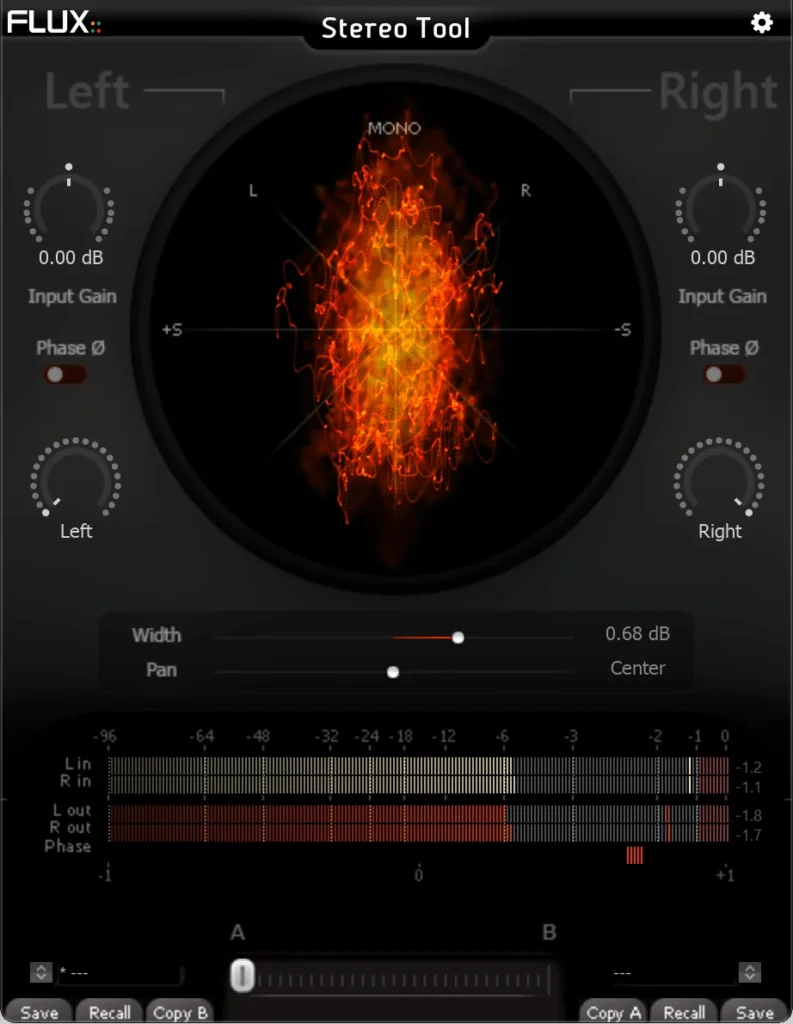
Always check mono after widening. Stereo Tool from FLUX:: shows a vectorscope (a picture of your stereo image), a phase correlation meter and input and output meters. If the correlation meter sits below zero for long stretches, parts of your song will cancel each other out on a mono speaker.
It’s 100% freeware with no license activation, for 64-bit Windows 10 and 11 and macOS 10.14.6 and up, Apple chips included. Already in FL Studio: Wave Candy can show a vectorscope, and it comes with every edition.
9. Youlean Loudness Meter 2: free LUFS meter
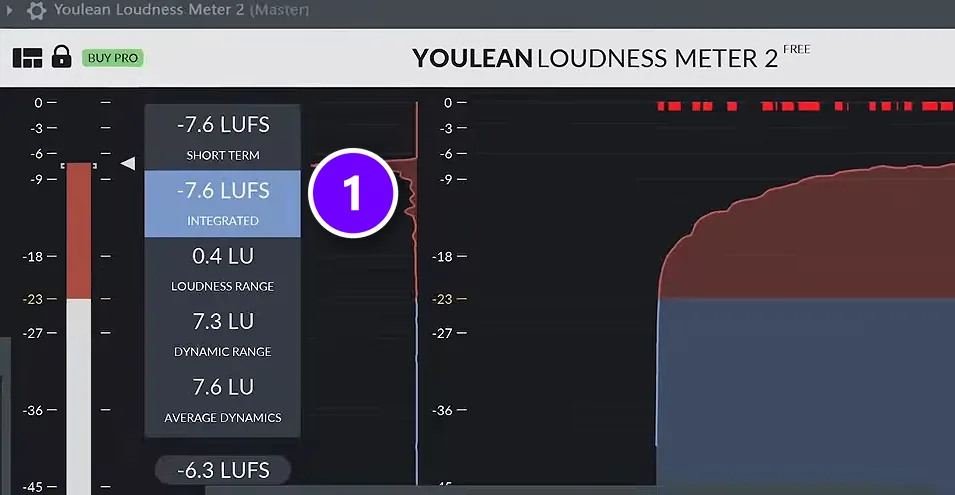
A peak meter shows how high the waveform goes. A loudness meter shows how loud the song feels, measured in LUFS (loudness units). Youlean Loudness Meter 2 is the meter in Mix Elite’s mastering video. Read the integrated number (1): that’s the average loudness of the whole song.
There’s no one magic number. For electronic music, Mix Elite’s 2026 video aims for about −8 to −6 integrated LUFS, and the other rule is to match the loudness of a pro song in your genre. Our LUFS vs RMS guide explains the numbers. The free version shows integrated loudness, true peak and loudness range, and it never expires. It runs as an app or as a VST2, VST3, AU or AAX plugin on Windows and Mac. A paid PRO version adds streaming presets and more.
10. SPAN (Voxengo): free spectrum analyzer
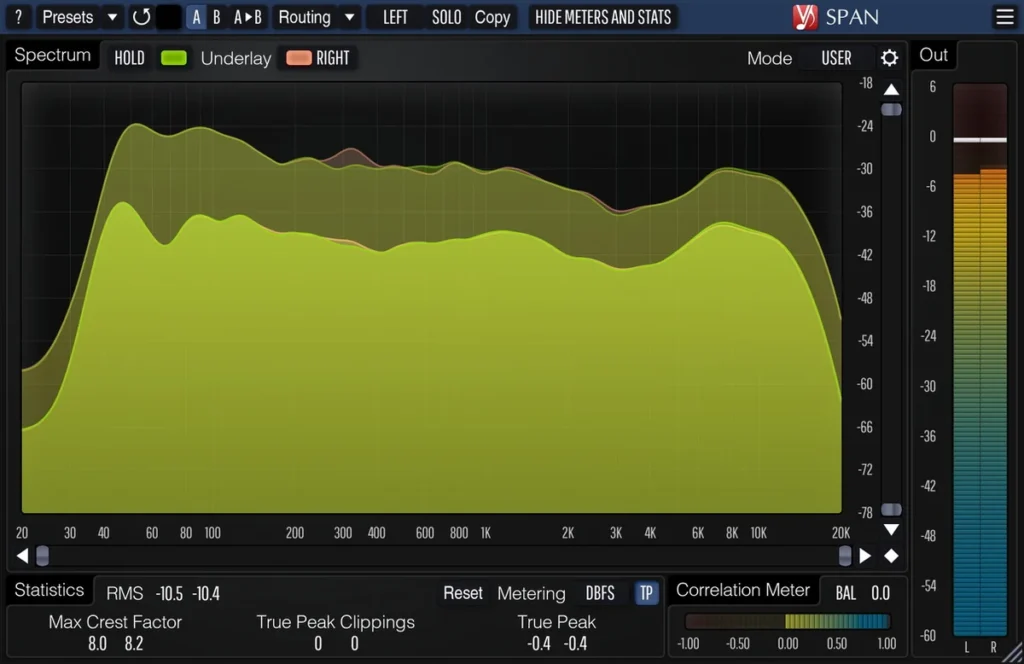
A spectrum analyzer shows how much bass, mids and highs your song has. SPAN is a popular free one: Voxengo counts over 230,000 downloads in the past year. Open your master and a pro song in the same genre. Then compare the shapes. If your low end looks very different, fix it in the mix rather than forcing big EQ moves on the master.
SPAN is free for Windows (VST, VST3 and AAX) and Mac (AU, AAX and VST3). If you’d like a classic VU needle as well, TBProAudio’s free mvMeter2 shows VU, RMS, peak and EBU R128 readings on Windows and Mac. Already in FL Studio: Fruity Parametric EQ 2 has a spectrum built in, and Wave Candy shows one too.
11. bx_masterdesk Classic (Plugin Alliance): free all-in-one mastering
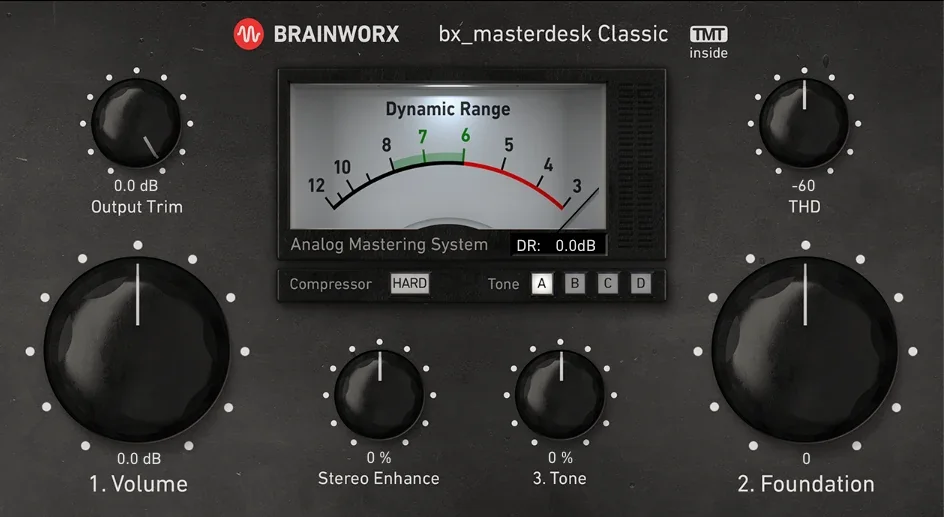
Want one plugin instead of a whole chain? bx_masterdesk Classic packs an analog-style mastering chain into three main knobs: Volume (how hard the song hits the chain), Foundation (the balance of lows and highs) and Tone (bright to dark). There are also THD and stereo knobs, plus a meter that shows how much dynamic range is left.
It’s close to auto mastering. Start from a preset, then set the three knobs by ear. It’s free with a free Plugin Alliance account, for Windows 10 and 11 and macOS 13 and up (Intel or Apple chips), as VST2, VST3, AU or AAX. Already in FL Studio: the closest is Soundgoodizer, a one-knob enhancer in every edition.
Which FL Studio plugins already do the job?
FL Studio already comes with a full mastering chain: Fruity Parametric EQ 2, Fruity Limiter and Maximus. You just have to set it up, and Mix Elite’s stock mastering video uses those three for almost everything. Image-Line’s edition list shows Fruity Parametric EQ 2 and Fruity Limiter in every edition, and Maximus in Producer Edition and up. The free trial has every effect, with no time limit.
Fruity Parametric EQ 2: the low cut, the high cut and small fixes
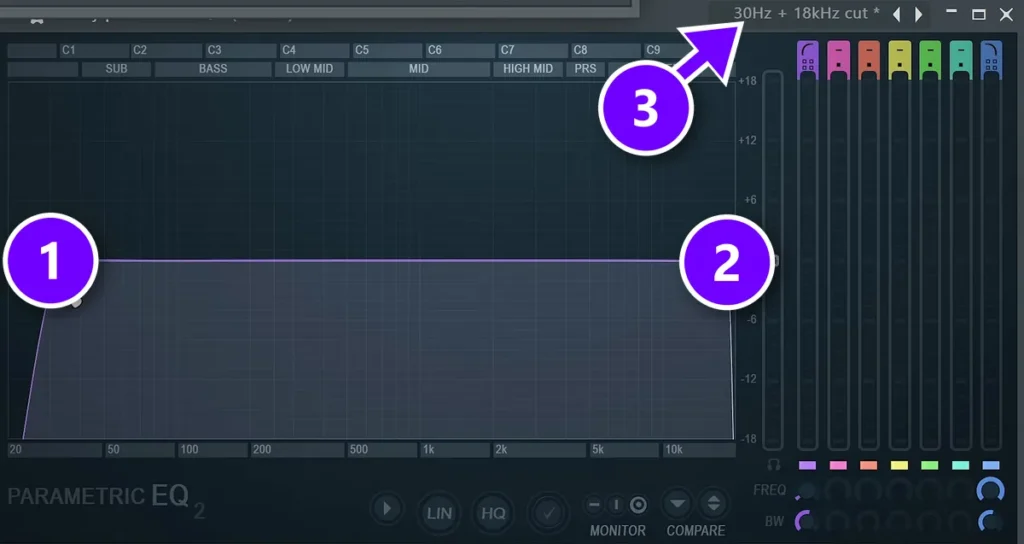
In the first screenshot, the video loads the Fruity Parametric EQ 2 preset “30Hz + 18kHz cut” (3). It puts a low cut at 30 Hz (1) and a high cut at the top (2). Max then pulls the high cut down to about 16.5 kHz, which is his own taste. Most club systems don’t play much below about 35 Hz, so a 30 Hz cut costs you nothing you can hear.
After that, keep every boost or cut on the master to 2 dB or less. Small moves win here. If the song needs more than that, the fix belongs in the mix.
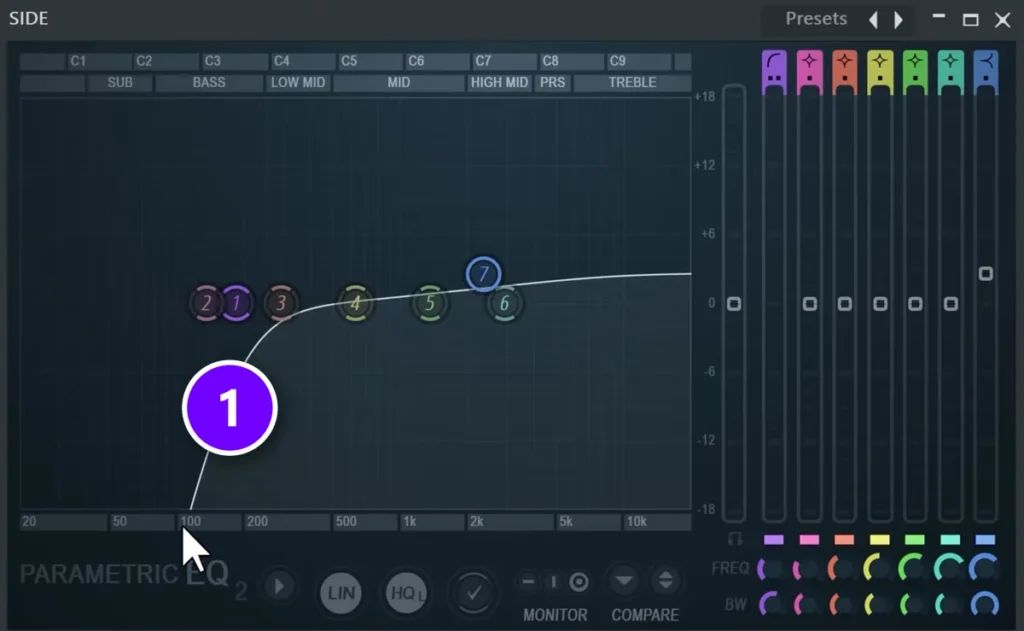
The second screenshot is a side EQ: a copy of Parametric EQ 2 inside Patcher that only hears the stereo part of the song. Its low end is rolled off (1), so the bass below about 120 Hz stays in mono. Max uses this trick on every song, because stereo bass can vanish on mono speakers and in clubs.
Fruity Limiter: gentle glue compression
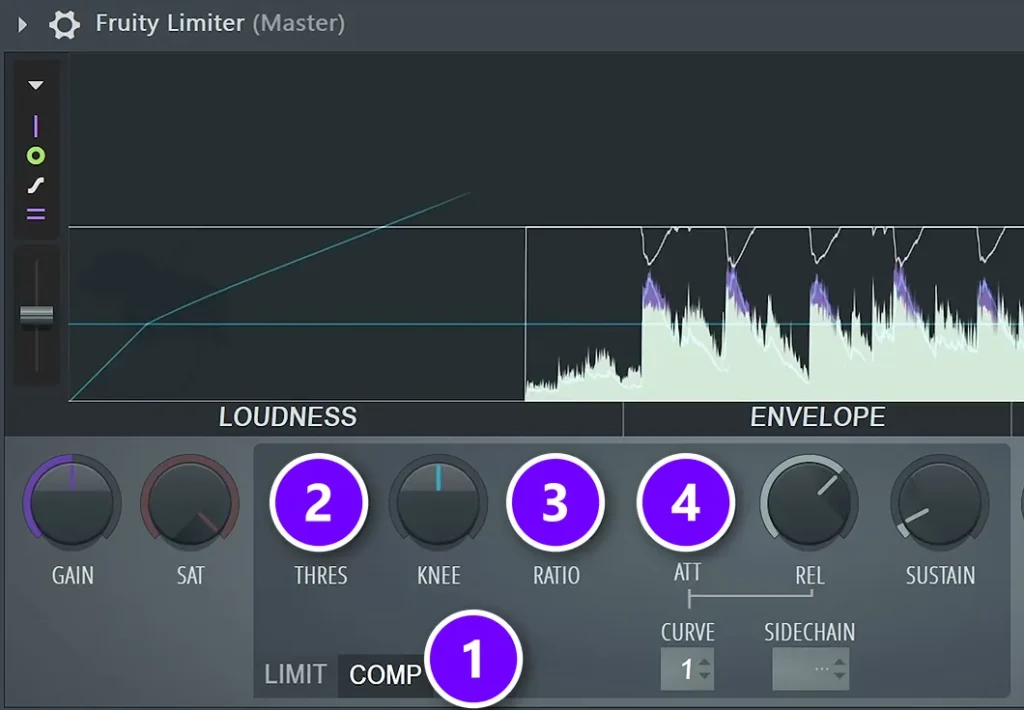
Fruity Limiter is a limiter, a compressor and a noise gate in one, and it comes with every edition. For gentle glue on a master, follow the numbers in the screenshot:
- Click COMP (1) to switch it from limiter to compressor.
- Lower THRES (2) until you see about 2 dB of gain reduction on the loudest parts.
- Set RATIO (3) to about 2:1, and don’t go much higher on a master.
- Set ATT (4) fast, 0 to 2 ms, if the song is too punchy. If it’s too smooth and the kick needs to pop, try a slower 40 to 60 ms.
Leave the release where it is to start. Max’s test: “we don’t hear the compression but we feel it.” If you can hear the song pumping, raise the threshold.
Maximus: multiband compression, width and loudness
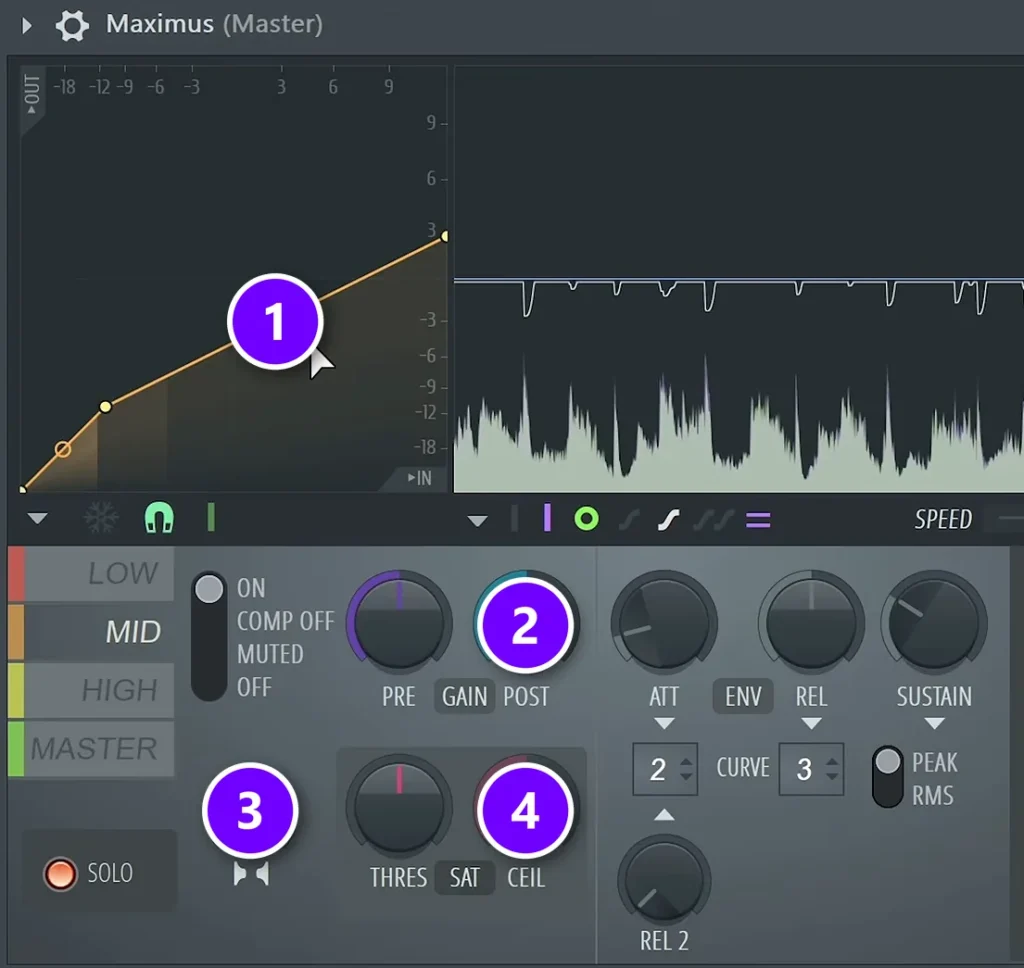
Mix Elite’s Maximus video rates Maximus as probably the most powerful stock plugin in FL Studio. It splits the song into low, mid and high bands and compresses each one on its own, so a loud kick no longer pushes down the whole song. In the screenshot, the MID band is selected on the left.
- Pick a band on the left (LOW, MID or HIGH), then bend its curve down a little (1). A small move on every band beats a big move on one.
- Make up the lost volume with POST gain (2). When a band loses about 3 dB, the video adds back about 2.5 dB.
- Use the stereo separation knob (3) to merge the lows about 15 to 20% toward mono, and widen the mids a little.
- On the MASTER band, set CEIL (4) to −1 dB for MP3s and streams. Then raise the POST gain until you hear distortion, and back off 1 to 2 dB.
Using Fruity Edition? Fruity Multiband Compressor comes with every edition and covers the multiband part.
How do you make a song loud and ready for streaming with free plugins?
Run the free chain in order (EQ, clipper, compressor, limiter), then check the result on a LUFS meter. Push the limiter until you hear distortion and back off 1 to 2 dB. Spotify plays every song at −14 LUFS and asks for true peaks below −1 dB, or below −2 dB if your master is louder than that.
Here’s that chain with the free plugins from this list and the settings from Mix Elite’s mastering videos, including the 2026 one:
- Cut what nobody hears. In TDR Nova or Fruity Parametric EQ 2, put a low cut just under the lowest note your song plays, and no lower than 30 Hz.
- Shave the peaks. Lower GClip’s clip level until the knock of the drums just changes, then back it off about 10%.
- Glue it gently. Set TDR Kotelnikov to about 2:1 with about 2 dB of gain reduction.
- Keep the lows in mono. Ozone Imager can widen the mids and highs a little, while the bass stays in the center.
- Limit with true peak on. Switch on ISP in LoudMax, then lower the threshold until you hear distortion and back off 1 to 2 dB.
- Measure last. Put Youlean Loudness Meter 2 at the end, read the integrated LUFS and compare it with a pro song in your genre.
How loud is loud enough? Spotify’s −14 LUFS is the level it plays songs at, not a target you have to hit. Its loudness guide says louder masters are simply turned down, with no extra distortion. That’s why the 2026 video masters electronic music to about −8 to −6 integrated LUFS: as loud as the song can go before it starts to sound worse. Our LUFS vs RMS guide explains the numbers.
True peak mode doesn’t protect you from the MP3 or AAC file a streaming service makes. In Mix Elite’s 2026 video, a loud master with a −0.3 dB true peak ceiling clipped right away in an AAC preview, and even at −2 dB it kept only about half a dB of room. That’s why Spotify asks for −2 dB on loud masters.
Why does my mix sound quiet compared to professional songs?
Usually because its peaks hit the ceiling before the song feels loud. The peak meter in your DAW doesn’t show how loud a song feels; LUFS does. Pro masters tame the peaks with a clipper and a limiter so the average level can come up, but most of the fix starts in the mix.
Max makes this point in Mix Elite’s 2026 mastering video: a master that won’t get loud and crisp is mainly a mixing problem, not a mastering one. These mix fixes come first:
- Fewer parts fighting over the sub. Pro tracks carry less sub than most people think, because the sub eats the most headroom.
- Sidechain for the priority. Not only kick to bass, but to make room for whatever matters most in your mix.
- Clip peaks while mixing. Clip single tracks and groups, so the sharpest peaks never reach the master.
- Keep the lows in mono. Everything below 100 Hz goes in the center.
The video says those fixes give you about 80% of a clean mix. After that, the free chain above does the rest: GClip and LoudMax raise the loudness, and Youlean Loudness Meter 2 tells you when you’ve matched a pro song.
Which free mastering plugins should you skip in 2026?
Skip D16 Frontier, Limiter No6 and Tonmann De-Esser. Frontier is now only for people who have bought a D16 product, Limiter No6 is discontinued, and Tonmann’s free de-esser is a Windows-only, 32-bit vocal tool.
Old lists still recommend these. Here’s why they’re not on ours:
- D16 Frontier: it’s still free of charge, but now only for registered D16 users who have bought one of their products. LoudMax does the same job for everyone.
- Limiter No6: Tokyo Dawn Labs lists it with its discontinued products, which aren’t supported anymore. Pick LoudMax or Kotelnikov instead.
- Tonmann De-Esser: it’s still free, but it’s a Windows-only, 32-bit vocal tool. On a master, fix harsh S sounds in the mix, or tame them with a dynamic band in TDR Nova.
Can you master a song with only free plugins?
Yes. Every job in a master has a good free plugin, and FL Studio users already own most of the chain. What holds a master back is mostly the mix, as the section above shows, and no mastering plugin can fix that, free or paid.
Check your master on the speakers people actually use: a phone, earbuds and a car. If it sounds good on those and next to a pro song in your genre, it’s ready.
How do you install free mastering plugins in FL Studio?
- Download the plugin from the maker’s page linked above and run its installer. Pick VST3 when you have the choice.
- In FL Studio, open OPTIONS and click Manage plugins.
- Click Find installed plugins and wait for the scan to finish.
- Star the new plugin so it shows in your plugin list, then load it on the master mixer track.
If a plugin has no installer, put its plugin file in a folder that’s on FL Studio’s plugin search list. Our guide to installing VST plugins in FL Studio shows every step with screenshots.
DAY 6 OF THE 7-DAY MUSIC PRODUCER COURSE
Free plugins are the easy part. Day 6 shows you the chain.
Day 6 of the 7-Day course is mastering: a 3-step mastering chain that makes your song loud, clear and punchy everywhere, the inter-sample clipping mistake that ruins the sound without you knowing (plus an easy way to always avoid it), and the best export settings for streaming platforms. You also get a final mix to practice on and a mastering chain preset pack. It’s taught in FL Studio (the free trial works), about 45 minutes a day, and on day 7 a pro gives you feedback on your finished track. It’s $27, and you get 60 days to decide if it was worth it.
Frequently asked questions
What is the best free mastering plugin?
There isn’t one plugin that does it all. For most songs, start with TDR Kotelnikov for gentle compression, LoudMax as the final limiter and Youlean Loudness Meter 2 to check the loudness. If you’d rather use one all-in-one plugin, bx_masterdesk Classic is free with a Plugin Alliance account. All four were free on their makers’ sites in October 2026.
Can you master a song with only free plugins?
Yes. A master needs EQ, compression, clipping, limiting and metering, and each job has a good free plugin. FL Studio users already own Fruity Parametric EQ 2 and Fruity Limiter, plus Maximus from Producer Edition up. A clean mix matters far more than the price of the plugins on your master.
Why does my mix sound quiet compared to professional songs?
Mostly because of the mix, not the master. Too many parts fighting over the sub, untamed peaks and stereo lows eat up headroom, so the limiter runs out of room before the song feels loud. Fix those first, then use a free clipper like GClip and a limiter like LoudMax, and compare the integrated LUFS with a pro song in your genre.
Is there a free auto mastering plugin?
Not a fully automatic one among the free picks here. The closest is bx_masterdesk Classic: you choose a preset, then set three knobs called Volume, Foundation and Tone. It’s free with a Plugin Alliance account. Always check the result with a loudness meter and compare it to a pro song you like.
What is the best free limiter for mastering?
LoudMax by Thomas Mundt is the best simple free limiter: one threshold slider, one output ceiling and an ISP switch for true peak limiting. Set the output to −1 dB for songs that will be streamed or turned into MP3s, or −2 dB for a loud master on Spotify. In FL Studio, Fruity Limiter does the same job and comes with every edition.





